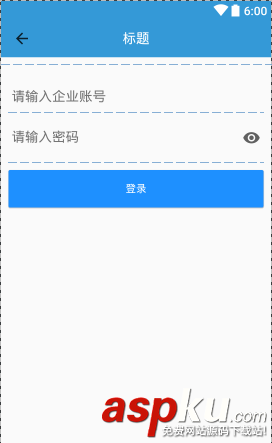
在Google发布了support:design:23+以后我们发现有这么一个东西TextInputLayout,先看下效果图:
<android.support.design.widget.TextInputLayout android:id="@+id/pwdLayout" android:layout_width="match_parent" android:layout_height="wrap_content" app:passwordToggleEnabled="true" > <EditText android:id="@+id/pwdEdt" android:layout_width="match_parent" android:layout_height="wrap_content" android:hint="@string/edt_pwd_hint" android:maxLines="1" android:inputType="textPassword" /> </android.support.design.widget.TextInputLayout>
只要在布局中添加属性app:passwordToggleEnabled=”true”就可以实现当EditText的inputType=”textPassword”的时候在输入框的最右边就会显示眼睛一样的开关来显示和隐藏密码,需要的同学不妨试试看。
参考:
http://stackoverflow.com/questions/39019675/remove-show-password-icon-in-android-n
以上所述是小编给大家介绍的Android中实现EditText密码显示隐藏的方法,希望对大家有所帮助,如果大家有任何疑问请给我留言,小编会及时回复大家的。在此也非常感谢大家对VEVB武林网网站的支持!
新闻热点






疑难解答