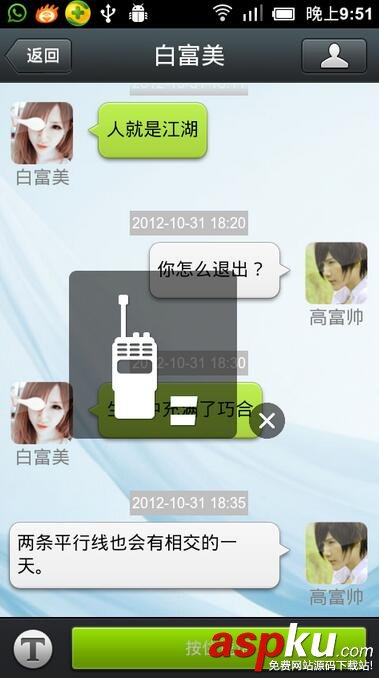
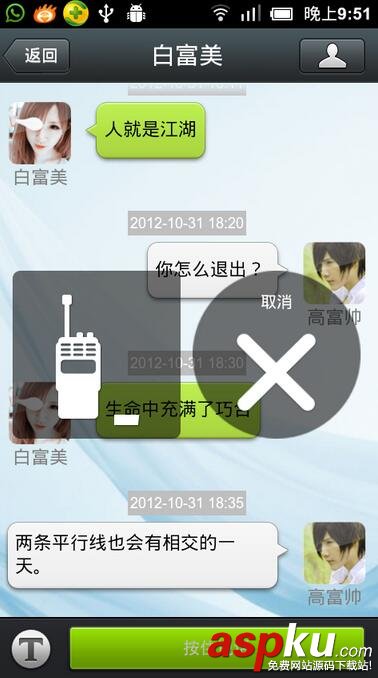
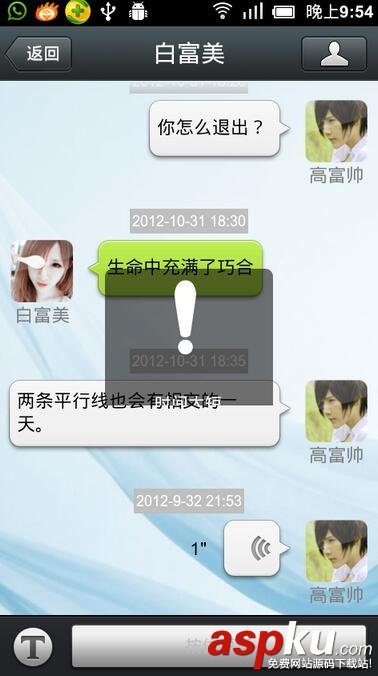
本例为模仿微信聊天界面UI设计,文字发送以及语言录制UI。
1先看效果图:


第一:chat.xml设计
<?xml version="1.0" encoding="utf-8"?> <RelativeLayout xmlns:android="http://schemas.android.com/apk/res/android" android:layout_width="fill_parent" android:layout_height="fill_parent" android:background="@drawable/chat_bg_default" > <!-- 标题栏 --> <RelativeLayout android:id="@+id/rl_layout" android:layout_width="fill_parent" android:layout_height="45dp" android:background="@drawable/title_bar" android:gravity="center_vertical" > <Button android:id="@+id/btn_back" android:layout_width="70dp" android:layout_height="wrap_content" android:layout_centerVertical="true" android:background="@drawable/title_btn_back" android:onClick="chat_back" android:text="返回" android:textColor="#fff" android:textSize="14sp" /> <TextView android:layout_width="wrap_content" android:layout_height="wrap_content" android:layout_centerInParent="true" android:text="白富美" android:textColor="#ffffff" android:textSize="20sp" /> <ImageButton android:id="@+id/right_btn" android:layout_width="67dp" android:layout_height="wrap_content" android:layout_alignParentRight="true" android:layout_centerVertical="true" android:layout_marginRight="5dp" android:background="@drawable/title_btn_right" android:src="@drawable/mm_title_btn_contact_normal" /> </RelativeLayout> <!-- 底部按钮以及 编辑框 --> <RelativeLayout android:id="@+id/rl_bottom" android:layout_width="fill_parent" android:layout_height="wrap_content" android:layout_alignParentBottom="true" android:background="@drawable/chat_footer_bg" > <ImageView android:id="@+id/ivPopUp" android:layout_width="wrap_content" android:layout_height="wrap_content" android:layout_alignParentLeft="true" android:layout_centerVertical="true" android:layout_marginLeft="10dip" android:src="@drawable/chatting_setmode_msg_btn" /> <RelativeLayout android:id="@+id/btn_bottom" android:layout_width="fill_parent" android:layout_height="wrap_content" android:layout_alignParentRight="true" android:layout_centerVertical="true" android:layout_toRightOf="@+id/ivPopUp" > <Button android:id="@+id/btn_send" android:layout_width="60dp" android:layout_height="40dp" android:layout_alignParentRight="true" android:layout_centerVertical="true" android:layout_marginRight="10dp" android:background="@drawable/chat_send_btn" android:text="发送" /> <EditText android:id="@+id/et_sendmessage" android:layout_width="fill_parent" android:layout_height="40dp" android:layout_centerVertical="true" android:layout_marginLeft="10dp" android:layout_marginRight="10dp" android:layout_toLeftOf="@id/btn_send" android:background="@drawable/login_edit_normal" android:singleLine="true" android:textSize="18sp" /> </RelativeLayout> <TextView android:id="@+id/btn_rcd" android:layout_width="fill_parent" android:layout_height="40dp" android:layout_alignParentRight="true" android:layout_centerVertical="true" android:layout_marginLeft="10dp" android:layout_marginRight="10dp" android:layout_toRightOf="@+id/ivPopUp" android:background="@drawable/chat_send_btn" android:gravity="center" android:text="按住说话" android:visibility="gone" /> </RelativeLayout> <!-- 聊天内容 listview --> <ListView android:id="@+id/listview" android:layout_width="fill_parent" android:layout_height="fill_parent" android:layout_above="@id/rl_bottom" android:layout_below="@id/rl_layout" android:cacheColorHint="#0000" android:divider="@null" android:dividerHeight="5dp" android:scrollbarStyle="outsideOverlay" android:stackFromBottom="true" /> <!-- 录音显示UI层 --> <LinearLayout android:id="@+id/rcChat_popup" android:layout_width="fill_parent" android:layout_height="fill_parent" android:gravity="center" android:visibility="gone" > <include android:layout_width="wrap_content" android:layout_height="wrap_content" android:layout_gravity="center" layout="@layout/voice_rcd_hint_window" /> </LinearLayout> </RelativeLayout>
第二:语音录制类封装SoundMeter.java
package com.example.voice_rcd; import java.io.IOException; import android.media.MediaRecorder; import android.os.Environment; public class SoundMeter { static final private double EMA_FILTER = 0.6; private MediaRecorder mRecorder = null; private double mEMA = 0.0; public void start(String name) { if (!Environment.getExternalStorageState().equals( android.os.Environment.MEDIA_MOUNTED)) { return; } if (mRecorder == null) { mRecorder = new MediaRecorder(); mRecorder.setAudioSource(MediaRecorder.AudioSource.MIC); mRecorder.setOutputFormat(MediaRecorder.OutputFormat.THREE_GPP); mRecorder.setAudioEncoder(MediaRecorder.AudioEncoder.AMR_NB); mRecorder.setOutputFile(android.os.Environment.getExternalStorageDirectory()+"/"+name); try { mRecorder.prepare(); mRecorder.start(); mEMA = 0.0; } catch (IllegalStateException e) { System.out.print(e.getMessage()); } catch (IOException e) { System.out.print(e.getMessage()); } } } public void stop() { if (mRecorder != null) { mRecorder.stop(); mRecorder.release(); mRecorder = null; } } public void pause() { if (mRecorder != null) { mRecorder.stop(); } } public void start() { if (mRecorder != null) { mRecorder.start(); } } public double getAmplitude() { if (mRecorder != null) return (mRecorder.getMaxAmplitude() / 2700.0); else return 0; } public double getAmplitudeEMA() { double amp = getAmplitude(); mEMA = EMA_FILTER * amp + (1.0 - EMA_FILTER) * mEMA; return mEMA; } } 第三:主界面Activity源码,没写太多解释,相对比较简单的自己研究下:
package com.example.voice_rcd; import java.io.File; import java.util.ArrayList; import java.util.Calendar; import java.util.List; import android.app.Activity; import android.os.Bundle; import android.os.Environment; import android.os.Handler; import android.os.SystemClock; import android.view.MotionEvent; import android.view.View; import android.view.View.OnClickListener; import android.view.View.OnTouchListener; import android.view.WindowManager; import android.view.animation.Animation; import android.view.animation.AnimationUtils; import android.widget.Button; import android.widget.EditText; import android.widget.ImageView; import android.widget.LinearLayout; import android.widget.ListView; import android.widget.RelativeLayout; import android.widget.TextView; import android.widget.Toast; public class MainActivity extends Activity implements OnClickListener { /** Called when the activity is first created. */ private Button mBtnSend; private TextView mBtnRcd; private Button mBtnBack; private EditText mEditTextContent; private RelativeLayout mBottom; private ListView mListView; private ChatMsgViewAdapter mAdapter; private List<ChatMsgEntity> mDataArrays = new ArrayList<ChatMsgEntity>(); private boolean isShosrt = false; private LinearLayout voice_rcd_hint_loading, voice_rcd_hint_rcding, voice_rcd_hint_tooshort; private ImageView img1, sc_img1; private SoundMeter mSensor; private View rcChat_popup; private LinearLayout del_re; private ImageView chatting_mode_btn, volume; private boolean btn_vocie = false; private int flag = 1; private Handler mHandler = new Handler(); private String voiceName; private long startVoiceT, endVoiceT; public void onCreate(Bundle savedInstanceState) { super.onCreate(savedInstanceState); setContentView(R.layout.chat); // 启动activity时不自动弹出软键盘 getWindow().setSoftInputMode( WindowManager.LayoutParams.SOFT_INPUT_STATE_ALWAYS_HIDDEN); initView(); initData(); } public void initView() { mListView = (ListView) findViewById(R.id.listview); mBtnSend = (Button) findViewById(R.id.btn_send); mBtnRcd = (TextView) findViewById(R.id.btn_rcd); mBtnSend.setOnClickListener(this); mBtnBack = (Button) findViewById(R.id.btn_back); mBottom = (RelativeLayout) findViewById(R.id.btn_bottom); mBtnBack.setOnClickListener(this); chatting_mode_btn = (ImageView) this.findViewById(R.id.ivPopUp); volume = (ImageView) this.findViewById(R.id.volume); rcChat_popup = this.findViewById(R.id.rcChat_popup); img1 = (ImageView) this.findViewById(R.id.img1); sc_img1 = (ImageView) this.findViewById(R.id.sc_img1); del_re = (LinearLayout) this.findViewById(R.id.del_re); voice_rcd_hint_rcding = (LinearLayout) this .findViewById(R.id.voice_rcd_hint_rcding); voice_rcd_hint_loading = (LinearLayout) this .findViewById(R.id.voice_rcd_hint_loading); voice_rcd_hint_tooshort = (LinearLayout) this .findViewById(R.id.voice_rcd_hint_tooshort); mSensor = new SoundMeter(); mEditTextContent = (EditText) findViewById(R.id.et_sendmessage); //语音文字切换按钮 chatting_mode_btn.setOnClickListener(new OnClickListener() { public void onClick(View v) { if (btn_vocie) { mBtnRcd.setVisibility(View.GONE); mBottom.setVisibility(View.VISIBLE); btn_vocie = false; chatting_mode_btn .setImageResource(R.drawable.chatting_setmode_msg_btn); } else { mBtnRcd.setVisibility(View.VISIBLE); mBottom.setVisibility(View.GONE); chatting_mode_btn .setImageResource(R.drawable.chatting_setmode_voice_btn); btn_vocie = true; } } }); mBtnRcd.setOnTouchListener(new OnTouchListener() { public boolean onTouch(View v, MotionEvent event) { //按下语音录制按钮时返回false执行父类OnTouch return false; } }); } private String[] msgArray = new String[] { "有人就有恩怨","有恩怨就有江湖","人就是江湖","你怎么退出? ","生命中充满了巧合","两条平行线也会有相交的一天。"}; private String[] dataArray = new String[] { "2012-10-31 18:00", "2012-10-31 18:10", "2012-10-31 18:11", "2012-10-31 18:20", "2012-10-31 18:30", "2012-10-31 18:35"}; private final static int COUNT = 6; public void initData() { for (int i = 0; i < COUNT; i++) { ChatMsgEntity entity = new ChatMsgEntity(); entity.setDate(dataArray[i]); if (i % 2 == 0) { entity.setName("白富美"); entity.setMsgType(true); } else { entity.setName("高富帅"); entity.setMsgType(false); } entity.setText(msgArray[i]); mDataArrays.add(entity); } mAdapter = new ChatMsgViewAdapter(this, mDataArrays); mListView.setAdapter(mAdapter); } public void onClick(View v) { // TODO Auto-generated method stub switch (v.getId()) { case R.id.btn_send: send(); break; case R.id.btn_back: finish(); break; } } private void send() { String contString = mEditTextContent.getText().toString(); if (contString.length() > 0) { ChatMsgEntity entity = new ChatMsgEntity(); entity.setDate(getDate()); entity.setName("高富帅"); entity.setMsgType(false); entity.setText(contString); mDataArrays.add(entity); mAdapter.notifyDataSetChanged(); mEditTextContent.setText(""); mListView.setSelection(mListView.getCount() - 1); } } private String getDate() { Calendar c = Calendar.getInstance(); String year = String.valueOf(c.get(Calendar.YEAR)); String month = String.valueOf(c.get(Calendar.MONTH)); String day = String.valueOf(c.get(Calendar.DAY_OF_MONTH) + 1); String hour = String.valueOf(c.get(Calendar.HOUR_OF_DAY)); String mins = String.valueOf(c.get(Calendar.MINUTE)); StringBuffer sbBuffer = new StringBuffer(); sbBuffer.append(year + "-" + month + "-" + day + " " + hour + ":" + mins); return sbBuffer.toString(); } //按下语音录制按钮时 @Override public boolean onTouchEvent(MotionEvent event) { if (!Environment.getExternalStorageDirectory().exists()) { Toast.makeText(this, "No SDCard", Toast.LENGTH_LONG).show(); return false; } if (btn_vocie) { System.out.println("1"); int[] location = new int[2]; mBtnRcd.getLocationInWindow(location); // 获取在当前窗口内的绝对坐标 int btn_rc_Y = location[1]; int btn_rc_X = location[0]; int[] del_location = new int[2]; del_re.getLocationInWindow(del_location); int del_Y = del_location[1]; int del_x = del_location[0]; if (event.getAction() == MotionEvent.ACTION_DOWN && flag == 1) { if (!Environment.getExternalStorageDirectory().exists()) { Toast.makeText(this, "No SDCard", Toast.LENGTH_LONG).show(); return false; } System.out.println("2"); if (event.getY() > btn_rc_Y && event.getX() > btn_rc_X) {//判断手势按下的位置是否是语音录制按钮的范围内 System.out.println("3"); mBtnRcd.setBackgroundResource(R.drawable.voice_rcd_btn_pressed); rcChat_popup.setVisibility(View.VISIBLE); voice_rcd_hint_loading.setVisibility(View.VISIBLE); voice_rcd_hint_rcding.setVisibility(View.GONE); voice_rcd_hint_tooshort.setVisibility(View.GONE); mHandler.postDelayed(new Runnable() { public void run() { if (!isShosrt) { voice_rcd_hint_loading.setVisibility(View.GONE); voice_rcd_hint_rcding .setVisibility(View.VISIBLE); } } }, 300); img1.setVisibility(View.VISIBLE); del_re.setVisibility(View.GONE); startVoiceT = SystemClock.currentThreadTimeMillis(); voiceName = startVoiceT + ".amr"; start(voiceName); flag = 2; } } else if (event.getAction() == MotionEvent.ACTION_UP && flag == 2) {//松开手势时执行录制完成 System.out.println("4"); mBtnRcd.setBackgroundResource(R.drawable.voice_rcd_btn_nor); if (event.getY() >= del_Y && event.getY() <= del_Y + del_re.getHeight() && event.getX() >= del_x && event.getX() <= del_x + del_re.getWidth()) { rcChat_popup.setVisibility(View.GONE); img1.setVisibility(View.VISIBLE); del_re.setVisibility(View.GONE); stop(); flag = 1; File file = new File(android.os.Environment.getExternalStorageDirectory()+"/" + voiceName); if (file.exists()) { file.delete(); } } else { voice_rcd_hint_rcding.setVisibility(View.GONE); stop(); endVoiceT = SystemClock.currentThreadTimeMillis(); flag = 1; int time = (int) ((endVoiceT - startVoiceT) / 1000); if (time < 1) { isShosrt = true; voice_rcd_hint_loading.setVisibility(View.GONE); voice_rcd_hint_rcding.setVisibility(View.GONE); voice_rcd_hint_tooshort.setVisibility(View.VISIBLE); mHandler.postDelayed(new Runnable() { public void run() { voice_rcd_hint_tooshort .setVisibility(View.GONE); rcChat_popup.setVisibility(View.GONE); isShosrt = false; } }, 500); return false; } ChatMsgEntity entity = new ChatMsgEntity(); entity.setDate(getDate()); entity.setName("高富帅"); entity.setMsgType(false); entity.setTime(time+"/""); entity.setText(voiceName); mDataArrays.add(entity); mAdapter.notifyDataSetChanged(); mListView.setSelection(mListView.getCount() - 1); rcChat_popup.setVisibility(View.GONE); } } if (event.getY() < btn_rc_Y) {//手势按下的位置不在语音录制按钮的范围内 System.out.println("5"); Animation mLitteAnimation = AnimationUtils.loadAnimation(this, R.anim.cancel_rc); Animation mBigAnimation = AnimationUtils.loadAnimation(this, R.anim.cancel_rc2); img1.setVisibility(View.GONE); del_re.setVisibility(View.VISIBLE); del_re.setBackgroundResource(R.drawable.voice_rcd_cancel_bg); if (event.getY() >= del_Y && event.getY() <= del_Y + del_re.getHeight() && event.getX() >= del_x && event.getX() <= del_x + del_re.getWidth()) { del_re.setBackgroundResource(R.drawable.voice_rcd_cancel_bg_focused); sc_img1.startAnimation(mLitteAnimation); sc_img1.startAnimation(mBigAnimation); } } else { img1.setVisibility(View.VISIBLE); del_re.setVisibility(View.GONE); del_re.setBackgroundResource(0); } } return super.onTouchEvent(event); } private static final int POLL_INTERVAL = 300; private Runnable mSleepTask = new Runnable() { public void run() { stop(); } }; private Runnable mPollTask = new Runnable() { public void run() { double amp = mSensor.getAmplitude(); updateDisplay(amp); mHandler.postDelayed(mPollTask, POLL_INTERVAL); } }; private void start(String name) { mSensor.start(name); mHandler.postDelayed(mPollTask, POLL_INTERVAL); } private void stop() { mHandler.removeCallbacks(mSleepTask); mHandler.removeCallbacks(mPollTask); mSensor.stop(); volume.setImageResource(R.drawable.amp1); } private void updateDisplay(double signalEMA) { switch ((int) signalEMA) { case 0: case 1: volume.setImageResource(R.drawable.amp1); break; case 2: case 3: volume.setImageResource(R.drawable.amp2); break; case 4: case 5: volume.setImageResource(R.drawable.amp3); break; case 6: case 7: volume.setImageResource(R.drawable.amp4); break; case 8: case 9: volume.setImageResource(R.drawable.amp5); break; case 10: case 11: volume.setImageResource(R.drawable.amp6); break; default: volume.setImageResource(R.drawable.amp7); break; } } public void head_xiaohei(View v) { // 标题栏 返回按钮 } } 第四:自定义的显示适配器:
package com.example.voice_rcd; import java.util.List; import android.content.Context; import android.media.MediaPlayer; import android.media.MediaPlayer.OnCompletionListener; import android.view.LayoutInflater; import android.view.View; import android.view.View.OnClickListener; import android.view.ViewGroup; import android.widget.BaseAdapter; import android.widget.TextView; public class ChatMsgViewAdapter extends BaseAdapter { public static interface IMsgViewType { int IMVT_COM_MSG = 0; int IMVT_TO_MSG = 1; } private static final String TAG = ChatMsgViewAdapter.class.getSimpleName(); private List<ChatMsgEntity> coll; private Context ctx; private LayoutInflater mInflater; private MediaPlayer mMediaPlayer = new MediaPlayer(); public ChatMsgViewAdapter(Context context, List<ChatMsgEntity> coll) { ctx = context; this.coll = coll; mInflater = LayoutInflater.from(context); } public int getCount() { return coll.size(); } public Object getItem(int position) { return coll.get(position); } public long getItemId(int position) { return position; } public int getItemViewType(int position) { // TODO Auto-generated method stub ChatMsgEntity entity = coll.get(position); if (entity.getMsgType()) { return IMsgViewType.IMVT_COM_MSG; } else { return IMsgViewType.IMVT_TO_MSG; } } public int getViewTypeCount() { // TODO Auto-generated method stub return 2; } public View getView(int position, View convertView, ViewGroup parent) { final ChatMsgEntity entity = coll.get(position); boolean isComMsg = entity.getMsgType(); ViewHolder viewHolder = null; if (convertView == null) { if (isComMsg) { convertView = mInflater.inflate( R.layout.chatting_item_msg_text_left, null); } else { convertView = mInflater.inflate( R.layout.chatting_item_msg_text_right, null); } viewHolder = new ViewHolder(); viewHolder.tvSendTime = (TextView) convertView .findViewById(R.id.tv_sendtime); viewHolder.tvUserName = (TextView) convertView .findViewById(R.id.tv_username); viewHolder.tvContent = (TextView) convertView .findViewById(R.id.tv_chatcontent); viewHolder.tvTime = (TextView) convertView .findViewById(R.id.tv_time); viewHolder.isComMsg = isComMsg; convertView.setTag(viewHolder); } else { viewHolder = (ViewHolder) convertView.getTag(); } viewHolder.tvSendTime.setText(entity.getDate()); if (entity.getText().contains(".amr")) { viewHolder.tvContent.setText(""); viewHolder.tvContent.setCompoundDrawablesWithIntrinsicBounds(0, 0, R.drawable.chatto_voice_playing, 0); viewHolder.tvTime.setText(entity.getTime()); } else { viewHolder.tvContent.setText(entity.getText()); viewHolder.tvContent.setCompoundDrawablesWithIntrinsicBounds(0, 0, 0, 0); viewHolder.tvTime.setText(""); } viewHolder.tvContent.setOnClickListener(new OnClickListener() { public void onClick(View v) { if (entity.getText().contains(".amr")) { playMusic(android.os.Environment.getExternalStorageDirectory()+"/"+entity.getText()) ; } } }); viewHolder.tvUserName.setText(entity.getName()); return convertView; } static class ViewHolder { public TextView tvSendTime; public TextView tvUserName; public TextView tvContent; public TextView tvTime; public boolean isComMsg = true; } /** * @Description * @param name */ private void playMusic(String name) { try { if (mMediaPlayer.isPlaying()) { mMediaPlayer.stop(); } mMediaPlayer.reset(); mMediaPlayer.setDataSource(name); mMediaPlayer.prepare(); mMediaPlayer.start(); mMediaPlayer.setOnCompletionListener(new OnCompletionListener() { public void onCompletion(MediaPlayer mp) { } }); } catch (Exception e) { e.printStackTrace(); } } private void stop() { } }以上就是本文的全部内容,希望对大家的学习有所帮助,也希望大家多多支持VEVB武林网。
新闻热点






疑难解答