本文实例讲述了Android基于service实现音乐的后台播放功能。分享给大家供大家参考,具体如下:
Service是一个生命周期长且没有用户界面的程序,当程序在各个activity中切换的时候,我们可以利用service来实现背景音乐的播放,即使当程序退出到后台的时候,音乐依然在播放。下面我们给出具体例子的实现:
当然,首先要在资源文件夹中添加一首MP3歌曲:
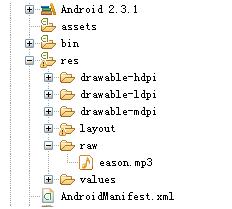
要实现音乐的播放,需要在界面中放置两个按钮,用来控制音乐的播放和停止,通过使用startService和stopService来实现这两个功能:
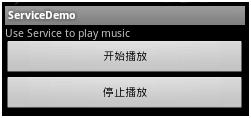
修改src下的ServiceDemoAvtivity.Java代码添加如下按钮事件的代码:
Button start = (Button)findViewById(R.id.start);Button stop = (Button)findViewById(R.id.stop);Button.OnClickListener listener = new Button.OnClickListener(){ @Override public void onClick(View v) { // TODO Auto-generated method stub Intent intent = new Intent(getApplicationContext(),MusicService.class); switch(v.getId()){ case R.id.start: startService(intent);break; case R.id.stop: stopService(intent);break; } }};start.setOnClickListener(listener);stop.setOnClickListener(listener);下面是更为重要的service部分。创建一个MusicService继承于Service,然后通过start和stop方法来控制音乐的播放。下面是MusicService.java中的关键代码:
public void onStart(Intent intent, int startId) { // TODO Auto-generated method stub super.onStart(intent, startId); Toast.makeText(this, "onStart", Toast.LENGTH_LONG).show(); player = MediaPlayer.create(this, R.raw.eason); player.setLooping(true); player.start();}public void onDestroy() { // TODO Auto-generated method stub super.onDestroy(); Toast.makeText(this, "onDestroy", Toast.LENGTH_LONG).show(); player.stop();}当然还需要在AndroidMainfest中声明MusicService:
<application android:icon="@drawable/ic_launcher" android:label="@string/app_name" > <activity android:name=".ServiceDemoActivity" android:label="@string/app_name" > <intent-filter> <action android:name="android.intent.action.MAIN" /> <category android:name="android.intent.category.LAUNCHER" /> </intent-filter> </activity> <service android:name="MusicService" /></application>
整个例子就构造完成了,部署到模拟器或者手机上就可以实现后台播放啦。
希望本文所述对大家Android程序设计有所帮助。
新闻热点






疑难解答