
这篇文章主要介绍了Android单片机与蓝牙模块通信实例代码,非常实用,特此分享给大家,需要的朋友可以参考下
啦啦毕业了,毕业前要写毕业设计,需要写一个简单的蓝牙APP进行交互,通过参考网上资料,问题顺利搞定,下面小编把具体实现思路分享给大家,供大家参考。
1、Android蓝牙编程
蓝牙3.0及以下版本编程需要使用UUID,UUID是通用唯一识别码(Universally Unique Identifier),这是一个软件构建的标准,也是被开源基金会组织应用在分布式计算环境领域的一部分。在蓝牙3.0及下一版本中,UUID被用于唯一标识一个服务,比如文件传输服务,串口服务、打印机服务等,如下:
#蓝牙串口服务
SerialPortServiceClass_UUID = '{00001101-0000-1000-8000-00805F9B34FB}'
LANAccessUsingPPPServiceClass_UUID = '{00001102-0000-1000-8000-00805F9B34FB}'
#拨号网络服务
DialupNetworkingServiceClass_UUID = '{00001103-0000-1000-8000-00805F9B34FB}'
#信息同步服务
IrMCSyncServiceClass_UUID = '{00001104-0000-1000-8000-00805F9B34FB}'
SDP_OBEXObjectPushServiceClass_UUID = '{00001105-0000-1000-8000-00805F9B34FB}'
#文件传输服务
OBEXFileTransferServiceClass_UUID = '{00001106-0000-1000-8000-00805F9B34FB}'
IrMCSyncCommandServiceClass_UUID = '{00001107-0000-1000-8000-00805F9B34FB}'
蓝牙的连接有主从设备,提供服务的可以认为是从设备。主设备通过UUID访问从设备提供具有相同UUID的服务,从而建立客服端—服务器(C/S)模式。
2、编程步骤
Android使用蓝牙,需要获得权限,蓝牙权限获得代码如下:
获取本地蓝牙适配器,如果蓝牙未开启,开启蓝牙设备:
bluetoothAdapter = BluetoothAdapter.getDefaultAdapter();
if (bluetoothAdapter == null) {
// Device does not support Bluetooth
return;
}
// 开启蓝牙
int REQUEST_ENABLE_BT = 1;
if (!bluetoothAdapter.isEnabled()) {
Intent intent = new Intent(BluetoothAdapter.ACTION_REQUEST_ENABLE);
startActivityForResult(intent, REQUEST_ENABLE_BT);
}
搜索已配对的蓝牙设备,并添加到已配对列表中:
// 查询配对设备
List
Set
for (BluetoothDevice device : bondedDevices) {
devices.add(device.getName() + "-" + device.getAddress());
}
搜索未配对蓝牙设备,并添加到未配对列表:
mBluetoothAdapter.startDiscovery();
//开始收索 搜索接收函数:
final BroadcastReceiver mReceiver = new BroadcastReceiver() {
public void onReceive(Context context, Intent intent) {
String action = intent.getAction(); // When discovery finds a device
if (BluetoothDevice.ACTION_FOUND.equals(action)) {
// Get the BluetoothDevice object from the Intent
BluetoothDevice device = intent.getParcelableExtra(BluetoothDevice.EXTRA_DEVICE);
// Add the name and address to an array adapter to show in a ListView
mArrayAdapter.add(device.getName() + "/n" + device.getAddress());
}
}
};
// 收索接收函数需要注册:
// Register the BroadcastReceiver
IntentFilter filter = new IntentFilter(BluetoothDevice.ACTION_FOUND);
registerReceiver(mReceiver, filter); // Don't forget to unregister during onDestroy
如果是服务器端,需要建立监听,注意监听的是某个服务的UUID,服务器监听类如下:
private class ConnectThread extends Thread {
private final String MY_UUID = "00001101-0000-1000-8000-00805F9B34FB";
private final BluetoothSocket socket;
private final BluetoothDevice device;
public ConnectThread(BluetoothDevice device) {
this.device = device;
BluetoothSocket tmp = null;
try {
tmp = device.createRfcommSocketToServiceRecord(UUID.fromString(MY_UUID));
} catch (IOException e) {
e.printStackTrace();
}
this.socket = tmp;
}
public void run() {
bluetoothAdapter.cancelDiscovery();
try {
socket.connect();
connectedThread = new ConnectedThread(socket);
connectedThread.start();
} catch (IOException e) {
try {
socket.close();
} catch (IOException ee) {
ee.printStackTrace();
}
return;
}
//manageConnectedSocket(socket);
}
public void cancel() {
try {
socket.close();
} catch (IOException e) {
e.printStackTrace();
}
}
}
客户端与服务器端建立连接成功后,需要ConnectedThread类接收发送数据:
// 客户端与服务器建立连接成功后,用ConnectedThread收发数据
private class ConnectedThread extends Thread {
private final BluetoothSocket socket;
private final InputStream inputStream;
private final OutputStream outputStream;
public ConnectedThread(BluetoothSocket socket) {
this.socket = socket;
InputStream input = null;
OutputStream output = null;
try {
input = socket.getInputStream();
output = socket.getOutputStream();
} catch (IOException e) {
e.printStackTrace();
}
this.inputStream = input;
this.outputStream = output;
}
public void run() {
byte[] buff = new byte[1024];
int bytes;
while (true) {
try {
bytes = inputStream.read(buff);
String str = new String(buff, "ISO-8859-1");
str = str.substring(0, bytes);
Log.e("recv", str);
} catch (IOException e) {
e.printStackTrace();
break;
}
}
}
public void write(byte[] bytes) {
try {
outputStream.write(bytes);
} catch (IOException e) {
e.printStackTrace();
}
}
public void cancel() {
try {
socket.close();
} catch (IOException e) {
e.printStackTrace();
}
}
}
到此为止就是蓝牙开发的大致步骤,其中没有涉及到蓝牙客户端建立连接类,不过可查阅BLE和经典蓝牙Android开发。
3、毕设蓝牙APP介绍
毕设蓝牙APP需要接收单片机通过蓝牙模块发送上来的数据,并且蓝牙APP也可以给单片机发送数据来进行控制。页面布局如下,一个是整体页面,一个是设置页面,测试手机是魅蓝note。因为毕设做的是十字路口红绿灯控制系统,所有页面布局有4个LED灯,分别代表路口的4个红绿灯,会根据时间不同显示不同的颜色(红/绿/黄),并且会显示倒计时,最后来一张红绿灯系统整体图。
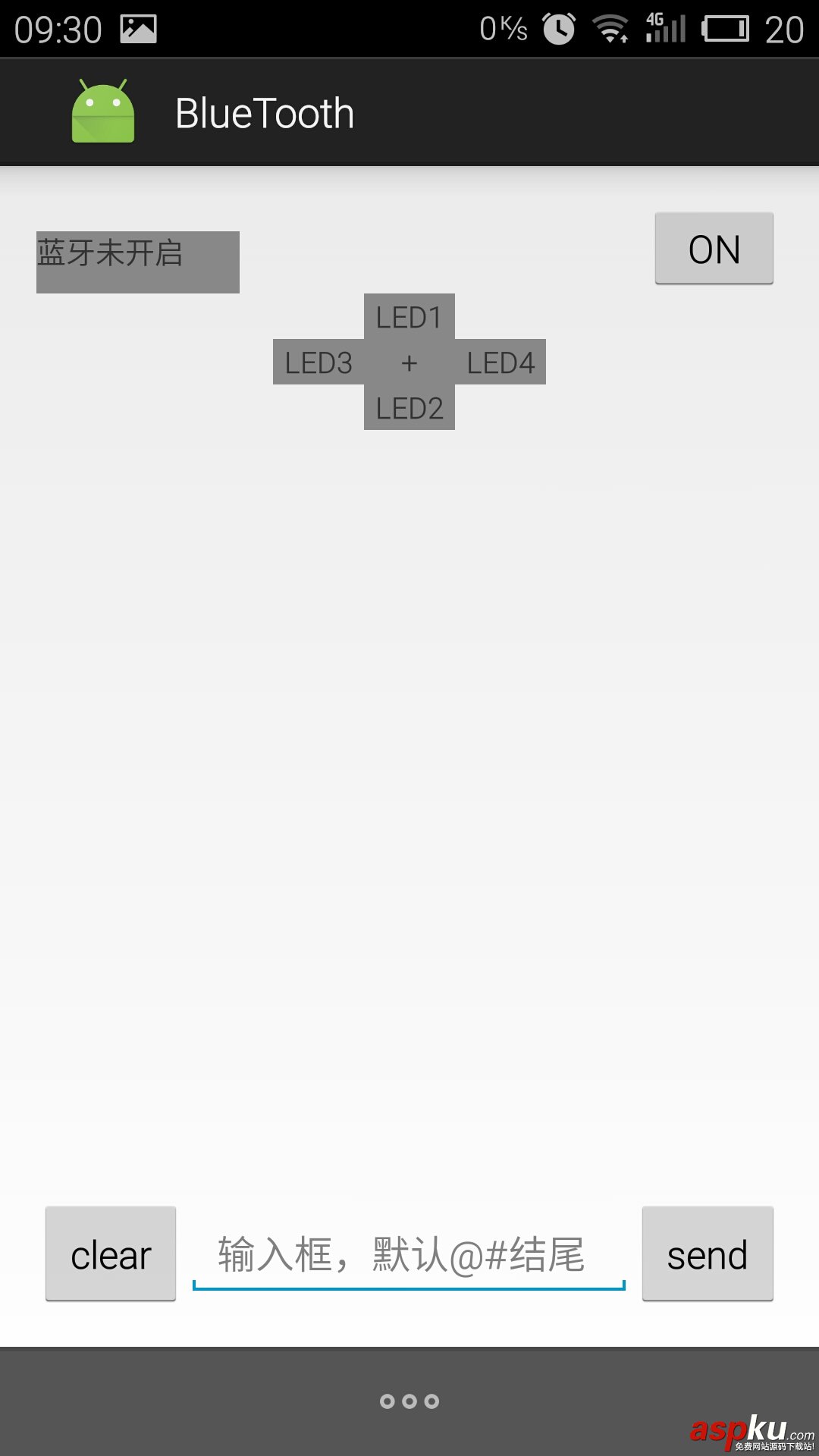
activity_main.xml文件如下:
xmlns:tools="http://schemas.android.com/tools" android:layout_width="match_parent"
android:layout_height="wrap_content" android:paddingLeft="@dimen/activity_horizontal_margin"
android:paddingRight="@dimen/activity_horizontal_margin"
android:paddingTop="@dimen/activity_vertical_margin"
android:paddingBottom="@dimen/activity_vertical_margin" tools:context=".MainActivity">
android:id="@+id/linear_layout_top"
android:layout_alignParentTop="true"
android:layout_width="match_parent"
android:layout_height="40dp">
android:id="@+id/notice_view"
android:layout_width="0dp"
android:layout_height="40dp"
android:text="蓝牙未开启"
android:layout_weight="3"/>
android:id="@+id/notice_recv_view"
android:layout_width="0dp"
android:layout_height="30dp"
android:layout_weight="3"/>
android:id="@+id/notice_send_view"
android:layout_width="0dp"
android:layout_height="30dp"
android:layout_weight="3"/>
android:id="@+id/turn_on_off"
android:layout_width="0dp"
android:layout_height="40dp"
android:layout_weight="2"
android:text="ON"/>
android:id="@+id/led1"
android:layout_centerHorizontal="true"
android:layout_below="@+id/linear_layout_top"
android:layout_width="40dp"
android:layout_height="20dp"
android:gravity="center"
android:text="LED1"/>
android:id="@+id/led0"
android:layout_centerHorizontal="true"
android:layout_below="@+id/led1"
android:layout_width="40dp"
android:layout_height="20dp"
android:gravity="center"
android:text="+"/>
android:id="@+id/led3"
android:layout_below="@+id/led1"
android:layout_toLeftOf="@+id/led1"
android:layout_width="40dp"
android:layout_height="20dp"
android:gravity="center"
android:text="LED3"/>
android:id="@+id/led2"
android:layout_centerHorizontal="true"
android:layout_below="@+id/led3"
android:layout_width="40dp"
android:layout_height="20dp"
android:gravity="center"
android:text="LED2"/>
android:id="@+id/led4"
android:layout_below="@+id/led1"
android:layout_toRightOf="@+id/led1"
android:layout_width="40dp"
android:layout_height="20dp"
android:gravity="center"
android:text="LED4"/>
android:id="@+id/scroll_view"
android:layout_below="@+id/led2"
android:layout_above="@+id/linear_layout_bottom"
android:layout_width="match_parent"
android:layout_height="match_parent">
android:id="@+id/recv_view"
android:text=""
android:layout_width="wrap_content"
android:layout_height="wrap_content" />
android:id="@+id/linear_layout_bottom"
android:layout_alignParentBottom="true"
android:layout_width="match_parent"
android:layout_height="50dp">
android:id="@+id/clear_recv_view"
android:layout_width="0dp"
android:layout_height="match_parent"
android:layout_weight="1"
android:text="clear" />
android:id="@+id/send_text"
android:layout_width="0dp"
android:layout_height="wrap_content"
android:layout_weight="3"
android:hint="输入框,默认@#结尾"/>
android:id="@+id/send"
android:layout_width="0dp"
android:layout_height="match_parent"
android:layout_weight="1"
android:text="send" />
MainActivity.java文件如下:
package com.luoxn28.bluetooth;
import android.bluetooth.BluetoothAdapter;
import android.bluetooth.BluetoothDevice;
import android.bluetooth.BluetoothSocket;
import android.content.Intent;
import android.graphics.Color;
import android.os.Bundle;
import android.os.Message;
import android.support.v7.app.ActionBarActivity;
import android.view.Menu;
import android.view.MenuItem;
import android.view.View;
import android.widget.Button;
import android.widget.EditText;
import android.widget.ScrollView;
import android.widget.TextView;
import android.widget.Toast;
import java.io.IOException;
import java.io.InputStream;
import java.io.OutputStream;
import java.util.ArrayList;
import java.util.List;
import java.util.Set;
import java.util.UUID;
public class MainActivity extends ActionBarActivity implements View.OnClickListener {
public static final int RECV_VIEW = 0;
public static final int NOTICE_VIEW = 1;
private BluetoothAdapter bluetoothAdapter = null;
private ConnectThread connectThread = null;
private ConnectedThread connectedThread = null;
private TextView noticeView = null;
private Button turnOnOff = null;
private TextView led0, led1, led2, led3, led4;
ScrollView scrollView = null;
private TextView recvView = null;
private Button clearRecvView = null;
private EditText sendText = null;
private Button send = null;
@Override
protected void onCreate(Bundle savedInstanceState) {
super.onCreate(savedInstanceState);
setContentView(R.layout.activity_main);
// 获取BluetoothAdapter
bluetoothAdapter = BluetoothAdapter.getDefaultAdapter();
if (bluetoothAdapter == null) {
// Device does not support Bluetooth
return;
}
// 注册监听事件
noticeView = (TextView) findViewById(R.id.notice_view);
turnOnOff = (Button) findViewById(R.id.turn_on_off);
led0 = (TextView) findViewById(R.id.led0);
led1 = (TextView) findViewById(R.id.led1);
led2 = (TextView) findViewById(R.id.led2);
led3 = (TextView) findViewById(R.id.led3);
led4 = (TextView) findViewById(R.id.led4);
scrollView = (ScrollView) findViewById(R.id.scroll_view);
recvView = (TextView) findViewById(R.id.recv_view);
clearRecvView = (Button) findViewById(R.id.clear_recv_view);
sendText = (EditText) findViewById(R.id.send_text);
send = (Button) findViewById(R.id.send);
turnOnOff.setOnClickListener(this);
clearRecvView.setOnClickListener(this);
send.setOnClickListener(this);
if (!bluetoothAdapter.isEnabled()) {
noticeView.setText("蓝牙未开启");
}
else {
noticeView.setText("蓝牙已开启");
}
noticeView.setBackgroundColor(Color.GRAY);
led0.setBackgroundColor(Color.GRAY);
led1.setBackgroundColor(Color.GRAY);
led2.setBackgroundColor(Color.GRAY);
led3.setBackgroundColor(Color.GRAY);
led4.setBackgroundColor(Color.GRAY);
}
private boolean isOn = false;
@Override
public void onClick(View view) {
switch (view.getId()) {
case R.id.turn_on_off: // 发送'0'或者'1'都可以
if (bluetoothAdapter == null || !bluetoothAdapter.isEnabled()) {
Toast.makeText(this, "蓝牙未开启", Toast.LENGTH_SHORT).show();
break;
}
if (connectedThread == null) {
Toast.makeText(this, "未连接设备", Toast.LENGTH_SHORT).show();
break;
}
String turn_string = "1@#";
connectedThread.write(turn_string.getBytes());
if (isOn == false) {
isOn = true; // 打开了
turnOnOff.setText("OFF");
led1.setText("");
led2.setText("");
led3.setText("");
led4.setText("");
}
else {
isOn = false; // 关闭了
turnOnOff.setText("ON");
led1.setText("LED1");
led2.setText("LED2");
led3.setText("LED3");
led4.setText("LED4");
}
break;
case R.id.clear_recv_view: // 清空接收框
recvView.setText("");
break;
case R.id.send: // 发送数据,默认以"@#"结尾
if (bluetoothAdapter == null || !bluetoothAdapter.isEnabled()) {
Toast.makeText(this, "蓝牙未开启", Toast.LENGTH_SHORT).show();
return;
}
if (connectedThread == null) {
Toast.makeText(this, "未连接设备", Toast.LENGTH_SHORT).show();
break;
}
String inputText = sendText.getText().toString() + "@#"; // 发送给单片机数据以"@#结尾",这样单片机知道一条数据发送结束
//Toast.makeText(MainActivity.this, inputText, Toast.LENGTH_SHORT).show();
connectedThread.write(inputText.getBytes());
break;
default:
break;
}
}
private android.os.Handler handler = new android.os.Handler() {
public void handleMessage(Message msg) {
Bundle bundle = null;
switch (msg.what) {
case RECV_VIEW:
if (isOn == false) {
isOn = true;
turnOnOff.setText("OFF");
}
bundle = msg.getData();
String recv = bundle.getString("recv");
recvView.append(recv + "/n");
scrollView.fullScroll(ScrollView.FOCUS_DOWN); // 滚动到底部
if (recv.isEmpty() || recv.contains(" ") || recv.contains("#")) {
break;
}
int num = Integer.valueOf(recv) / 2; // 0-60s
if (num <= 20) {
led1.setText("");
led2.setText("");
led3.setText("");
led4.setText("");
led1.setBackgroundColor(Color.RED);
led2.setBackgroundColor(Color.RED);
led3.setBackgroundColor(Color.GREEN);
led4.setBackgroundColor(Color.GREEN);
}
else if (num < 30) {
int n = 30 - num;
led1.setText("" + n);
led2.setText("" + n);
if (num < 28) {
led3.setBackgroundColor(Color.GREEN);
led4.setBackgroundColor(Color.GREEN);
}
else {
led3.setBackgroundColor(Color.YELLOW);
led4.setBackgroundColor(Color.YELLOW);
}
}
else if (num <= 50) {
led1.setText("");
led2.setText("");
led3.setText("");
led4.setText("");
led1.setBackgroundColor(Color.GREEN);
led2.setBackgroundColor(Color.GREEN);
led3.setBackgroundColor(Color.RED);
led4.setBackgroundColor(Color.RED);
}
else {
int n = 60 - num;
led3.setText("" + n);
led4.setText("" + n);
if (num < 58) {
led1.setBackgroundColor(Color.GREEN);
led2.setBackgroundColor(Color.GREEN);
}
else {
led1.setBackgroundColor(Color.YELLOW);
led2.setBackgroundColor(Color.YELLOW);
}
}
break;
case NOTICE_VIEW:
bundle = msg.getData();
String notice = bundle.getString("notice");
noticeView.setText(notice);
break;
default:
break;
}
}
};
@Override
public boolean onCreateOptionsMenu(Menu menu) {
// Inflate the menu; this adds items to the action bar if it is present.
getMenuInflater().inflate(R.menu.menu_main, menu);
return true;
}
@Override
public boolean onOptionsItemSelected(MenuItem item) {
int id = item.getItemId();
if (id == R.id.start_bluetooth) {
if (bluetoothAdapter != null) {
// 开启蓝牙
int REQUEST_ENABLE_BT = 1;
if (!bluetoothAdapter.isEnabled()) {
Intent intent = new Intent(BluetoothAdapter.ACTION_REQUEST_ENABLE);
startActivityForResult(intent, REQUEST_ENABLE_BT);
noticeView.setText("开启蓝牙成功");
//Toast.makeText(this, "开启蓝牙成功", Toast.LENGTH_SHORT).show();
} else {
Toast.makeText(this, "蓝牙已开启", Toast.LENGTH_SHORT).show();
}
}
return true;
}
else if (id == R.id.show_devices) {
if (bluetoothAdapter != null) {
if (!bluetoothAdapter.isEnabled()) {
Toast.makeText(this, "蓝牙未开启", Toast.LENGTH_SHORT).show();
return true;
}
// 查询配对设备
List
Set
for (BluetoothDevice device : bondedDevices) {
devices.add(device.getName() + "-" + device.getAddress());
}
StringBuilder text = new StringBuilder();
for (String device : devices) {
text.append(device + "/n");
}
Toast.makeText(this, text, Toast.LENGTH_SHORT).show();
}
return true;
}
else if (id == R.id.find_devices) {
Toast.makeText(this, "该功能暂时不可用", Toast.LENGTH_SHORT).show();
}
else if (id == R.id.connect_devices) {
if (bluetoothAdapter == null || !bluetoothAdapter.isEnabled()) {
Toast.makeText(this, "蓝牙未开启", Toast.LENGTH_SHORT).show();
return true;
}
// 查询配对设备 建立连接,只能连接第一个配对的设备
List
Set
for (BluetoothDevice device : bondedDevices) {
connectThread = new ConnectThread(device);
connectThread.start();
//Toast.makeText(this, "连接成功", Toast.LENGTH_SHORT).show();
break;
}
}
return super.onOptionsItemSelected(item);
}
private class ConnectThread extends Thread {
private final String MY_UUID = "00001101-0000-1000-8000-00805F9B34FB";
private final BluetoothSocket socket;
private final BluetoothDevice device;
public ConnectThread(BluetoothDevice device) {
this.device = device;
BluetoothSocket tmp = null;
try {
tmp = device.createRfcommSocketToServiceRecord(UUID.fromString(MY_UUID));
} catch (IOException e) {
e.printStackTrace();
}
this.socket = tmp;
}
public void run() {
bluetoothAdapter.cancelDiscovery();
try {
socket.connect();
connectedThread = new ConnectedThread(socket);
connectedThread.start();
} catch (IOException e) {
try {
socket.close();
} catch (IOException ee) {
ee.printStackTrace();
}
return;
}
//manageConnectedSocket(socket);
}
public void cancel() {
try {
socket.close();
} catch (IOException e) {
e.printStackTrace();
}
}
}
// 客户端与服务器建立连接成功后,用ConnectedThread收发数据
private class ConnectedThread extends Thread {
private final BluetoothSocket socket;
private final InputStream inputStream;
private final OutputStream outputStream;
public ConnectedThread(BluetoothSocket socket) {
this.socket = socket;
InputStream input = null;
OutputStream output = null;
try {
input = socket.getInputStream();
output = socket.getOutputStream();
} catch (IOException e) {
e.printStackTrace();
}
this.inputStream = input;
this.outputStream = output;
}
public void run() {
StringBuilder recvText = new StringBuilder();
byte[] buff = new byte[1024];
int bytes;
Bundle tmpBundle = new Bundle();
Message tmpMessage = new Message();
tmpBundle.putString("notice", "连接成功");
tmpMessage.what = NOTICE_VIEW;
tmpMessage.setData(tmpBundle);
handler.sendMessage(tmpMessage);
while (true) {
try {
bytes = inputStream.read(buff);
String str = new String(buff, "ISO-8859-1");
str = str.substring(0, bytes);
// 收到数据,单片机发送上来的数据以"#"结束,这样手机知道一条数据发送结束
//Log.e("read", str);
if (!str.endsWith("#")) {
recvText.append(str);
continue;
}
recvText.append(str.substring(0, str.length() - 1)); // 去除'#'
Bundle bundle = new Bundle();
Message message = new Message();
bundle.putString("recv", recvText.toString());
message.what = RECV_VIEW;
message.setData(bundle);
handler.sendMessage(message);
recvText.replace(0, recvText.length(), "");
} catch (IOException e) {
e.printStackTrace();
break;
}
}
}
public void write(byte[] bytes) {
try {
outputStream.write(bytes);
} catch (IOException e) {
e.printStackTrace();
}
}
public void cancel() {
try {
socket.close();
} catch (IOException e) {
e.printStackTrace();
}
}
}
}
menu_main.xml文件如下:
xmlns:app="http://schemas.android.com/apk/res-auto"
xmlns:tools="http://schemas.android.com/tools" tools:context=".MainActivity">
android:id="@+id/show_devices"
android:title="@string/show_devices"
android:orderInCategory="100"
app:showAsAction="never" />
android:id="@+id/start_bluetooth"
android:title="@string/start_bluetooth"
android:orderInCategory="100"
app:showAsAction="never" />
android:id="@+id/find_devices"
android:title="@string/find_devices"
android:orderInCategory="100"
app:showAsAction="never" />
android:id="@+id/connect_devices"
android:title="@string/connect_devices"
android:orderInCategory="100"
app:showAsAction="never" />
strings.xml文件如下:
到这里整个APP已经开发完成,亲测可用,如果有什么错误,欢迎评论指正谈论^_^。
到此,本文全部内容就给大家介绍完了,亲自测试过,代码安全可靠,放心实用,如果有任何问题欢迎给我留言,小编会及时回复的!
新闻热点






疑难解答













