一、基本使用要点回顾
Volley框架在请求网络图片方面也做了很多工作,提供了好几种方法.本文介绍使用ImageLoader来进行网络图片的加载.
ImageLoader的内部使用ImageRequest来实现,它的构造器可以传入一个ImageCache缓存形参,实现了图片缓存的功能,同时还可以过滤重复链接,避免重复发送请求。
下面是ImageLoader加载图片的实现方法:
public void displayImg(View view){ ImageView imageView = (ImageView)this.findViewById(R.id.image_view); RequestQueue mQueue = Volley.newRequestQueue(getApplicationContext()); ImageLoader imageLoader = new ImageLoader(mQueue, new BitmapCache()); ImageListener listener = ImageLoader.getImageListener(imageView,R.drawable.default_image, R.drawable.default_image); imageLoader.get("http://developer.android.com/images/home/aw_dac.png", listener); //指定图片允许的最大宽度和高度 //imageLoader.get("http://developer.android.com/images/home/aw_dac.png",listener, 200, 200); } 使用ImageLoader.getImageListener()方法创建一个ImageListener实例后,在imageLoader.get()方法中加入此监听器和图片的url,即可加载网络图片.
下面是使用LruCache实现的缓存类
public class BitmapCache implements ImageCache { private LruCache<String, Bitmap> cache; public BitmapCache() { cache = new LruCache<String, Bitmap>(8 * 1024 * 1024) { @Override protected int sizeOf(String key, Bitmap bitmap) { return bitmap.getRowBytes() * bitmap.getHeight(); } }; } @Override public Bitmap getBitmap(String url) { return cache.get(url); } @Override public void putBitmap(String url, Bitmap bitmap) { cache.put(url, bitmap); } } 最后,别忘记在AndroidManifest.xml文件中加入访问网络的权限
<uses-permission android:name="android.permission.INTERNET"/>
二、源码分析
(一) 初始化Volley请求队列
mReqQueue = Volley.newRequestQueue(mCtx);
主要就是这一行了:
#Volleypublic static RequestQueue newRequestQueue(Context context) { return newRequestQueue(context, null); }public static RequestQueue newRequestQueue(Context context, HttpStack stack) { return newRequestQueue(context, stack, -1); }public static RequestQueue newRequestQueue(Context context, HttpStack stack, int maxDiskCacheBytes) { File cacheDir = new File(context.getCacheDir(), DEFAULT_CACHE_DIR); String userAgent = "volley/0"; try { String packageName = context.getPackageName(); PackageInfo info = context.getPackageManager().getPackageInfo(packageName, 0); userAgent = packageName + "/" + info.versionCode; } catch (NameNotFoundException e) { } if (stack == null) { if (Build.VERSION.SDK_INT >= 9) { stack = new HurlStack(); } else { // Prior to Gingerbread, HttpUrlConnection was unreliable. // See: http://android-developers.blogspot.com/2011/09/androids-http-clients.html stack = new HttpClientStack(AndroidHttpClient.newInstance(userAgent)); } } Network network = new BasicNetwork(stack); RequestQueue queue; if (maxDiskCacheBytes <= -1) { // No maximum size specified queue = new RequestQueue(new DiskBasedCache(cacheDir), network); } else { // Disk cache size specified queue = new RequestQueue(new DiskBasedCache(cacheDir, maxDiskCacheBytes), network); } queue.start(); return queue; } 这里主要就是初始化HttpStack,对于HttpStack在API大于等于9的时候选择HttpUrlConnetcion,反之则选择HttpClient,这里我们并不关注Http相关代码。
接下来初始化了RequestQueue,然后调用了start()方法。
接下来看RequestQueue的构造:
public RequestQueue(Cache cache, Network network) { this(cache, network, DEFAULT_NETWORK_THREAD_POOL_SIZE); }public RequestQueue(Cache cache, Network network, int threadPoolSize) { this(cache, network, threadPoolSize, new ExecutorDelivery(new Handler(Looper.getMainLooper()))); }public RequestQueue(Cache cache, Network network, int threadPoolSize, ResponseDelivery delivery) { mCache = cache; mNetwork = network; mDispatchers = new NetworkDispatcher[threadPoolSize]; mDelivery = delivery; } 初始化主要就是4个参数:mCache、mNetwork、mDispatchers、mDelivery。第一个是硬盘缓存;第二个主要用于Http相关操作;第三个用于转发请求的;第四个参数用于把结果转发到UI线程(ps:你可以看到new Handler(Looper.getMainLooper()))。
接下来看start方法
#RequestQueue /** * Starts the dispatchers in this queue. */ public void start() { stop(); // Make sure any currently running dispatchers are stopped. // Create the cache dispatcher and start it. mCacheDispatcher = new CacheDispatcher(mCacheQueue, mNetworkQueue, mCache, mDelivery); mCacheDispatcher.start(); // Create network dispatchers (and corresponding threads) up to the pool size. for (int i = 0; i < mDispatchers.length; i++) { NetworkDispatcher networkDispatcher = new NetworkDispatcher(mNetworkQueue, mNetwork, mCache, mDelivery); mDispatchers[i] = networkDispatcher; networkDispatcher.start(); } } 首先是stop,确保转发器退出,其实就是内部的几个线程退出,这里大家如果有兴趣可以看眼源码,参考下Volley中是怎么处理线程退出的(几个线程都是while(true){//doSomething})。
接下来初始化CacheDispatcher,然后调用start();初始化NetworkDispatcher,然后调用start();
上面的转发器呢,都是线程,可以看到,这里开了几个线程在帮助我们工作,具体的源码,我们一会在看。
好了,到这里,就完成了Volley的初始化的相关代码,那么接下来看初始化ImageLoader相关源码。
(二) 初始化ImageLoader
#VolleyHelpermImageLoader = new ImageLoader(mReqQueue, new ImageCache() { private final LruCache<String, Bitmap> mLruCache = new LruCache<String, Bitmap>( (int) (Runtime.getRuntime().maxMemory() / 10)) { @Override protected int sizeOf(String key, Bitmap value) { return value.getRowBytes() * value.getHeight(); } }; @Override public void putBitmap(String url, Bitmap bitmap) { mLruCache.put(url, bitmap); } @Override public Bitmap getBitmap(String url) { return mLruCache.get(url); } });#ImageLoaderpublic ImageLoader(RequestQueue queue, ImageCache imageCache) { mRequestQueue = queue; mCache = imageCache; } 很简单,就是根据我们初始化的RequestQueue和LruCache初始化了一个ImageLoader。
(三) 加载图片
我们在加载图片时,调用的是:
# VolleyHelper getInstance().getImageLoader().get(url, new ImageLoader.ImageListener());
接下来看get方法:
#ImageLoader public ImageContainer get(String requestUrl, final ImageListener listener) { return get(requestUrl, listener, 0, 0); }public ImageContainer get(String requestUrl, ImageListener imageListener, int maxWidth, int maxHeight) { return get(requestUrl, imageListener, maxWidth, maxHeight, ScaleType.CENTER_INSIDE); }public ImageContainer get(String requestUrl, ImageListener imageListener, int maxWidth, int maxHeight, ScaleType scaleType) { // only fulfill requests that were initiated from the main thread. throwIfNotOnMainThread(); final String cacheKey = getCacheKey(requestUrl, maxWidth, maxHeight, scaleType); // Try to look up the request in the cache of remote images. Bitmap cachedBitmap = mCache.getBitmap(cacheKey); if (cachedBitmap != null) { // Return the cached bitmap. ImageContainer container = new ImageContainer(cachedBitmap, requestUrl, null, null); imageListener.onResponse(container, true); return container; } // The bitmap did not exist in the cache, fetch it! ImageContainer imageContainer = new ImageContainer(null, requestUrl, cacheKey, imageListener); // Update the caller to let them know that they should use the default bitmap. imageListener.onResponse(imageContainer, true); // Check to see if a request is already in-flight. BatchedImageRequest request = mInFlightRequests.get(cacheKey); if (request != null) { // If it is, add this request to the list of listeners. request.addContainer(imageContainer); return imageContainer; } // The request is not already in flight. Send the new request to the network and // track it. Request<Bitmap> newRequest = makeImageRequest(requestUrl, maxWidth, maxHeight, scaleType, cacheKey); mRequestQueue.add(newRequest); mInFlightRequests.put(cacheKey, new BatchedImageRequest(newRequest, imageContainer)); return imageContainer; } 可以看到get方法,首先通过throwIfNotOnMainThread()方法限制必须在UI线程调用;
然后根据传入的参数计算cacheKey,获取cache;
=>如果cache存在,直接将返回结果封装为一个ImageContainer(cachedBitmap, requestUrl),然后直接回调imageListener.onResponse(container, true);我们就可以设置图片了。
=>如果cache不存在,初始化一个ImageContainer(没有bitmap),然后直接回调,imageListener.onResponse(imageContainer, true);,这里为了让大家在回调中判断,然后设置默认图片(所以,大家在自己实现listener的时候,别忘了判断resp.getBitmap()!=null);
接下来检查该url是否早已加入了请求对了,如果早已加入呢,则将刚初始化的ImageContainer加入BatchedImageRequest,返回结束。
如果是一个新的请求,则通过makeImageRequest创建一个新的请求,然后将这个请求分别加入mRequestQueue和mInFlightRequests,注意mInFlightRequests中会初始化一个BatchedImageRequest,存储相同的请求队列。
这里注意mRequestQueue是个对象,并不是队列数据结构,所以我们要看下add方法
#RequestQueuepublic <T> Request<T> add(Request<T> request) { // Tag the request as belonging to this queue and add it to the set of current requests. request.setRequestQueue(this); synchronized (mCurrentRequests) { mCurrentRequests.add(request); } // Process requests in the order they are added. request.setSequence(getSequenceNumber()); request.addMarker("add-to-queue"); // If the request is uncacheable, skip the cache queue and go straight to the network. if (!request.shouldCache()) { mNetworkQueue.add(request); return request; } // Insert request into stage if there's already a request with the same cache key in flight. synchronized (mWaitingRequests) { String cacheKey = request.getCacheKey(); if (mWaitingRequests.containsKey(cacheKey)) { // There is already a request in flight. Queue up. Queue<Request<?>> stagedRequests = mWaitingRequests.get(cacheKey); if (stagedRequests == null) { stagedRequests = new LinkedList<Request<?>>(); } stagedRequests.add(request); mWaitingRequests.put(cacheKey, stagedRequests); if (VolleyLog.DEBUG) { VolleyLog.v("Request for cacheKey=%s is in flight, putting on hold.", cacheKey); } } else { // Insert 'null' queue for this cacheKey, indicating there is now a request in // flight. mWaitingRequests.put(cacheKey, null); mCacheQueue.add(request); } return request; } } 这里首先将请求加入mCurrentRequests,这个mCurrentRequests保存了所有需要处理的Request,主要为了提供cancel的入口。
如果该请求不应该被缓存则直接加入mNetworkQueue,然后返回。
然后判断该请求是否有相同的请求正在被处理,如果有则加入mWaitingRequests;如果没有,则
加入mWaitingRequests.put(cacheKey, null)和mCacheQueue.add(request)。
ok,到这里我们就分析完成了直观的代码,但是你可能会觉得,那么到底是在哪里触发的网络请求,加载图片呢?
那么,首先你应该知道,我们需要加载图片的时候,会makeImageRequest然后将这个请求加入到各种队列,主要包含mCurrentRequests、mCacheQueue。
然后,还记得我们初始化RequestQueue的时候,启动了几个转发线程吗?CacheDispatcher和NetworkDispatcher。
其实,网络请求就是在这几个线程中真正去加载的,我们分别看一下;
(四)CacheDispatcher
看一眼构造方法;
#CacheDispatcher public CacheDispatcher( BlockingQueue<Request<?>> cacheQueue, BlockingQueue<Request<?>> networkQueue, Cache cache, ResponseDelivery delivery) { mCacheQueue = cacheQueue; mNetworkQueue = networkQueue; mCache = cache; mDelivery = delivery; }
这是一个线程,那么主要的代码肯定在run里面。
#CacheDispatcher @Override public void run() { if (DEBUG) VolleyLog.v("start new dispatcher"); Process.setThreadPriority(Process.THREAD_PRIORITY_BACKGROUND); // Make a blocking call to initialize the cache. mCache.initialize(); while (true) { try { // Get a request from the cache triage queue, blocking until // at least one is available. final Request<?> request = mCacheQueue.take(); request.addMarker("cache-queue-take"); // If the request has been canceled, don't bother dispatching it. if (request.isCanceled()) { request.finish("cache-discard-canceled"); continue; } // Attempt to retrieve this item from cache. Cache.Entry entry = mCache.get(request.getCacheKey()); if (entry == null) { request.addMarker("cache-miss"); // Cache miss; send off to the network dispatcher. mNetworkQueue.put(request); continue; } // If it is completely expired, just send it to the network. if (entry.isExpired()) { request.addMarker("cache-hit-expired"); request.setCacheEntry(entry); mNetworkQueue.put(request); continue; } // We have a cache hit; parse its data for delivery back to the request. request.addMarker("cache-hit"); Response<?> response = request.parseNetworkResponse( new NetworkResponse(entry.data, entry.responseHeaders)); request.addMarker("cache-hit-parsed"); if (!entry.refreshNeeded()) { // Completely unexpired cache hit. Just deliver the response. mDelivery.postResponse(request, response); } else { // Soft-expired cache hit. We can deliver the cached response, // but we need to also send the request to the network for // refreshing. request.addMarker("cache-hit-refresh-needed"); request.setCacheEntry(entry); // Mark the response as intermediate. response.intermediate = true; // Post the intermediate response back to the user and have // the delivery then forward the request along to the network. mDelivery.postResponse(request, response, new Runnable() { @Override public void run() { try { mNetworkQueue.put(request); } catch (InterruptedException e) { // Not much we can do about this. } } }); } } catch (InterruptedException e) { // We may have been interrupted because it was time to quit. if (mQuit) { return; } continue; } } } ok,首先要明确这个缓存指的是硬盘缓存(目录为context.getCacheDir()/volley),内存缓存在ImageLoader那里已经判断过了。
可以看到这里是个无限循环,不断的从mCacheQueue去取出请求,如果请求已经被取消就直接结束;
接下来从缓存中获取:
=>如果没有取到,则加入mNetworkQueue
=>如果缓存过期,则加入mNetworkQueue
否则,就是取到了可用的缓存了;调用request.parseNetworkResponse解析从缓存中取出的data和responseHeaders;接下来判断TTL(主要还是判断是否过期),如果没有过期则直接通过mDelivery.postResponse转发,然后回调到UI线程;如果ttl不合法,回调完成后,还会将该请求加入mNetworkQueue。
好了,这里其实就是如果拿到合法的缓存,则直接转发到UI线程;反之,则加入到NetworkQueue.
接下来我们看NetworkDispatcher。
(五)NetworkDispatcher
与CacheDispatcher类似,依然是个线程,核心代码依然在run中;
# NetworkDispatcher//new NetworkDispatcher(mNetworkQueue, mNetwork,mCache, mDelivery)public NetworkDispatcher(BlockingQueue<Request<?>> queue, Network network, Cache cache, ResponseDelivery delivery) { mQueue = queue; mNetwork = network; mCache = cache; mDelivery = delivery; }@Override public void run() { Process.setThreadPriority(Process.THREAD_PRIORITY_BACKGROUND); while (true) { long startTimeMs = SystemClock.elapsedRealtime(); Request<?> request; try { // Take a request from the queue. request = mQueue.take(); } catch (InterruptedException e) { // We may have been interrupted because it was time to quit. if (mQuit) { return; } continue; } try { request.addMarker("network-queue-take"); // If the request was cancelled already, do not perform the // network request. if (request.isCanceled()) { request.finish("network-discard-cancelled"); continue; } addTrafficStatsTag(request); // Perform the network request. NetworkResponse networkResponse = mNetwork.performRequest(request); request.addMarker("network-http-complete"); // If the server returned 304 AND we delivered a response already, // we're done -- don't deliver a second identical response. if (networkResponse.notModified && request.hasHadResponseDelivered()) { request.finish("not-modified"); continue; } // Parse the response here on the worker thread. Response<?> response = request.parseNetworkResponse(networkResponse); request.addMarker("network-parse-complete"); // Write to cache if applicable. // TODO: Only update cache metadata instead of entire record for 304s. if (request.shouldCache() && response.cacheEntry != null) { mCache.put(request.getCacheKey(), response.cacheEntry); request.addMarker("network-cache-written"); } // Post the response back. request.markDelivered(); mDelivery.postResponse(request, response); } catch (VolleyError volleyError) { volleyError.setNetworkTimeMs(SystemClock.elapsedRealtime() - startTimeMs); parseAndDeliverNetworkError(request, volleyError); } catch (Exception e) { VolleyLog.e(e, "Unhandled exception %s", e.toString()); VolleyError volleyError = new VolleyError(e); volleyError.setNetworkTimeMs(SystemClock.elapsedRealtime() - startTimeMs); mDelivery.postError(request, volleyError); } } } 看代码前,我们首先想一下逻辑,正常情况下我们会取出请求,让network去请求处理我们的请求,处理完成以后呢:加入缓存,然后转发。
那么看下是不是:
首先取出请求;然后通过mNetwork.performRequest(request)处理我们的请求,拿到NetworkResponse;接下来,使用request去解析我们的NetworkResponse。
拿到Response以后,判断是否应该缓存,如果需要,则缓存。
最后mDelivery.postResponse(request, response);转发;
ok,和我们的预期差不多。
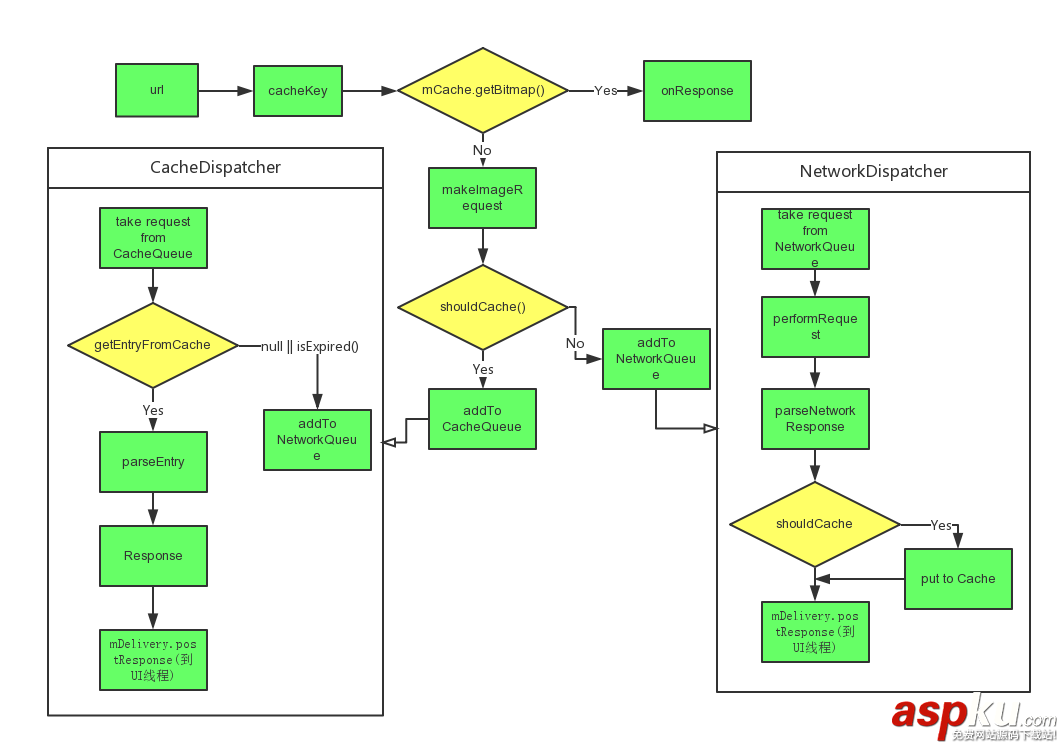
这样的话,我们的Volley去加载图片的核心逻辑就分析完成了,简单总结下:
首先初始化RequestQueue,主要就是开启几个Dispatcher线程,线程会不断读取请求(使用的阻塞队列,没有消息则阻塞)
当我们发出请求以后,会根据url,ImageView属性等,构造出一个cacheKey,然后首先从LruCache中获取(这个缓存我们自己构建的,凡是实现ImageCache接口的都合法);如果没有取到,则判断是否存在硬盘缓存,这一步是从getCacheDir里面获取(默认5M);如果没有取到,则从网络请求;
不过,可以发现的是Volley的图片加载,并没有LIFO这种策略;貌似对于图片的下载,也是完整的加到内存,然后压缩,这么看,对于巨图、大文件这样的就废了;
看起来还是蛮简单的,不过看完以后,对于如何更好的时候该库以及如何去设计图片加载库还是有很大的帮助的;
如果有兴趣,大家还可以在看源码分析的同时,想想某些细节的实现,比如:
Dispatcher都是一些无限循环的线程,可以去看看Volley如何保证其关闭的。
对于图片压缩的代码,可以在ImageRequest的parseNetworkResponse里面去看看,是如何压缩的。
so on…
最后贴个大概的流程图,方便记忆: