
本文实例讲述了Android利用Intent实现数据传递的方法。分享给大家供大家参考,具体如下:
在Android开发过程中,很多人都熟悉Intent,这是个用于在多个View之间共享数据的类。本节主要讲述通过点选ListView中的文本,把文本中的URL加载到一个新的页面上,并且打印出来。为了方便,我先把前面一篇《Android开发之利用jsoup解析HTML页面的方法》的代码重新贴一下,因为在上一节后,代码做了少许修改:
try { doc = Jsoup.parse(new URL("http://www.51yam.com"), 5000); } catch (MalformedURLException e1) { e1.printStackTrace(); } catch (IOException e1) { e1.printStackTrace(); } final List<Map<String, String>> list = new ArrayList<Map<String, String>>(); Elements es = doc.getElementsByClass("subnav"); for (int i=0;i<es.size();i++) { Element e = es.get(i); int count = e.getElementsByTag("a").size(); for(int j=0;j<count;j++) { Map<String, String> map = new HashMap<String, String>(); Element ex = e.getElementsByTag("a").get(j); map.put("title", ex.text()); map.put("href", "http://www.51yam.com/"+ex.attr("href")); list.add(map); } } ListView listView = (ListView) findViewById(R.id.listView1); listView.setAdapter(new SimpleAdapter(this, list, android.R.layout.simple_list_item_2, new String[] { "title","href" }, new int[] { android.R.id.text1,android.R.id.text2})); 实现的效果如下:
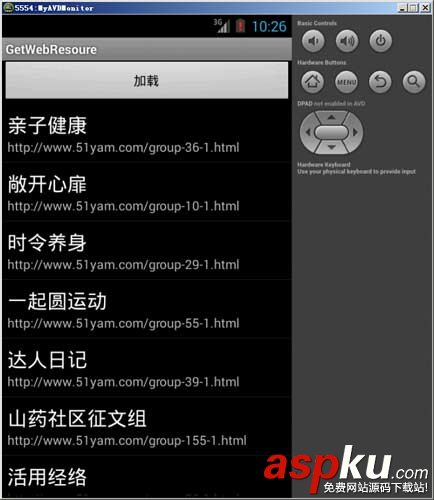
然后我们需要做的就是当点击ListView中的项目的时候,程序会将每个话题下面的URL链接发送到新的页面显示:
下面是当点击ListView项目的时候,利用Intent传递数据的方法:
listView.setOnItemClickListener(new OnItemClickListener(){ @Override public void onItemClick(AdapterView<?> parent, View v, int position,long id) { //Toast.makeText(getApplicationContext(), (TextView), duration) System.out.println("position:"+position); System.out.println("id:"+id); //Toast.makeText(_GetWebResoureActivity.this, list.get(position).get("href"), Toast.LENGTH_SHORT).show(); Intent intent = new Intent(v.getContext(),topicdetails.class); intent.putExtra("src", list.get(position).get("href")); startActivityForResult(intent,0); }}); 在子页面“topicdetails.java”中,我们可以通过如下的方式来接收传递过来的值:
package com.android.web;import android.app.Activity;import android.content.Intent;import android.os.Bundle;import android.widget.EditText;import java.lang.Object;public class topicdetails extends Activity { private EditText editText; @Override protected void onCreate(Bundle savedInstanceState) { super.onCreate(savedInstanceState); setContentView(R.layout.topiccontent); editText = (EditText)this.findViewById(R.id.editText); String srcUrl = getIntent().getStringExtra("src"); editText.setText(srcUrl); }} 当然,一定不要忘记了在AndroidManifest.xml文件中添加Activity映射(黄色背景部分):
<?xml version="1.0" encoding="utf-8"?><manifest xmlns:android="http://schemas.android.com/apk/res/android" package="com.android.web" android:versionCode="1" android:versionName="1.0" > <uses-sdk android:minSdkVersion="7" /> <!-- 加入访问网络的权限 --> <uses-permission android:name="android.permission.INTERNET" /> <application android:icon="@drawable/ic_launcher" android:label="@string/app_name" > <activity android:label="@string/app_name" android:name="._GetWebResoureActivity" > <intent-filter > <action android:name="android.intent.action.MAIN" /> <category android:name="android.intent.category.LAUNCHER" /> </intent-filter> </activity> <activity android:name=".topicdetails"></activity> </application></manifest>
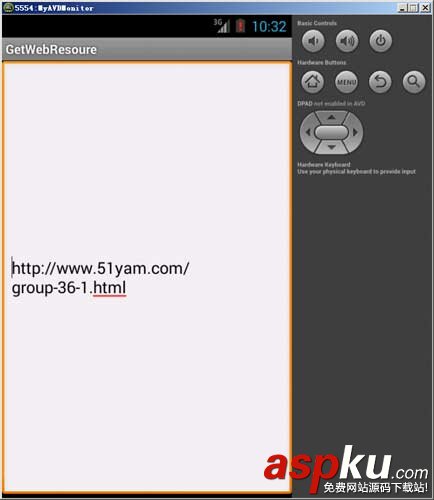
这样当一切工作准备完毕后,运行程序,点击ListView 的Item,我们成功地跳转到了子页面:
以下是所有的源码:
主页面源码:
package com.android.web;import java.io.BufferedInputStream;import java.io.IOException;import java.io.InputStream;import java.net.MalformedURLException;import java.net.URL;import java.net.URLConnection;import java.util.ArrayList;import java.util.HashMap;import java.util.List;import java.util.Map;import java.lang.Object;import org.apache.http.util.ByteArrayBuffer;import org.apache.http.util.EncodingUtils;import org.jsoup.Jsoup;import org.jsoup.nodes.Document;import org.jsoup.nodes.Element;import org.jsoup.select.Elements;import android.app.Activity;import android.content.Intent;import android.os.Bundle;import android.view.View;import android.view.View.OnClickListener;import android.widget.AdapterView;import android.widget.AdapterView.OnItemClickListener;import android.widget.ListView;import android.widget.SimpleAdapter;import android.widget.Toast;public class _GetWebResoureActivity extends Activity { Document doc; @Override public void onCreate(Bundle savedInstanceState) { super.onCreate(savedInstanceState); setContentView(R.layout.main); findViewById(R.id.button1).setOnClickListener(new OnClickListener() { @Override public void onClick(View v) { load(); } }); } protected void load() { try { doc = Jsoup.parse(new URL("http://www.51yam.com"), 5000); } catch (MalformedURLException e1) { e1.printStackTrace(); } catch (IOException e1) { e1.printStackTrace(); } final List<Map<String, String>> list = new ArrayList<Map<String, String>>(); Elements es = doc.getElementsByClass("subnav"); for (int i=0;i<es.size();i++) { Element e = es.get(i); int count = e.getElementsByTag("a").size(); for(int j=0;j<count;j++) { Map<String, String> map = new HashMap<String, String>(); Element ex = e.getElementsByTag("a").get(j); map.put("title", ex.text()); map.put("href", "http://www.51yam.com/"+ex.attr("href")); list.add(map); } } ListView listView = (ListView) findViewById(R.id.listView1); listView.setAdapter(new SimpleAdapter(this, list, android.R.layout.simple_list_item_2, new String[] { "title","href" }, new int[] { android.R.id.text1,android.R.id.text2 })); listView.setOnItemClickListener(new OnItemClickListener(){ @Override public void onItemClick(AdapterView<?> parent, View v, int position,long id) { //Toast.makeText(getApplicationContext(), (TextView), duration) System.out.println("position:"+position); System.out.println("id:"+id); //Toast.makeText(_GetWebResoureActivity.this, list.get(position).get("href"), Toast.LENGTH_SHORT).show(); Intent intent = new Intent(v.getContext(),topicdetails.class); intent.putExtra("src", list.get(position).get("href")); startActivityForResult(intent,0); } }); } /** * @param urlString * @return */ public String getHtmlString(String urlString) { try { URL url = null; url = new URL(urlString); URLConnection ucon = null; ucon = url.openConnection(); InputStream instr = null; instr = ucon.getInputStream(); BufferedInputStream bis = new BufferedInputStream(instr); ByteArrayBuffer baf = new ByteArrayBuffer(500); int current = 0; while ((current = bis.read()) != -1) { baf.append((byte) current); } return EncodingUtils.getString(baf.toByteArray(), "gbk"); } catch (Exception e) { return ""; } }} 子页面源码:
package com.android.web;import android.app.Activity;import android.content.Intent;import android.os.Bundle;import android.widget.EditText;import java.lang.Object;public class topicdetails extends Activity { private EditText editText; @Override protected void onCreate(Bundle savedInstanceState) { super.onCreate(savedInstanceState); setContentView(R.layout.topiccontent); editText = (EditText)this.findViewById(R.id.editText); String srcUrl = getIntent().getStringExtra("src"); editText.setText(srcUrl); }} 


















