表格布局模型以行列的形式管理子控件,每一行为一个TableRow的对象,当然也可以是一个View的对象。TableRow可以添加子控件,每添加一个为一列。
TableLayout属性:
android:collapseColumns:将TableLayout里面指定的列隐藏,若有多列需要隐藏,请用逗号将需要隐藏的列序号隔开。
android:stretchColumns:设置指定的列为可伸展的列,以填满剩下的多余空白空间,若有多列需要设置为可伸展,请用逗号将需要伸展的列序号隔开。
android:shrinkColumns:设置指定的列为可收缩的列。当可收缩的列太宽(内容过多)不会被挤出屏幕。当需要设置多列为可收缩时,将列序号用逗号隔开。
列元素(Button)属性:(奇怪的是button 里面没有android:layout_column 和android:layout_span两个属性,写进去无反应,还不知道为什么)
android:layout_colum:设置该控件在TableRow中指定的列。
android:layout_span:设置该控件所跨越的列数。
图片:
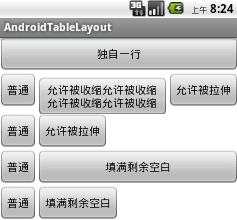
代码:
<LinearLayout xmlns:android="http://schemas.android.com/apk/res/android" xmlns:tools="http://schemas.android.com/tools" android:layout_width="match_parent" android:layout_height="match_parent" android:orientation="vertical" tools:context=".AndroidTableLayoutActivity" > <!-- 定义第一个表格,指定第2列允许收缩,第3列允许拉伸 --> <TableLayout android:id="@+id/tablelayout01" android:layout_width="match_parent" android:layout_height="wrap_content" android:shrinkColumns="1" android:stretchColumns="2" > <!-- 直接添加按钮,自己占用一行 --> <Button android:id="@+id/btn01" android:layout_width="wrap_content" android:layout_height="wrap_content" android:text="独自一行" > </Button> <TableRow> <Button android:id="@+id/btn02" android:layout_width="wrap_content" android:layout_height="wrap_content" android:text="普通" > </Button> <Button android:id="@+id/btn03" android:layout_width="wrap_content" android:layout_height="wrap_content" android:text="允许被收缩允许被收缩允许被收缩允许被收缩" > </Button> <Button android:id="@+id/btn04" android:layout_width="wrap_content" android:layout_height="wrap_content" android:text="允许被拉伸" > </Button> </TableRow> </TableLayout> <!-- 定义第2个表格,指定第2列隐藏 --> <TableLayout android:id="@+id/tablelayout02" android:layout_width="match_parent" android:layout_height="wrap_content" android:collapseColumns="1" > <TableRow> <Button android:id="@+id/btn05" android:layout_width="wrap_content" android:layout_height="wrap_content" android:text="普通" > </Button> <Button android:id="@+id/btn06" android:layout_width="wrap_content" android:layout_height="wrap_content" android:text="被隐藏列" > </Button> <Button android:id="@+id/btn07" android:layout_width="wrap_content" android:layout_height="wrap_content" android:text="允许被拉伸" > </Button> </TableRow> </TableLayout> <!-- 定义第3个表格,指定第2列填满空白--> <TableLayout android:id="@+id/tablelayout03" android:layout_width="match_parent" android:layout_height="wrap_content" android:stretchColumns="1" > <TableRow> <Button android:id="@+id/btn08" android:layout_width="wrap_content" android:layout_height="wrap_content" android:text="普通" > </Button> <Button android:id="@+id/btn09" android:layout_width="wrap_content" android:layout_height="wrap_content" android:text="填满剩余空白" > </Button> </TableRow> </TableLayout> <!-- 定义第3个表格,指定第2列横跨2列--> <TableLayout android:id="@+id/tablelayout04" android:layout_width="match_parent" android:layout_height="wrap_content" > <TableRow> <Button android:id="@+id/btn10" android:layout_width="wrap_content" android:layout_height="wrap_content" android:text="普通" > </Button> <Button android:id="@+id/btn11" android:layout_column="2" android:layout_width="wrap_content" android:layout_height="wrap_content" android:text="填满剩余空白" > </Button> </TableRow> </TableLayout> </LinearLayout>
希望本文所述对大家学习Android软件编程有所帮助。




















