首先为大家介绍Andorid5.0原生下拉刷新简单实现。
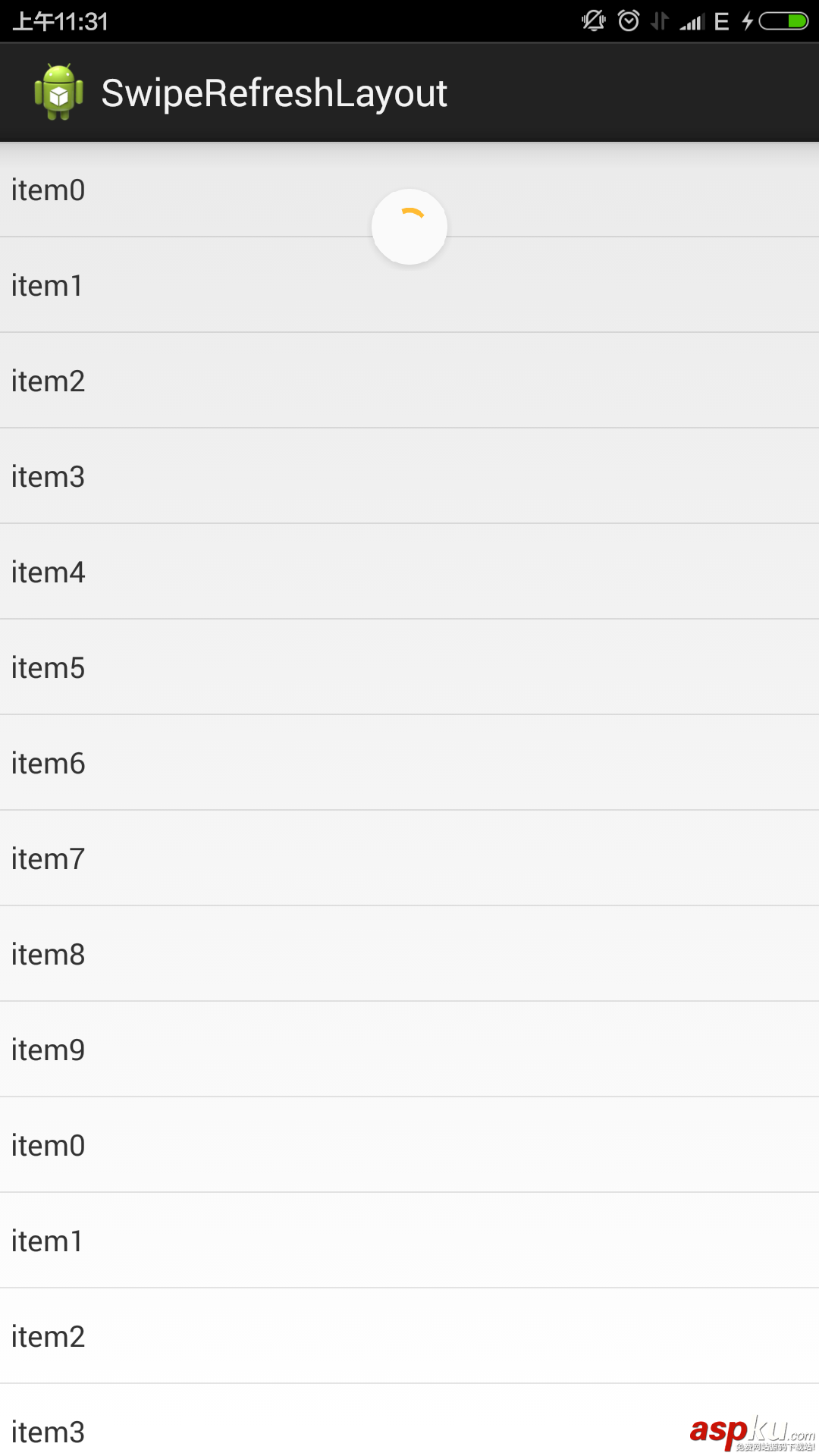
先上效果图;
相对于上一个19.1.0版本中的横条效果好看了很多。使用起来也很简单。
<FrameLayout xmlns:android="http://schemas.android.com/apk/res/android" xmlns:tools="http://schemas.android.com/tools" android:id="@+id/container" android:layout_width="match_parent" android:layout_height="match_parent" tools:ignore="MergeRootFrame" > <android.support.v4.widget.SwipeRefreshLayout android:id="@+id/swipe_container" android:layout_width="match_parent" android:layout_height="match_parent" > <ListView android:id="@+id/list" android:layout_width="match_parent" android:layout_height="match_parent" > </ListView> </android.support.v4.widget.SwipeRefreshLayout></FrameLayout>package hi.xiaoyu.swiperefreshlayout;import hi.xiaoyu.swiperefreshlayout.adapter.TestAdapter;import java.util.ArrayList;import java.util.List;import android.app.Activity;import android.os.Bundle;import android.os.Handler;import android.support.v4.widget.SwipeRefreshLayout;import android.support.v4.widget.SwipeRefreshLayout.OnRefreshListener;import android.widget.ListView;public class MainActivity extends Activity implements OnRefreshListener { private SwipeRefreshLayout swipeLayout; private ListView listView; private List<String> listDatas; private TestAdapter adapter; @Override protected void onCreate(Bundle savedInstanceState) { super.onCreate(savedInstanceState); setContentView(R.layout.activity_main); swipeLayout = (SwipeRefreshLayout) findViewById(R.id.swipe_container); listView = (ListView) findViewById(R.id.list); swipeLayout.setOnRefreshListener(this); swipeLayout.setColorSchemeResources(android.R.color.holo_orange_dark, android.R.color.holo_green_light, android.R.color.holo_orange_light, android.R.color.holo_red_light); listDatas = new ArrayList<String>(); for (int i = 0; i < 10; i++) { listDatas.add("item" + i); } adapter = new TestAdapter(this, listDatas, R.layout.test_item); listView.setAdapter(adapter); } public void onRefresh() { new Handler().postDelayed(new Runnable() { public void run() { swipeLayout.setRefreshing(false); listDatas.addAll(listDatas); adapter.notifyDataSetChanged(); } }, 3000); }} 几行代码就可以实现下拉刷新,效果也还不错,不用引入第三方jar,唯一的缺憾就是没有上拉加载,不知道谷歌工程师基于什么方面的考虑,希望能在下个版本看到。不过自己修改下源码加一个上拉也比较简单,结合上个一个版本的刷新效果做成上拉效果还不错。
二、Android实现上拉加载更多功能以及下拉刷新功能
采用了目前比较火的PullToRefresh,他是目前实现比较好的下拉刷新的类库。
目前他支持的控件有:ListView, ExpandableListView,GridView,WebView等。
首先第一步当然是导入libriay到咱们的项目了,具体导入方式,这里不再赘述。
下面是个例子采用的是ListView,当然其余的和这个类似
1、布局文件activity_main.xml
<RelativeLayout xmlns:android="http://schemas.android.com/apk/res/android" xmlns:tools="http://schemas.android.com/tools" android:layout_width="match_parent" android:layout_height="match_parent" tools:context=".MainActivity" > <com.handmark.pulltorefresh.library.PullToRefreshListView android:id="@+id/pull_refresh_list" android:layout_width="fill_parent" android:layout_height="fill_parent" /></RelativeLayout>
2、要实现下拉刷新的功能很简单,只需要实现OnRefreshListener的OnRefresh方法即可。
这里说一下如何实现上拉和下拉分别执行不同的操作。
原理是:根据下拉和上拉显示的布局的可见状态类区分上拉还是下拉,然后执行相应操作。
在PullToRefresh的类库的com.handmark.pulltorefresh.library包下,打开PullToRefreshBase.java,在这个类的最后面添加如下代码:
public boolean isHeaderShown() { return getHeaderLayout().isShown();}public boolean isFooterShown() { return getFooterLayout().isShown();} 3、在Activity的代码如下:
public class MainActivity extends ListActivity { private PullToRefreshListView mPullToRefreshListView; private LinkedList<String> mItemList; private ArrayAdapter<String> adapter; private Context context; @Override protected void onCreate(Bundle savedInstanceState) { super.onCreate(savedInstanceState); setContentView(R.layout.activity_main); context = this; initData(); adapter = new ArrayAdapter<String>(this, android.R.layout.simple_list_item_1, mItemList); //初始化控件 mPullToRefreshListView = (PullToRefreshListView)findViewById(R.id.pull_refresh_list); ListView mListView = mPullToRefreshListView.getRefreshableView(); mListView.setAdapter(adapter); //设置pull-to-refresh模式为Mode.Both mPullToRefreshListView.setMode(Mode.BOTH); //设置上拉下拉事件 mPullToRefreshListView.setOnRefreshListener(new OnRefreshListener<ListView>() { @Override public void onRefresh(PullToRefreshBase<ListView> refreshView) { if (refreshView.isHeaderShown()){ Toast.makeText(context, "下拉刷新",Toast.LENGTH_SHORT).show(); //下拉刷新 业务代码 }else { Toast.makeText(context, "上拉加载更多",Toast.LENGTH_SHORT).show(); //上拉加载更多 业务代码 } } }); } private void initData(){ //初始化数据 mItemList = new LinkedList<String>(); mItemList.addAll(Arrays.asList(data)); } private String[] data = new String[]{"data1","data2","data3","data4","data5","data6", "data1","data2","data3","data4","data5","data6"};} 如上代码所示,在OnRefresh的实现代码中,用以区分上拉还是下拉,关键代码如下:
if (refreshView.isHeaderShown()){ Toast.makeText(context, "下拉刷新",Toast.LENGTH_SHORT).show(); //下拉刷新 业务代码 }else { Toast.makeText(context, "上拉加载更多",Toast.LENGTH_SHORT).show(); //上拉加载更多 业务代码 } 至此,运行项目,可以得到演示结果了。
文章内容很丰富,希望对大家学习Android实现上拉加载更多以及下拉刷新功能有所帮助。




















