
这篇文章主要介绍了Android基于ViewPager Fragment实现选项卡的相关资料,需要的朋友可以参考下
先给大家展示效果图:
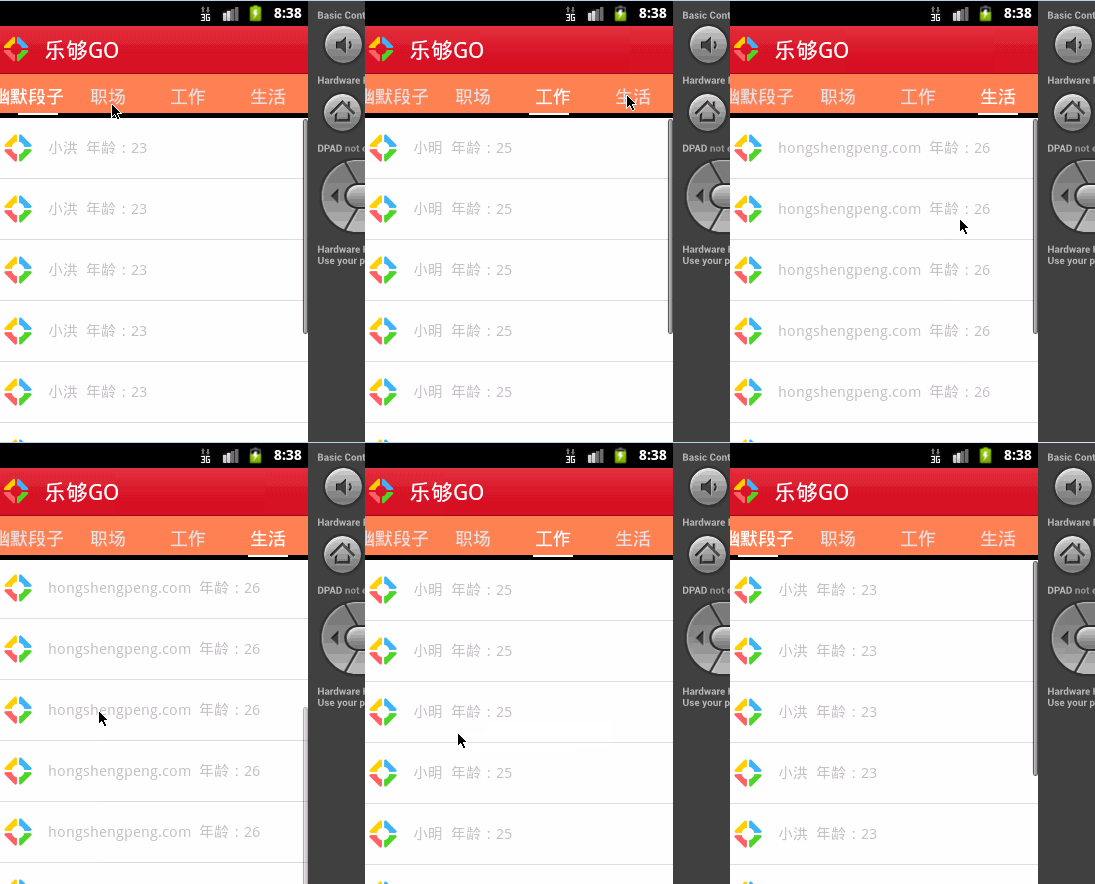
1.新建TestFragmen继承Fragment
- public class TestFragment extends Fragment {
- private static final String TAG = "TestFragment";
- private String hello;// = "hello android";
- private String defaultHello = "default value";
- private Map<string, object=""> maplist;
- static TestFragment newInstance(String s, Map<string, object=""> map) {
- TestFragment newFragment = new TestFragment();
- // Bundle bundle = new Bundle();
- // bundle.putString("hello", s);
- // newFragment.setArguments(bundle);
- final SerializableMap myMap=new SerializableMap();
- myMap.setMap(map);
- Bundle bundle = new Bundle();
- bundle.putSerializable("map", myMap);
- newFragment.setArguments(bundle);
- return newFragment;
- }
- @Override
- public void onCreate(Bundle savedInstanceState) {
- super.onCreate(savedInstanceState);
- Log.d(TAG, "TestFragment-----onCreate");
- Bundle args = getArguments();
- // hello = args != null ? args.getString("hello") : defaultHello;
- Bundle bundle = getArguments();
- SerializableMap serializableMap = (SerializableMap) bundle.get("map");
- maplist =serializableMap.getMap();
- }
- @Override
- public View onCreateView(LayoutInflater inflater, ViewGroup container,Bundle savedInstanceState) {
- Log.d(TAG, "TestFragment-----onCreateView");
- View view = inflater.inflate(R.layout.lay1, container, false);
- // TextView viewhello = (TextView) view.findViewById(R.id.tv_hello);
- //viewhello.setText(maplist.get("userid")+"time");
- ListView lv = (ListView) view.findViewById(R.id.listView3);
- ContactAdapter hc = new ContactAdapter(getActivity().getApplicationContext(),getContact());
- lv.setAdapter(hc);
- lv.setCacheColorHint(0);
- return view;
- }
- private ArrayList<contact> getContact(){
- ArrayList<contact> hcList = new ArrayList<contact>();
- for(int i=0;i<10;i++)
- {
- Contact c0 = new Contact();
- c0.setTxPath(R.drawable.more_game+"");
- c0.setName(maplist.get("userid")+" 年龄:"+maplist.get("age"));
- hcList.add(c0);
- }
- return hcList;
- }
- @Override
- public void onDestroy() {
- super.onDestroy();
- Log.d(TAG, "TestFragment-----onDestroy");
- }
- }
- </contact></contact></contact></string,></string,>
2.MyFragmentPagerAdapter继承FragmentPagerAdapter
- public class MyFragmentPagerAdapter extends FragmentPagerAdapter {
- private ArrayList<fragment> fragmentsList;
- public MyFragmentPagerAdapter(FragmentManager fm) {
- super(fm);
- }
- public MyFragmentPagerAdapter(FragmentManager fm, ArrayList<fragment> fragments) {
- super(fm);
- this.fragmentsList = fragments;
- }
- @Override
- public int getCount() {
- return fragmentsList.size();
- }
- @Override
- public Fragment getItem(int arg0) {
- return fragmentsList.get(arg0);
- }
- @Override
- public int getItemPosition(Object object) {
- return super.getItemPosition(object);
- }
- }
- </fragment></fragment>
3.MainActivity 要继承FragmentActivity
- public class MainActivity extends FragmentActivity {
- private static final String TAG = "MainActivity";
- private ViewPager mPager;
- private ArrayList<fragment> fragmentsList;
- private ImageView ivBottomLine;
- private TextView tvTabActivity, tvTabGroups, tvTabFriends, tvTabChat;
- private int currIndex = 0;
- private int bottomLineWidth;
- private int offset = 0;
- private int position_one;
- private int position_two;
- private int position_three;
- private Resources resources;
- @Override
- public void onCreate(Bundle savedInstanceState) {
- super.onCreate(savedInstanceState);
- requestWindowFeature(Window.FEATURE_NO_TITLE);
- setContentView(R.layout.main);
- resources = getResources();
- InitWidth();
- InitTextView();
- InitViewPager();
- }
- private void InitTextView() {
- tvTabActivity = (TextView) findViewById(R.id.tv_tab_activity);
- tvTabGroups = (TextView) findViewById(R.id.tv_tab_groups);
- tvTabFriends = (TextView) findViewById(R.id.tv_tab_friends);
- tvTabChat = (TextView) findViewById(R.id.tv_tab_chat);
- tvTabActivity.setOnClickListener(new MyOnClickListener(0));
- tvTabGroups.setOnClickListener(new MyOnClickListener(1));
- tvTabFriends.setOnClickListener(new MyOnClickListener(2));
- tvTabChat.setOnClickListener(new MyOnClickListener(3));
- }
- private void InitViewPager() {
- mPager = (ViewPager) findViewById(R.id.vPager);
- fragmentsList = new ArrayList<fragment>();
- Map<string, object=""> paramMap = new HashMap<string, object="">();
- paramMap.put("userid","小洪");
- paramMap.put("age",23);
- Map<string, object=""> paramMap2 = new HashMap<string, object="">();
- paramMap2.put("userid","vatty");
- paramMap2.put("age",24);
- Map<string, object=""> paramMap3 = new HashMap<string, object="">();
- paramMap3.put("userid","小明");
- paramMap3.put("age",25);
- Map<string, object=""> paramMap4 = new HashMap<string, object="">();
- paramMap4.put("userid","hongshengpeng.com");
- paramMap4.put("age",26);
- Fragment activityfragment = TestFragment.newInstance("Hello Activity.",paramMap);
- Fragment groupFragment = TestFragment.newInstance("Hello Group.",paramMap2);
- Fragment friendsFragment=TestFragment.newInstance("Hello Friends.",paramMap3);
- Fragment chatFragment=TestFragment.newInstance("Hello Chat.",paramMap4);
- fragmentsList.add(activityfragment);
- fragmentsList.add(groupFragment);
- fragmentsList.add(friendsFragment);
- fragmentsList.add(chatFragment);
- mPager.setAdapter(new MyFragmentPagerAdapter(getSupportFragmentManager(), fragmentsList));
- mPager.setCurrentItem(0);
- mPager.setOnPageChangeListener(new MyOnPageChangeListener());
- }
- private void InitWidth() {
- ivBottomLine = (ImageView) findViewById(R.id.iv_bottom_line);
- bottomLineWidth = ivBottomLine.getLayoutParams().width;
- Log.d(TAG, "cursor imageview width=" + bottomLineWidth);
- DisplayMetrics dm = new DisplayMetrics();
- getWindowManager().getDefaultDisplay().getMetrics(dm);
- int screenW = dm.widthPixels;
- offset = (int) ((screenW / 4.0 - bottomLineWidth) / 2);
- Log.i("MainActivity", "offset=" + offset);
- position_one = (int) (screenW / 4.0);
- position_two = position_one * 2;
- position_three = position_one * 3;
- }
- public class MyOnClickListener implements View.OnClickListener {
- private int index = 0;
- public MyOnClickListener(int i) {
- index = i;
- }
- @Override
- public void onClick(View v) {
- mPager.setCurrentItem(index);
- }
- };
- public class MyOnPageChangeListener implements OnPageChangeListener {
- @Override
- public void onPageSelected(int arg0) {
- Animation animation = null;
- switch (arg0) {
- case 0:
- if (currIndex == 1) {
- animation = new TranslateAnimation(position_one, 0, 0, 0);
- tvTabGroups.setTextColor(resources.getColor(R.color.lightwhite));
- } else if (currIndex == 2) {
- animation = new TranslateAnimation(position_two, 0, 0, 0);
- tvTabFriends.setTextColor(resources.getColor(R.color.lightwhite));
- } else if (currIndex == 3) {
- animation = new TranslateAnimation(position_three, 0, 0, 0);
- tvTabChat.setTextColor(resources.getColor(R.color.lightwhite));
- }
- tvTabActivity.setTextColor(resources.getColor(R.color.white));
- break;
- case 1:
- if (currIndex == 0) {
- animation = new TranslateAnimation(0, position_one, 0, 0);
- tvTabActivity.setTextColor(resources.getColor(R.color.lightwhite));
- } else if (currIndex == 2) {
- animation = new TranslateAnimation(position_two, position_one, 0, 0);
- tvTabFriends.setTextColor(resources.getColor(R.color.lightwhite));
- } else if (currIndex == 3) {
- animation = new TranslateAnimation(position_three, position_one, 0, 0);
- tvTabChat.setTextColor(resources.getColor(R.color.lightwhite));
- }
- tvTabGroups.setTextColor(resources.getColor(R.color.white));
- break;
- case 2:
- if (currIndex == 0) {
- animation = new TranslateAnimation(0, position_two, 0, 0);
- tvTabActivity.setTextColor(resources.getColor(R.color.lightwhite));
- } else if (currIndex == 1) {
- animation = new TranslateAnimation(position_one, position_two, 0, 0);
- tvTabGroups.setTextColor(resources.getColor(R.color.lightwhite));
- } else if (currIndex == 3) {
- animation = new TranslateAnimation(position_three, position_two, 0, 0);
- tvTabChat.setTextColor(resources.getColor(R.color.lightwhite));
- }
- tvTabFriends.setTextColor(resources.getColor(R.color.white));
- break;
- case 3:
- if (currIndex == 0) {
- animation = new TranslateAnimation(0, position_three, 0, 0);
- tvTabActivity.setTextColor(resources.getColor(R.color.lightwhite));
- } else if (currIndex == 1) {
- animation = new TranslateAnimation(position_one, position_three, 0, 0);
- tvTabGroups.setTextColor(resources.getColor(R.color.lightwhite));
- } else if (currIndex == 2) {
- animation = new TranslateAnimation(position_two, position_three, 0, 0);
- tvTabFriends.setTextColor(resources.getColor(R.color.lightwhite));
- }
- tvTabChat.setTextColor(resources.getColor(R.color.white));
- break;
- }
- currIndex = arg0;
- animation.setFillAfter(true);
- animation.setDuration(300);
- ivBottomLine.startAnimation(animation);
- }
- @Override
- public void onPageScrolled(int arg0, float arg1, int arg2) {
- }
- @Override
- public void onPageScrollStateChanged(int arg0) {
- }
- }
- }</string,></string,></string,></string,></string,></string,></string,></string,></fragment></fragment>
4.分别新建lay1.xml、 lay2.xml 、lay3.xml
lay1.xml
- <!--?xml version="1.0" encoding="utf-8"?-->
- <linearlayout xmlns:android="http://schemas.android.com/apk/res/android" android:layout_width="fill_parent" android:layout_height="fill_parent" android:background="#fff" android:orientation="vertical">
- <textview android:id="@+id/tv_hello" android:layout_width="wrap_content" android:layout_height="wrap_content" android:text="TextView" android:visibility="gone">
- <listview android:id="@+id/listView3" android:layout_width="match_parent" android:layout_height="wrap_content" android:cachecolorhint="@android:color/transparent" android:divider="@drawable/reader_item_divider" android:listselector="@android:color/transparent">
- </listview>
- </textview></linearlayout>
lay2.xml
- <!--?xml version="1.0" encoding="utf-8"?-->
- <linearlayout xmlns:android="http://schemas.android.com/apk/res/android" android:layout_width="fill_parent" android:layout_height="fill_parent" android:orientation="vertical" android:background="#FF8684">
- </linearlayout>
lay3.xml与lay2.xml类型
- <!--?xml version="1.0" encoding="utf-8"?-->
- <linearlayout xmlns:android="http://schemas.android.com/apk/res/android" android:layout_width="fill_parent" android:layout_height="fill_parent" android:orientation="vertical" android:background="#1586FF">
- </linearlayout>
main.xml
- <!--?xml version="1.0" encoding="utf-8"?-->
- <linearlayout xmlns:android="http://schemas.android.com/apk/res/android" xmlns:umadsdk="http://schemas.android.com/apk/res/com.LoveBus" android:layout_width="fill_parent" android:layout_height="fill_parent" android:orientation="vertical">
- <linearlayout android:layout_width="match_parent" android:layout_height="wrap_content" android:orientation="vertical">
- <linearlayout android:layout_width="match_parent" android:layout_height="48dip" android:background="@drawable/android_title_bg">
- <imageview android:id="@+id/imageView1" android:layout_width="36dip" android:layout_height="36dip" android:layout_gravity="center_vertical" android:layout_marginleft="10dip" android:src="@drawable/more_game">
- <textview android:id="@+id/textView1" android:layout_width="wrap_content" android:layout_height="wrap_content" android:layout_gravity="center_vertical" android:layout_marginleft="10dip" android:text="乐够GO" android:textappearance="?android:attr/textAppearanceLarge">
- <imageview android:id="@+id/imageView2" android:layout_width="wrap_content" android:layout_height="wrap_content" android:layout_gravity="center_vertical" android:paddingleft="10dip" android:src="@drawable/status_online" android:visibility="gone">
- </imageview></textview></imageview></linearlayout>
- <linearlayout android:id="@+id/linearLayout1" android:layout_width="fill_parent" android:layout_height="wrap_content" android:paddingbottom="5dip" android:paddingtop="10dip" android:background="@color/coral">
- <textview android:id="@+id/tv_tab_activity" android:layout_width="fill_parent" android:layout_height="fill_parent" android:layout_weight="1.0" android:gravity="center" android:text="@string/tab_1" android:textcolor="@color/white" android:textsize="18sp">
- <textview android:id="@+id/tv_tab_groups" android:layout_width="fill_parent" android:layout_height="fill_parent" android:layout_weight="1.0" android:gravity="center" android:text="@string/tab_2" android:textcolor="@color/lightwhite" android:textsize="18sp">
- <textview android:id="@+id/tv_tab_friends" android:layout_width="fill_parent" android:layout_height="fill_parent" android:layout_weight="1.0" android:gravity="center" android:text="@string/tab_3" android:textcolor="@color/lightwhite" android:textsize="18sp">
- <textview android:id="@+id/tv_tab_chat" android:layout_width="fill_parent" android:layout_height="fill_parent" android:layout_weight="1.0" android:gravity="center" android:text="@string/tab_4" android:textcolor="@color/lightwhite" android:textsize="18sp">
- </textview></textview></textview></textview></linearlayout>
- <linearlayout android:layout_width="match_parent" android:layout_height="wrap_content" android:layout_gravity="bottom" android:orientation="vertical" android:paddingbottom="3dip">
- <imageview android:id="@+id/iv_bottom_line" android:layout_width="40dip" android:layout_height="2dip" android:layout_marginleft="20dip" android:scaletype="matrix" android:src="#fff">
- </imageview></linearlayout>
- </linearlayout>
- </android.support.v4.view.viewpager></linearlayout>
ps:ViewPager + Fragment实现滑动标签页
ViewPager 结合Fragment实现一个Activity里包含多个可滑动的标签页,每个标签页可以有独立的布局及响应。
activity_main.xml
- <?xml version="1.0" encoding="utf-8"?>
- <LinearLayout xmlns:android="http://schemas.android.com/apk/res/android"
- xmlns:tools="http://schemas.android.com/tools"
- android:layout_width="match_parent"
- android:layout_height="match_parent"
- android:orientation="vertical">
- <LinearLayout
- android:layout_width="match_parent"
- android:layout_height="wrap_content"
- android:orientation="horizontal">
- <TextView
- android:id="@+id/tv_guid1"
- android:layout_width="wrap_content"
- android:layout_height="wrap_content"
- android:layout_weight="1.0"
- android:gravity="center"
- android:text="特性1"
- android:textSize="18sp"/>
- <TextView
- android:id="@+id/tv_guid2"
- android:layout_width="wrap_content"
- android:layout_height="wrap_content"
- android:layout_weight="1.0"
- android:gravity="center"
- android:text="特性2"
- android:textSize="18sp"/>
- <TextView
- android:id="@+id/tv_guid3"
- android:layout_width="wrap_content"
- android:layout_height="wrap_content"
- android:layout_weight="1.0"
- android:gravity="center"
- android:text="特性3 "
- android:textSize="18sp"/>
- <TextView
- android:id="@+id/tv_guid4"
- android:layout_width="wrap_content"
- android:layout_height="wrap_content"
- android:layout_weight="1.0"
- android:gravity="center"
- android:text="特性4"
- android:textSize="18sp"/>
- </LinearLayout>
- <ImageView
- android:id="@+id/cursor"
- android:layout_width="wrap_content"
- android:layout_height="wrap_content"
- android:scaleType="matrix"
- android:src="@drawable/cursor"/>
- <android.support.v4.view.ViewPager
- android:id="@+id/viewpager"
- android:layout_width="fill_parent"
- android:layout_height="fill_parent"
- android:flipInterval="30"
- android:persistentDrawingCache="animation"/>
- </LinearLayout>
MainActivity.java
- package com.example.viewpagernfragment;
- import java.util.ArrayList;
- import android.graphics.BitmapFactory;
- import android.graphics.Matrix;
- import android.os.Bundle;
- import android.support.v4.app.Fragment;
- import android.support.v4.app.FragmentActivity;
- import android.support.v4.view.ViewPager;
- import android.support.v4.view.ViewPager.OnPageChangeListener;
- import android.util.DisplayMetrics;
- import android.view.Menu;
- import android.view.View;
- import android.view.animation.Animation;
- import android.view.animation.TranslateAnimation;
- import android.widget.ImageView;
- import android.widget.TextView;
- import android.widget.Toast;
- public class MainActivity extends FragmentActivity {
- private ViewPager mPager;
- private ArrayList<Fragment> fragmentList;
- private ImageView image;
- private TextView view1, view2, view3, view4;
- private int currIndex;//当前页卡编号
- private int bmpW;//横线图片宽度
- private int offset;//图片移动的偏移量
- @Override
- protected void onCreate(Bundle savedInstanceState) {
- super.onCreate(savedInstanceState);
- setContentView(R.layout.activity_main);
- InitTextView();
- InitImage();
- InitViewPager();
- }
- /*
- * 初始化标签名
- */
- public void InitTextView(){
- view1 = (TextView)findViewById(R.id.tv_guid1);
- view2 = (TextView)findViewById(R.id.tv_guid2);
- view3 = (TextView)findViewById(R.id.tv_guid3);
- view4 = (TextView)findViewById(R.id.tv_guid4);
- view1.setOnClickListener(new txListener(0));
- view2.setOnClickListener(new txListener(1));
- view3.setOnClickListener(new txListener(2));
- view4.setOnClickListener(new txListener(3));
- }
- public class txListener implements View.OnClickListener{
- private int index=0;
- public txListener(int i) {
- index =i;
- }
- @Override
- public void onClick(View v) {
- // TODO Auto-generated method stub
- mPager.setCurrentItem(index);
- }
- }
- /*
- * 初始化图片的位移像素
- */
- public void InitImage(){
- image = (ImageView)findViewById(R.id.cursor);
- bmpW = BitmapFactory.decodeResource(getResources(), R.drawable.cursor).getWidth();
- DisplayMetrics dm = new DisplayMetrics();
- getWindowManager().getDefaultDisplay().getMetrics(dm);
- int screenW = dm.widthPixels;
- offset = (screenW/4 - bmpW)/2;
- //imgageview设置平移,使下划线平移到初始位置(平移一个offset)
- Matrix matrix = new Matrix();
- matrix.postTranslate(offset, 0);
- image.setImageMatrix(matrix);
- }
- /*
- * 初始化ViewPager
- */
- public void InitViewPager(){
- mPager = (ViewPager)findViewById(R.id.viewpager);
- fragmentList = new ArrayList<Fragment>();
- Fragment btFragment= new ButtonFragment();
- Fragment secondFragment = TestFragment.newInstance("this is second fragment");
- Fragment thirdFragment = TestFragment.newInstance("this is third fragment");
- Fragment fourthFragment = TestFragment.newInstance("this is fourth fragment");
- fragmentList.add(btFragment);
- fragmentList.add(secondFragment);
- fragmentList.add(thirdFragment);
- fragmentList.add(fourthFragment);
- //给ViewPager设置适配器
- mPager.setAdapter(new MyFragmentPagerAdapter(getSupportFragmentManager(), fragmentList));
- mPager.setCurrentItem(0);//设置当前显示标签页为第一页
- mPager.setOnPageChangeListener(new MyOnPageChangeListener());//页面变化时的监听器
- }
- public class MyOnPageChangeListener implements OnPageChangeListener{
- private int one = offset *2 +bmpW;//两个相邻页面的偏移量
- @Override
- public void onPageScrolled(int arg0, float arg1, int arg2) {
- // TODO Auto-generated method stub
- }
- @Override
- public void onPageScrollStateChanged(int arg0) {
- // TODO Auto-generated method stub
- }
- @Override
- public void onPageSelected(int arg0) {
- // TODO Auto-generated method stub
- Animation animation = new TranslateAnimation(currIndex*one,arg0*one,0,0);//平移动画
- currIndex = arg0;
- animation.setFillAfter(true);//动画终止时停留在最后一帧,不然会回到没有执行前的状态
- animation.setDuration(200);//动画持续时间0.2秒
- image.startAnimation(animation);//是用ImageView来显示动画的
- int i = currIndex + 1;
- Toast.makeText(MainActivity.this, "您选择了第"+i+"个页卡", Toast.LENGTH_SHORT).show();
- }
- }
- @Override
- public boolean onCreateOptionsMenu(Menu menu) {
- // Inflate the menu; this adds items to the action bar if it is present.
- getMenuInflater().inflate(R.menu.main, menu);
- return true;
- }
- }
谷歌官方认为,ViewPager应该和Fragment一起使用时,此时ViewPager的适配器是FragmentPagerAdapter,当你实现一个FragmentPagerAdapter,你必须至少覆盖以下方法:
getCount()
getItem()
如果ViewPager没有和Fragment一起,ViewPager的适配器是PagerAdapter,它是基类提供适配器来填充页面ViewPager内部,当你实现一个PagerAdapter,你必须至少覆盖以下方法:
- instantiateItem(ViewGroup, int)
- destroyItem(ViewGroup, int, Object)
- getCount()
- isViewFromObject(View, Object)
- [java] view plaincopy
- package com.example.viewpagernfragment;
- import java.util.ArrayList;
- import android.support.v4.app.Fragment;
- import android.support.v4.app.FragmentManager;
- import android.support.v4.app.FragmentPagerAdapter;
- public class MyFragmentPagerAdapter extends FragmentPagerAdapter{
- ArrayList<Fragment> list;
- public MyFragmentPagerAdapter(FragmentManager fm,ArrayList<Fragment> list) {
- super(fm);
- this.list = list;
- }
- @Override
- public int getCount() {
- return list.size();
- }
- @Override
- public Fragment getItem(int arg0) {
- return list.get(arg0);
- }
- }
- [java] view plaincopy
- package com.example.viewpagernfragment;
- import android.os.Bundle;
- import android.support.v4.app.Fragment;
- import android.view.LayoutInflater;
- import android.view.View;
- import android.view.ViewGroup;
- import android.widget.Button;
- import android.widget.Toast;
- public class ButtonFragment extends Fragment{
- Button myButton;
- @Override
- public View onCreateView(LayoutInflater inflater, ViewGroup container,
- Bundle savedInstanceState) {
- View rootView = inflater.inflate(R.layout.guide_1, container, false);//关联布局文件
- myButton = (Button)rootView.findViewById(R.id.mybutton);//根据rootView找到button
- //设置按键监听事件
- myButton.setOnClickListener(new View.OnClickListener() {
- @Override
- public void onClick(View v) {
- // TODO Auto-generated method stub
- Toast.makeText(ButtonFragment.this.getActivity(), "button is click!", Toast.LENGTH_SHORT).show();
- }
- });
- return rootView;
- }
- }
- [java] view plaincopy
- package com.example.viewpagernfragment;
- import android.os.Bundle;
- import android.support.v4.app.Fragment;
- import android.util.Log;
- import android.view.LayoutInflater;
- import android.view.View;
- import android.view.ViewGroup;
- import android.widget.TextView;
- public class TestFragment extends Fragment {
- private static final String TAG = "TestFragment";
- private String hello;// = "hello android";
- private String defaultHello = "default value";
- static TestFragment newInstance(String s) {
- TestFragment newFragment = new TestFragment();
- Bundle bundle = new Bundle();
- bundle.putString("hello", s);
- newFragment.setArguments(bundle);
- //bundle还可以在每个标签里传送数据
- return newFragment;
- }
- @Override
- public View onCreateView(LayoutInflater inflater, ViewGroup container,Bundle savedInstanceState) {
- Log.d(TAG, "TestFragment-----onCreateView");
- Bundle args = getArguments();
- hello = args != null ? args.getString("hello") : defaultHello;
- View view = inflater.inflate(R.layout.guide_2, container, false);
- TextView viewhello = (TextView) view.findViewById(R.id.tv);
- viewhello.setText(hello);
- return view;
- }
- }
- <?xml version="1.0" encoding="UTF-8"?>
- <RelativeLayout xmlns:android="http://schemas.android.com/apk/res/android"
- android:layout_width="fill_parent"
- android:layout_height="fill_parent"
- android:background="#ff0000ff" >
- <Button
- android:id="@+id/mybutton"
- android:layout_width="wrap_content"
- android:layout_height="wrap_content"
- android:text="hit me"
- android:gravity="center"/>
- </RelativeLayout>
- [html] view plaincopy
- <?xml version="1.0" encoding="utf-8"?>
- <RelativeLayout xmlns:android="http://schemas.android.com/apk/res/android"
- android:layout_width="fill_parent"
- android:layout_height="fill_parent"
- android:orientation="vertical"
- android:background="#158684" >
- <TextView
- android:id="@+id/tv"
- android:layout_width="wrap_content"
- android:layout_height="wrap_content"
- android:text="TextView" />
- </RelativeLayout>
新闻热点






疑难解答













