
目前手机市场上android已经具有强大的霸主地位,吸引了很多的追棒者,android学习越来越火热,本文给大家介绍android学习笔记(二)之电话拨号器,感兴趣的朋友一起学习吧
目前Android已经在只能手机市场已经具有强大的霸主地位,也吸引了越来越多的追捧者。Android的学习也越来越火。但是,报名费用确实大多人望而却步
一、新建项目CallPhone
1.1、建立项目
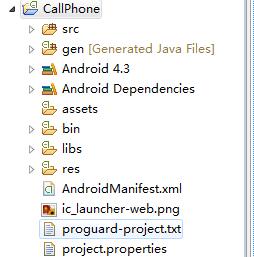
二、设置界面与项目名称
2.1、更改项目名称
res/values下strings.xml中更改app_name电话拔号器
string.xml
- <?xml version="1.0" encoding="utf-8"?>
- <resources>
- <string name="app_name">电话拔号器</string>
- <string name="action_settings">Settings</string>
- <string name="hello_world">Hello world!</string>
- <string name="dail">拔打电话</string>
- <string name="defaul_prop">请输入电话号码</string>
- </resources>
2.2、设置文件框与按键
- <RelativeLayout xmlns:android="http://schemas.android.com/apk/res/android"
- xmlns:tools="http://schemas.android.com/tools"
- android:layout_width="match_parent"
- android:layout_height="match_parent"
- android:paddingBottom="@dimen/activity_vertical_margin"
- android:paddingLeft="@dimen/activity_horizontal_margin"
- android:paddingRight="@dimen/activity_horizontal_margin"
- android:paddingTop="@dimen/activity_vertical_margin"
- tools:context=".MainActivity" >
- <EditText
- android:id="@+id/et_number"
- android:layout_width="match_parent"
- android:layout_height="wrap_content"
- android:inputType="phone"
- android:hint="@string/defaul_prop">
- <requestFocus />
- </EditText>
- <Button
- android:id="@+id/btn_dail"
- android:layout_width="wrap_content"
- android:layout_height="wrap_content"
- android:layout_alignParentRight="true"
- android:layout_below="@+id/et_number"
- android:text="@string/dail" />
- </RelativeLayout>
三、写java代码
3.1、MainActivity.java
- package com.pb.dial;
- import android.net.Uri;
- import android.os.Bundle;
- import android.view.View;
- import android.view.View.OnClickListener;
- import android.widget.Button;
- import android.widget.EditText;
- import android.app.Activity;
- import android.content.Intent;
- public class MainActivity extends Activity {
- @Override
- protected void onCreate(Bundle savedInstanceState) {
- super.onCreate(savedInstanceState);
- setContentView(R.layout.activity_main);
- //根据ID找到ID,拔号按键的ID
- Button bt_dail= (Button) findViewById(R.id.btn_dail);
- //为按键设置点击事件
- bt_dail.setOnClickListener(new MyOnClickListener());
- }
- //单击监听事件
- private class MyOnClickListener implements OnClickListener{
- /**
- * 单击按键被点击时调用的方法
- */
- @Override
- public void onClick(View v) {
- //取出输入框中的内容
- //先找到ID
- EditText et_number=(EditText) MainActivity.this.findViewById(R.id.et_number);
- //根据ID出内容
- String phoneNumber=et_number.getText().toString();
- //意图,想做什么事
- Intent intent=new Intent();
- //开始拔打电话
- intent.setAction(Intent.ACTION_CALL);
- //设置动作内容 uri:统一资源标识符,url的类型 统一资源定位符
- intent.setData(Uri.parse("tel:"+phoneNumber));
- //开启新的界面
- startActivity(intent);
- }
- }
- }
或者
- package com.pb.dial;
- import android.net.Uri;
- import android.os.Bundle;
- import android.text.TextUtils;
- import android.view.View;
- import android.view.View.OnClickListener;
- import android.widget.Button;
- import android.widget.EditText;
- import android.widget.Toast;
- import android.app.Activity;
- import android.content.Intent;
- public class MainActivity extends Activity implements OnClickListener{
- private Button bt_dail;
- private EditText et_number;
- @Override
- protected void onCreate(Bundle savedInstanceState) {
- super.onCreate(savedInstanceState);
- setContentView(R.layout.activity_main);
- //根据ID找到ID,拔号按键的ID
- bt_dail= (Button) findViewById(R.id.btn_dail);
- //取出输入框中的内容
- //先找到ID
- //根据ID出内容
- et_number=(EditText) MainActivity.this.findViewById(R.id.et_number);
- //为按键设置点击事件
- bt_dail.setOnClickListener(this);
- }
- @Override
- public void onClick(View v) {
- String phoneNumber=et_number.getText().toString().trim();
- //判断内容是否为空 TextUtils是个工具类
- if(TextUtils.isEmpty(phoneNumber)){
- Toast.makeText(this, "电话号码不能为空", Toast.LENGTH_LONG).show();
- //如果是内容类请将this改为MainActivity.this
- return;
- }
- //意图,想做什么事
- Intent intent=new Intent();
- //开始拔打电话
- intent.setAction(Intent.ACTION_CALL);
- //设置动作内容 uri:统一资源标识符,url的类型 统一资源定位符
- intent.setData(Uri.parse("tel:"+phoneNumber));
- //开启新的界面
- startActivity(intent);
- }
- //单击监听事件
- /* private class MyOnClickListener implements OnClickListener{
- *//**
- * 单击按键被点击时调用的方法
- *//*
- @Override
- public void onClick(View v) {
- //取出输入框中的内容
- //先找到ID
- EditText et_number=(EditText) MainActivity.this.findViewById(R.id.et_number);
- //根据ID出内容
- String phoneNumber=et_number.getText().toString();
- //意图,想做什么事
- Intent intent=new Intent();
- //开始拔打电话
- intent.setAction(Intent.ACTION_CALL);
- //设置动作内容 uri:统一资源标识符,url的类型 统一资源定位符
- intent.setData(Uri.parse("tel:"+phoneNumber));
- //开启新的界面
- startActivity(intent);
- }
- }*/
- }
3.2、添加权限
- <!--添加权限 -->
- <uses-permission android:name="android.permission.CALL_PHONE"/>
3.3、运行

下面给大家分享一段代码 ————android电话拔号器和短信发送器
android电话拔号器
因为应用要使用手机的电话服务,所以要在清单文件AndroidManifest.xml中添加电话服务权限:
- <?xml version="1.0" encoding="utf-8"?>
- <manifest xmlns:android="http://schemas.android.com/apk/res/android"
- package="cn.itcast.action"
- android:versionCode="1"
- android:versionName="1.0">
- 略....
- <uses-sdk android:minSdkVersion=“6" />
- <uses-permission android:name="android.permission.CALL_PHONE"/>
- </manifest>
界面布局:
- <?xml version="1.0" encoding="utf-8"?>
- <LinearLayout xmlns:android="http://schemas.android.com/apk/res/android"
- android:orientation="vertical"
- android:layout_width="fill_parent"
- android:layout_height="fill_parent" >
- <TextView
- android:layout_width="fill_parent" android:layout_height="wrap_content"
- android:text="@string/inputmobile"/>
- <EditText android:layout_width="fill_parent" android:layout_height="wrap_content"
- android:id="@+id/mobile"/>
- <Button android:layout_width="wrap_content" android:layout_height="wrap_content"
- android:text="@string/button"
- android:id="@+id/button"/>
- </LinearLayout>
LinearLayout (线性布局)、AbsoluteLayout(绝对布局)、RelativeLayout(相对布局)、TableLayout(表格布局)、FrameLayout(帧布局)
Activity:
- public class DialerAction extends Activity {
- @Override
- public void onCreate(Bundle savedInstanceState) {
- super.onCreate(savedInstanceState);
- setContentView(R.layout.main);
- Button button = (Button)findViewById(R.id.button);
- button.setOnClickListener(new View.OnClickListener(){
- public void onClick(View v) {
- EditText editText = (EditText)findViewById(R.id.mobile);
- Intent intent = new Intent(Intent.ACTION_CALL, Uri.parse("tel:"+ editText.getText()));
- DialerAction.this.startActivity(intent);
- }
- });
- }
- }
短信发送器
因为应用要使用手机的短信服务,所以要在清单文件AndroidManifest.xml中添加短信服务权限:
- <uses-permission android:name="android.permission.SEND_SMS"/>
界面布局:
- <?xml version="1.0" encoding="utf-8"?>
- <LinearLayout xmlns:android="http://schemas.android.com/apk/res/android"
- android:orientation="vertical“ android:layout_width="fill_parent“ android:layout_height="fill_parent" >
- <TextView android:layout_width="fill_parent" android:layout_height="wrap_content"
- android:text="@string/inputmobile"/>
- <EditText android:layout_width="fill_parent" android:layout_height="wrap_content"
- android:id="@+id/mobile"/>
- <TextView android:layout_width="fill_parent" android:layout_height="wrap_content"
- android:text="@string/content"/>
- <EditText android:layout_width="fill_parent" android:layout_height="wrap_content"
- android:minLines="3"
- android:id="@+id/content"/>
- <Button android:layout_width="wrap_content" android:layout_height="wrap_content"
- android:text="@string/button"
- android:id="@+id/button"/>
- </LinearLayout>
Activity主要代码:
- String mobile = mobileView.getText().toString();
- String content = contentView.getText().toString();
- SmsManager smsManager = SmsManager.getDefault();
- PendingIntent sentIntent = PendingIntent.getBroadcast(SMSSender.this, 0, new Intent(), 0);
- if(content.length()>70){//如果字数超过70,需拆分成多条短信发送
- List<String> msgs = smsManager.divideMessage(content);
- for(String msg : msgs){
- smsManager.sendTextMessage(mobile, null, msg, sentIntent, null);
- //最后二个参数为短信已发送的广播意图,最后一个参数为短信对方已收到短信的广播意图
- }
- }else{
- smsManager.sendTextMessage(mobile, null, content, sentIntent, null);
- }
- Toast.makeText(SMSSender.this, "短信发送完成", Toast.LENGTH_LONG).show();
新闻热点






疑难解答













