
这篇文章主要介绍了Android编程实现泡泡聊天界面,结合实例形式较为详细的分析了Android泡泡聊天界面的窗体定义与功能实现技巧,具有一定参考借鉴价值,需要的朋友可以参考下
本文实例讲述了Android编程实现泡泡聊天界面的方法。分享给大家供大家参考,具体如下:
昨天写了个界面,实现了Android泡泡聊天界面。运行结果如下,点击发送按钮,屏幕就显示Text的内容。
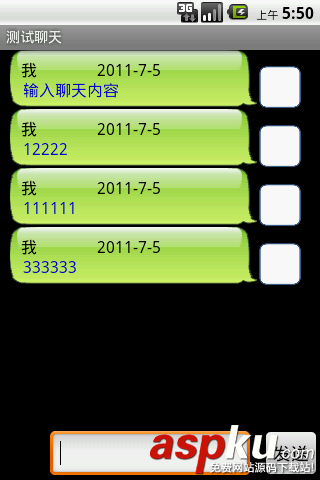
我也是在网上的一份源码的基础上更改的,整个泡泡界面的实现要点:
(1)主界面其实就是一个List View
(2)文字显示界面其实就使用了android:background="@drawable/incoming"这个东西。背景图片的格式是xxx.9.png,专门用来缩放的,不然显示效果非常差。
(3)自定义了一个adapter,当然是继承android.widget.BaseAdapter,重写了getView的方法。
整个工程分布如下:
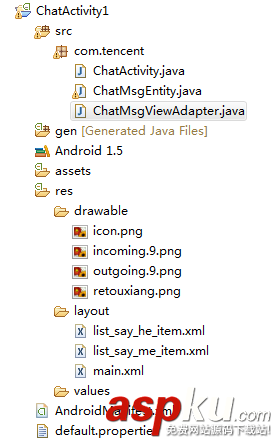
主activity: ChatActivity如下:
- package com.tencent;
- import android.app.Activity;
- import android.os.Bundle;
- import android.util.Log;
- import android.view.View;
- import android.view.View.OnClickListener;
- import android.widget.Button;
- import android.widget.EditText;
- import android.widget.ListView;
- import java.util.ArrayList;
- import java.util.Calendar;
- public class ChatActivity extends Activity {
- private static final String TAG = ChatActivity.class.getSimpleName();;
- private ListView talkView;
- private Button messageButton;
- private EditText messageText;
- // private ChatMsgViewAdapter myAdapter;
- private ArrayList<ChatMsgEntity> list = new ArrayList<ChatMsgEntity>();
- public void onCreate(Bundle savedInstanceState) {
- Log.v(TAG, "onCreate >>>>>>");
- super.onCreate(savedInstanceState);
- setContentView(R.layout.main);
- talkView = (ListView) findViewById(R.id.list);
- messageButton = (Button) findViewById(R.id.MessageButton);
- messageText = (EditText) findViewById(R.id.MessageText);
- OnClickListener messageButtonListener = new OnClickListener() {
- @Override
- public void onClick(View arg0) {
- // TODO Auto-generated method stub
- Log.v(TAG, "onclick >>>>>>>>");
- String name = getName();
- String date = getDate();
- String msgText = getText();
- int RId = R.layout.list_say_he_item;
- ChatMsgEntity newMessage = new ChatMsgEntity(name, date, msgText, RId);
- list.add(newMessage);
- // list.add(d0);
- talkView.setAdapter(new ChatMsgViewAdapter(ChatActivity.this, list));
- messageText.setText("");
- // myAdapter.notifyDataSetChanged();
- }
- };
- messageButton.setOnClickListener(messageButtonListener);
- }
- // shuold be redefine in the future
- private String getName() {
- return getResources().getString(R.string.myDisplayName);
- }
- // shuold be redefine in the future
- private String getDate() {
- Calendar c = Calendar.getInstance();
- String date = String.valueOf(c.get(Calendar.YEAR)) + "-"
- + String.valueOf(c.get(Calendar.MONTH)) + "-" + c.get(c.get(Calendar.DAY_OF_MONTH));
- return date;
- }
- // shuold be redefine in the future
- private String getText() {
- return messageText.getText().toString();
- }
- public void onDestroy() {
- Log.v(TAG, "onDestroy>>>>>>");
- // list = null;
- super.onDestroy();
- }
- }
显示消息体的定义
- package com.tencent;
- public class ChatMsgEntity {
- private static final String TAG = ChatMsgEntity.class.getSimpleName();
- private String name;
- private String date;
- private String text;
- private int layoutID;
- public String getName() {
- return name;
- }
- public void setName(String name) {
- this.name = name;
- }
- public String getDate() {
- return date;
- }
- public void setDate(String date) {
- this.date = date;
- }
- public String getText() {
- return text;
- }
- public void setText(String text) {
- this.text = text;
- }
- public int getLayoutID() {
- return layoutID;
- }
- public void setLayoutID(int layoutID) {
- this.layoutID = layoutID;
- }
- public ChatMsgEntity() {
- }
- public ChatMsgEntity(String name, String date, String text, int layoutID) {
- super();
- this.name = name;
- this.date = date;
- this.text = text;
- this.layoutID = layoutID;
- }
- }
ChatMsgViewAdapter定义如下:
- package com.tencent;
- import android.content.Context;
- import android.database.DataSetObserver;
- import android.util.Log;
- import android.view.LayoutInflater;
- import android.view.View;
- import android.view.ViewGroup;
- import android.widget.BaseAdapter;
- import android.widget.LinearLayout;
- import android.widget.TextView;
- import java.util.ArrayList;
- public class ChatMsgViewAdapter extends BaseAdapter {
- private static final String TAG = ChatMsgViewAdapter.class.getSimpleName();
- private ArrayList<ChatMsgEntity> coll;
- private Context ctx;
- public ChatMsgViewAdapter(Context context, ArrayList<ChatMsgEntity> coll) {
- ctx = context;
- this.coll = coll;
- }
- public boolean areAllItemsEnabled() {
- return false;
- }
- public boolean isEnabled(int arg0) {
- return false;
- }
- public int getCount() {
- return coll.size();
- }
- public Object getItem(int position) {
- return coll.get(position);
- }
- public long getItemId(int position) {
- return position;
- }
- public int getItemViewType(int position) {
- return position;
- }
- public View getView(int position, View convertView, ViewGroup parent) {
- Log.v(TAG, "getView>>>>>>>");
- ChatMsgEntity entity = coll.get(position);
- int itemLayout = entity.getLayoutID();
- LinearLayout layout = new LinearLayout(ctx);
- LayoutInflater vi = (LayoutInflater) ctx.getSystemService(Context.LAYOUT_INFLATER_SERVICE);
- vi.inflate(itemLayout, layout, true);
- TextView tvName = (TextView) layout.findViewById(R.id.messagedetail_row_name);
- tvName.setText(entity.getName());
- TextView tvDate = (TextView) layout.findViewById(R.id.messagedetail_row_date);
- tvDate.setText(entity.getDate());
- TextView tvText = (TextView) layout.findViewById(R.id.messagedetail_row_text);
- tvText.setText(entity.getText());
- return layout;
- }
- public int getViewTypeCount() {
- return coll.size();
- }
- public boolean hasStableIds() {
- return false;
- }
- public boolean isEmpty() {
- return false;
- }
- public void registerDataSetObserver(DataSetObserver observer) {
- }
- public void unregisterDataSetObserver(DataSetObserver observer) {
- }
- }
布局文件看得我比较痛苦,这个布局文件不好搞啊,呵呵
完整实例代码代码点击此处本站下载。
希望本文所述对大家Android程序设计有所帮助。
新闻热点






疑难解答













