
这篇文章主要介绍了Android编程之界面跳动提示动画效果实现方法,实例分析了Android动画效果的布局及功能相关实现技巧,具有一定参考借鉴价值,需要的朋友可以参考下
本文实例讲述了Android编程之界面跳动提示动画效果实现方法。分享给大家供大家参考,具体如下:
上一个效果图:
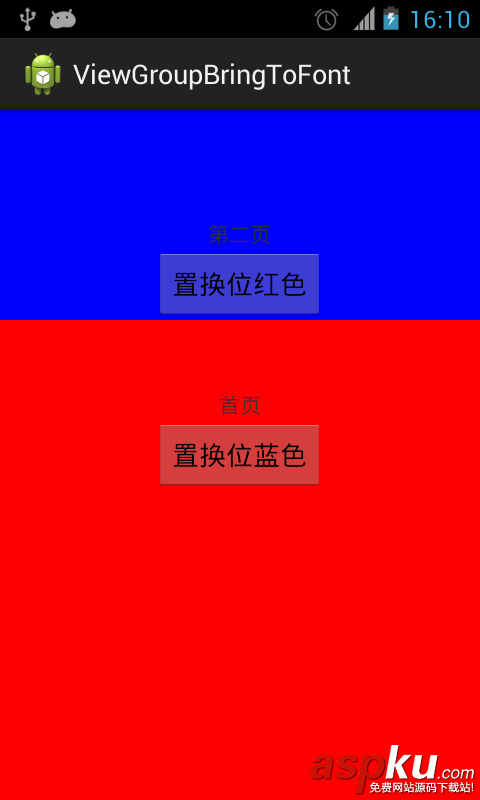
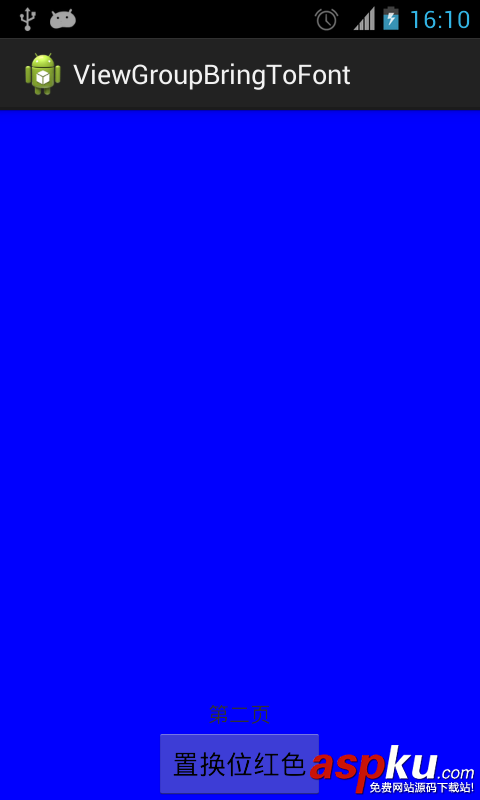
先上布局:
- <RelativeLayout xmlns:android="http://schemas.android.com/apk/res/android"
- xmlns:tools="http://schemas.android.com/tools"
- android:layout_width="match_parent"
- android:layout_height="match_parent" >
- <RelativeLayout
- android:id="@+id/red"
- android:layout_width="match_parent"
- android:layout_height="match_parent"
- android:background="#ff0000" >
- <TextView
- android:layout_width="wrap_content"
- android:layout_height="wrap_content"
- android:layout_above="@+id/switch2blue"
- android:layout_centerHorizontal="true"
- android:text="首页" />
- <Button
- android:id="@+id/switch2blue"
- android:layout_width="wrap_content"
- android:layout_height="wrap_content"
- android:layout_centerInParent="true"
- android:text="置换位蓝色" />
- </RelativeLayout>
- <RelativeLayout
- android:id="@+id/blue"
- android:layout_width="match_parent"
- android:layout_height="match_parent"
- android:background="#0000ff" >
- <TextView
- android:layout_width="wrap_content"
- android:layout_height="wrap_content"
- android:layout_above="@+id/switch2red"
- android:layout_centerHorizontal="true"
- android:text="第二页" />
- <Button
- android:id="@+id/switch2red"
- android:layout_width="wrap_content"
- android:layout_height="wrap_content"
- android:layout_alignParentBottom="true"
- android:layout_centerHorizontal="true"
- android:text="置换位红色" />
- </RelativeLayout>
- </RelativeLayout>
代码如下:
- import java.lang.reflect.Field;
- import android.app.Activity;
- import android.os.Bundle;
- import android.os.Handler;
- import android.util.DisplayMetrics;
- import android.view.GestureDetector;
- import android.view.MotionEvent;
- import android.view.View;
- import android.view.GestureDetector.OnGestureListener;
- import android.view.View.OnClickListener;
- import android.view.View.OnTouchListener;
- import android.view.animation.AccelerateDecelerateInterpolator;
- import android.view.animation.AccelerateInterpolator;
- import android.view.animation.Animation;
- import android.view.animation.AnimationSet;
- import android.view.animation.TranslateAnimation;
- import android.view.animation.Animation.AnimationListener;
- import android.widget.Button;
- import android.widget.RelativeLayout;
- public class MainActivity extends Activity implements OnClickListener,
- OnTouchListener, OnGestureListener {
- private RelativeLayout red, blue;
- private Button switch2blue, switch2red;
- private float thisDelta = 0.05f;
- private static boolean hasEverPulled = false;
- private boolean pulled = false;
- private static int height;
- private GestureDetector gestureDetector;
- private static int statusHeight = 0;
- @Override
- protected void onCreate(Bundle savedInstanceState) {
- super.onCreate(savedInstanceState);
- setContentView(R.layout.activity_main);
- DisplayMetrics metrics = getResources().getDisplayMetrics();
- height = metrics.heightPixels;
- statusHeight = getStatusHeight();
- initView();
- // 跳动提示可以上拉
- final Handler handler = new Handler();
- handler.postDelayed(new Runnable() {
- @Override
- public void run() {
- jump(thisDelta);
- // handler.postDelayed(this, 3000);
- }
- }, 3000);
- }
- private void initView() {
- red = (RelativeLayout) findViewById(R.id.red);
- blue = (RelativeLayout) findViewById(R.id.blue);
- switch2blue = (Button) findViewById(R.id.switch2blue);
- switch2red = (Button) findViewById(R.id.switch2red);
- switch2blue.setOnClickListener(this);
- switch2red.setOnClickListener(this);
- blue.setOnTouchListener(this);
- blue.setLongClickable(true);
- gestureDetector = new GestureDetector(this, this);
- }
- @Override
- public void onClick(View arg0) {
- // TODO Auto-generated method stub
- switch (arg0.getId()) {
- case R.id.switch2blue:
- red2BlueUI();
- break;
- case R.id.switch2red:
- blue2RedUI();
- break;
- }
- }
- // 从红页面转到蓝页面
- private void red2BlueUI() {
- blue.bringToFront();
- blue.requestLayout();
- blue.invalidate();
- }
- // 从蓝页面转到红页面
- private void blue2RedUI() {
- red.bringToFront();
- red.requestLayout();
- red.invalidate();
- }
- // 获取状态栏的高度
- private int getStatusHeight() {
- Class<?> c = null;
- Object obj = null;
- Field field = null;
- int x = 0;
- int height = 0;
- try {
- c = Class.forName("com.android.internal.R$dimen");
- obj = c.newInstance();
- field = c.getField("status_bar_height");
- x = Integer.parseInt(field.get(obj).toString());
- height = getResources().getDimensionPixelSize(x);
- } catch (Exception e) {
- e.printStackTrace();
- }
- return height;
- }
- // 主页面跳动
- private void jump(float delta) {
- if (thisDelta - 0.03f < 0.001f) {
- thisDelta = 0.05f;
- return;
- }
- thisDelta = delta;
- if (hasEverPulled) {
- return;
- }
- playJumpAnimation(thisDelta);
- }
- // 上拉/下拉主页面
- private void pull(boolean upward) {
- if (upward && pulled) {
- return;
- }
- if (!upward && !pulled) {
- return;
- }
- float originalY;
- float finalY;
- if (!pulled) {
- originalY = 0;
- finalY = (float) (0 - height + 0.4 * height);
- } else {
- originalY = (float) (0 - height + 0.4 * height);
- finalY = 0;
- }
- pulled = !pulled;
- AnimationSet animationSet = new AnimationSet(true);
- animationSet.addAnimation(new TranslateAnimation(0, 0, originalY,
- finalY));
- animationSet.setDuration(300);
- animationSet.setInterpolator(new AccelerateDecelerateInterpolator());
- animationSet.setFillAfter(true);
- animationSet.setAnimationListener(new AnimationListener() {
- @Override
- public void onAnimationStart(Animation animation) {
- if (!pulled) {
- red2BlueUI();
- }
- }
- @Override
- public void onAnimationRepeat(Animation animation) {
- }
- @Override
- public void onAnimationEnd(Animation animation) {
- // if (pulled) {
- // blue2RedUI();
- // }
- }
- });
- blue.startAnimation(animationSet);
- hasEverPulled = true;
- }
- // 跳起动画
- private void playJumpAnimation(final float delta) {
- float originalY = 0;
- float finalY = 0 - height * delta;
- AnimationSet animationSet = new AnimationSet(true);
- animationSet.addAnimation(new TranslateAnimation(0, 0, originalY,
- finalY));
- animationSet.setDuration(300);
- animationSet.setInterpolator(new AccelerateDecelerateInterpolator());
- animationSet.setFillAfter(true);
- animationSet.setAnimationListener(new AnimationListener() {
- @Override
- public void onAnimationStart(Animation animation) {
- }
- @Override
- public void onAnimationRepeat(Animation animation) {
- }
- @Override
- public void onAnimationEnd(Animation animation) {
- playLandAnimation(delta);
- }
- });
- blue.startAnimation(animationSet);
- }
- // 落下动画
- private void playLandAnimation(final float delta) {
- float originalY = 0 - height * delta;
- float finalY = 0;
- AnimationSet animationSet = new AnimationSet(true);
- animationSet.addAnimation(new TranslateAnimation(0, 0, originalY,
- finalY));
- animationSet.setDuration(200);
- animationSet.setInterpolator(new AccelerateInterpolator());
- animationSet.setFillAfter(true);
- animationSet.setAnimationListener(new AnimationListener() {
- @Override
- public void onAnimationStart(Animation animation) {
- }
- @Override
- public void onAnimationRepeat(Animation animation) {
- }
- @Override
- public void onAnimationEnd(Animation animation) {
- jump(0.03f);
- }
- });
- blue.startAnimation(animationSet);
- }
- @Override
- public boolean onDown(MotionEvent e) {
- pull(false);
- return false;
- }
- @Override
- public boolean onFling(MotionEvent e1, MotionEvent e2, float velocityX,
- float velocityY) {
- // 手势滑动达到100才触发
- if (e1.getY() - e2.getY() > 100) {
- pull(true);
- } else if (e2.getY() >= e1.getY()) {
- pull(false);
- }
- return false;
- }
- @Override
- public void onLongPress(MotionEvent e) {
- }
- @Override
- public boolean onScroll(MotionEvent e1, MotionEvent e2, float distanceX,
- float distanceY) {
- return false;
- }
- @Override
- public void onShowPress(MotionEvent e) {
- }
- @Override
- public boolean onSingleTapUp(MotionEvent e) {
- return false;
- }
- @Override
- public boolean onTouch(View v, MotionEvent event) {
- if (pulled) {
- // 首张页可触控点
- if (event.getY() > height * 0.4 - statusHeight) {
- return false;
- }
- }
- return gestureDetector.onTouchEvent(event);
- }
- }
希望本文所述对大家Android程序设计有所帮助。
新闻热点






疑难解答













