
这篇文章主要介绍了基于Android 实现图片平移、缩放、旋转同时进行的相关资料,需要的朋友可以参考下
前言
之前因为项目需求,其中使用到了图片的单击显示取消,图片平移缩放功能,昨天突然想再加上图片的旋转功能,在网上看了很多相关的例子,可是没看到能同时实现我想要的功能的。
需求:
(1)图片平移、缩放、旋转等一系列操作后,图片需要自动居中显示。
(2)图片旋转后选自动水平显示或者垂直显示
(3)图片在放大缩小的同时都能旋转
Demo实现部分效果截图
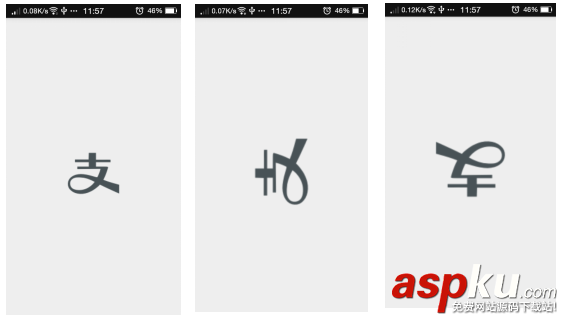
Demo主要代码
Java
- MainActivity.java
- package com.practice.noyet.rotatezoomimageview;
- import android.app.Activity;
- import android.graphics.Bitmap;
- import android.graphics.BitmapFactory;
- import android.graphics.Matrix;
- import android.graphics.PointF;
- import android.graphics.RectF;
- import android.os.AsyncTask;
- import android.os.Bundle;
- import android.util.DisplayMetrics;
- import android.view.MotionEvent;
- import android.view.View;
- import android.widget.ImageView;
- import com.ypy.eventbus.EventBus;
- import java.io.File;
- import java.math.BigDecimal;
- /**
- * package: com.practice.noyet.rotatezoomimageview
- * Created by noyet on 2015/11/11.
- */
- public class MainActivity extends Activity implements View.OnTouchListener {
- private ImageView mImageView;
- private PointF point0 = new PointF();
- private PointF pointM = new PointF();
- private final int NONE = 0;
- /**
- * 平移
- */
- private final int DRAG = 1;
- /**
- * 旋转、缩放
- */
- private final int ZOOM = 2;
- /**
- * 设定事件模式
- */
- private int mode = NONE;
- /**
- * 图片缩放矩阵
- */
- private Matrix matrix = new Matrix();
- /**
- * 保存触摸前的图片缩放矩阵
- */
- private Matrix savedMatrix = new Matrix();
- /**
- * 保存触点移动过程中的图片缩放矩阵
- */
- private Matrix matrix1 = new Matrix();
- /**
- * 屏幕高度
- */
- private int displayHeight;
- /**
- * 屏幕宽度
- */
- private int displayWidth;
- /**
- * 最小缩放比例
- */
- protected float minScale = 1f;
- /**
- * 最大缩放比例
- */
- protected float maxScale = 3f;
- /**
- * 当前缩放比例
- */
- protected float currentScale = 1f;
- /**
- * 多点触摸2个触摸点间的起始距离
- */
- private float oldDist;
- /**
- * 多点触摸时图片的起始角度
- */
- private float oldRotation = 0;
- /**
- * 旋转角度
- */
- protected float rotation = 0;
- /**
- * 图片初始宽度
- */
- private int imgWidth;
- /**
- * 图片初始高度
- */
- private int imgHeight;
- /**
- * 设置单点触摸退出图片显示时,单点触摸的灵敏度(可针对不同手机单独设置)
- */
- protected final int MOVE_MAX = 2;
- /**
- * 单点触摸时手指触发的‘MotionEvent.ACTION_MOVE'次数
- */
- private int fingerNumMove = 0;
- private Bitmap bm;
- /**
- * 保存matrix缩放比例
- */
- private float matrixScale= 1;
- /*private String imagePath;*/
- /**
- * 显示被存入缓存中的网络图片
- *
- * @param event 观察者事件
- */
- public void onEventMainThread(CustomEventBus event) {
- if (event == null) {
- return;
- }
- if (event.type == CustomEventBus.EventType.SHOW_PICTURE) {
- bm = (Bitmap) event.obj;
- showImage();
- }
- }
- @Override
- protected void onCreate(Bundle savedInstanceState) {
- super.onCreate(savedInstanceState);
- setContentView(R.layout.activity_main);
- initData();
- }
- public void initData() {
- // TODO Auto-generated method stub
- bm = BitmapFactory.decodeResource(getResources(), R.drawable.alipay);
- DisplayMetrics dm = getResources().getDisplayMetrics();
- displayWidth = dm.widthPixels;
- displayHeight = dm.heightPixels;
- mImageView = (ImageView) findViewById(R.id.image_view);
- mImageView.setOnTouchListener(this);
- showImage();
- //显示网络图片时使用
- /*File file = MainApplication.getInstance().getImageCache()
- .getDiskCache().get(图片路径);
- if (!file.exists()) {
- Toast.makeText(this, "图片路径错误", Toast.LENGTH_SHORT).show();
- } else {
- new MyTask().execute(file);
- }*/
- }
- @Override
- public boolean onTouch(View view, MotionEvent event) {
- ImageView imageView = (ImageView) view;
- switch (event.getAction() & MotionEvent.ACTION_MASK) {
- case MotionEvent.ACTION_DOWN:
- savedMatrix.set(matrix);
- point0.set(event.getX(), event.getY());
- mode = DRAG;
- System.out.println("MotionEvent--ACTION_DOWN");
- break;
- case MotionEvent.ACTION_POINTER_DOWN:
- oldDist = spacing(event);
- oldRotation = rotation(event);
- savedMatrix.set(matrix);
- setMidPoint(pointM, event);
- mode = ZOOM;
- System.out.println("MotionEvent--ACTION_POINTER_DOWN---" + oldRotation);
- break;
- case MotionEvent.ACTION_UP:
- if (mode == DRAG & (fingerNumMove this.finish();
- }
- checkView();
- centerAndRotate();
- imageView.setImageMatrix(matrix);
- System.out.println("MotionEvent--ACTION_UP");
- fingerNumMove = 0;
- break;
- case MotionEvent.ACTION_POINTER_UP:
- mode = NONE;
- System.out.println("MotionEvent--ACTION_POINTER_UP");
- break;
- case MotionEvent.ACTION_MOVE:
- operateMove(event);
- imageView.setImageMatrix(matrix1);
- fingerNumMove++;
- System.out.println("MotionEvent--ACTION_MOVE");
- break;
- }
- return true;
- }
- @Override
- protected void onDestroy() {
- // TODO Auto-generated method stub
- super.onDestroy();
- if (bm != null & !bm.isRecycled()) {
- bm.recycle(); // 回收图片所占的内存
- System.gc(); // 提醒系统及时回收
- }
- }
- /**
- * 显示图片
- */
- private void showImage() {
- imgWidth = bm.getWidth();
- imgHeight = bm.getHeight();
- mImageView.setImageBitmap(bm);
- matrix.setScale(1, 1);
- centerAndRotate();
- mImageView.setImageMatrix(matrix);
- }
- /**
- * 触点移动时的操作
- *
- * @param event 触摸事件
- */
- private void operateMove(MotionEvent event) {
- matrix1.set(savedMatrix);
- switch (mode) {
- case DRAG:
- matrix1.postTranslate(event.getX() - point0.x, event.getY() - point0.y);
- break;
- case ZOOM:
- rotation = rotation(event) - oldRotation;
- float newDist = spacing(event);
- float scale = newDist / oldDist;
- currentScale = (scale > 3.5f) ? 3.5f : scale;
- System.out.println("缩放倍数---" + currentScale);
- System.out.println("旋转角度---" + rotation);
- /** 縮放 */
- matrix1.postScale(currentScale, currentScale, pointM.x, pointM.y);
- /** 旋轉 */
- matrix1.postRotate(rotation, displayWidth / 2, displayHeight / 2);
- break;
- }
- }
- /**
- * 两个触点的距离
- *
- * @param event 触摸事件
- * @return float
- */
- private float spacing(MotionEvent event) {
- float x = event.getX(0) - event.getX(1);
- float y = event.getY(0) - event.getY(1);
- return (float) Math.sqrt(x * x + y * y);
- }
- /**
- * 获取旋转角度
- */
- private float rotation(MotionEvent event) {
- double delta_x = (event.getX(0) - event.getX(1));
- double delta_y = (event.getY(0) - event.getY(1));
- double radians = Math.atan2(delta_y, delta_x);
- return (float) Math.toDegrees(radians);
- }
- /**
- * 两个触点的中间坐标
- *
- * @param pointM 中间坐标
- * @param event 触摸事件
- */
- private void setMidPoint(PointF pointM, MotionEvent event) {
- float x = event.getX(0) + event.getY(1);
- float y = event.getY(0) + event.getY(1);
- pointM.set(x / 2, y / 2);
- }
- /**
- * 检查约束条件(缩放倍数)
- */
- private void checkView() {
- if (currentScale > 1) {
- if (currentScale * matrixScale > maxScale) {
- matrix.postScale(maxScale / matrixScale, maxScale / matrixScale, pointM.x, pointM.y);
- matrixScale = maxScale;
- } else {
- matrix.postScale(currentScale, currentScale, pointM.x, pointM.y);
- matrixScale *= currentScale;
- }
- } else {
- if (currentScale * matrixScale else {
- matrix.postScale(currentScale, currentScale, pointM.x, pointM.y);
- matrixScale *= currentScale;
- }
- }
- }
- /**
- * 图片居中显示、判断旋转角度 小于(90 * x + 45)度图片旋转(90 * x)度 大于则旋转(90 * (x+1))
- */
- private void centerAndRotate() {
- RectF rect = new RectF(0, 0, imgWidth, imgHeight);
- matrix.mapRect(rect);
- float width = rect.width();
- float height = rect.height();
- float dx = 0;
- float dy = 0;
- if (width 2 - width / 2 - rect.left;
- } else if (rect.left > 0) {
- dx = -rect.left;
- } else if (rect.right if (height 2 - height / 2 - rect.top;
- } else if (rect.top > 0) {
- dy = -rect.top;
- } else if (rect.bottom if (rotation != 0) {
- int rotationNum = (int) (rotation / 90);
- float rotationAvai = new BigDecimal(rotation % 90).setScale(1, BigDecimal.ROUND_HALF_UP).floatValue();
- float realRotation = 0;
- if (rotation > 0) {
- realRotation = rotationAvai > 45 ? (rotationNum + 1) * 90 : rotationNum * 90;
- } else if (rotation 0) {
- realRotation = rotationAvai 45 ? (rotationNum - 1) * 90 : rotationNum * 90;
- }
- System.out.println("realRotation: " + realRotation);
- matrix.postRotate(realRotation, displayWidth / 2, displayHeight / 2);
- rotation = 0;
- }
- }
- /**
- * 显示网络图片时使用
- */
- private class MyTask extends AsyncTaskFile, File, Bitmap> {
- Bitmap bitmap;
- String path;
- int scale = 1;
- long size;
- @Override
- protected Bitmap doInBackground(File... params) {
- // TODO Auto-generated method stub
- try {
- size = params[0].length();
- path = params[0].getAbsolutePath();
- BitmapFactory.Options options = new BitmapFactory.Options();
- options.inJustDecodeBounds = true;
- BitmapFactory.decodeFile(path, options);
- scale = calculateInSampleSize(options, displayWidth,
- displayHeight);
- options.inJustDecodeBounds = false;
- options.inSampleSize = scale;
- bitmap = BitmapFactory.decodeFile(path, options);
- } catch (Exception e) {
- // TODO Auto-generated catch block
- e.printStackTrace();
- }
- return bitmap;
- }
- @Override
- protected void onPostExecute(Bitmap result) {
- // TODO Auto-generated method stub
- EventBus.getDefault().post(
- new CustomEventBus(CustomEventBus.EventType.SHOW_PICTURE, result));
- }
- /**
- * 获取图片缩放比例
- *
- * @param paramOptions Options
- * @param paramInt1 宽
- * @param paramInt2 高
- * @return int
- */
- private int calculateInSampleSize(BitmapFactory.Options paramOptions,
- int paramInt1, int paramInt2) {
- int i = paramOptions.outHeight;
- int j = paramOptions.outWidth;
- int k = 1;
- if ((i > paramInt2) || (j > paramInt1)) {
- int m = Math.round(i / paramInt2);
- int n = Math.round(j / paramInt1);
- k = m return k;
- }
- }
- }
- CustomEventBus.java
- package com.practice.noyet.rotatezoomimageview;
- /**
- * package: com.practice.noyet.rotatezoomimageview
- * Created by noyet on 2015/11/11.
- */
- public class CustomEventBus {
- public EventType type;
- public Object obj;
- public CustomEventBus(EventType type, Object obj) {
- this.type = type;
- this.obj = obj;
- }
- enum EventType {
- SHOW_PICTURE
- }
- }
新闻热点






疑难解答













