
这篇文章主要介绍了Android实现仿通讯录侧边栏滑动SiderBar效果代码,实例分析了通讯录侧边栏滑动效果的实现技巧,并附带完整实例代码供读者下载参考,需要的朋友可以参考下
本文实例讲述了Android实现仿通讯录侧边栏滑动SiderBar效果代码。分享给大家供大家参考,具体如下:
之前看到某些应用的侧边栏做得不错,想想自己也弄一个出来,现在分享出来,当然里面还有不足的地方,请大家多多包涵。
先上图:
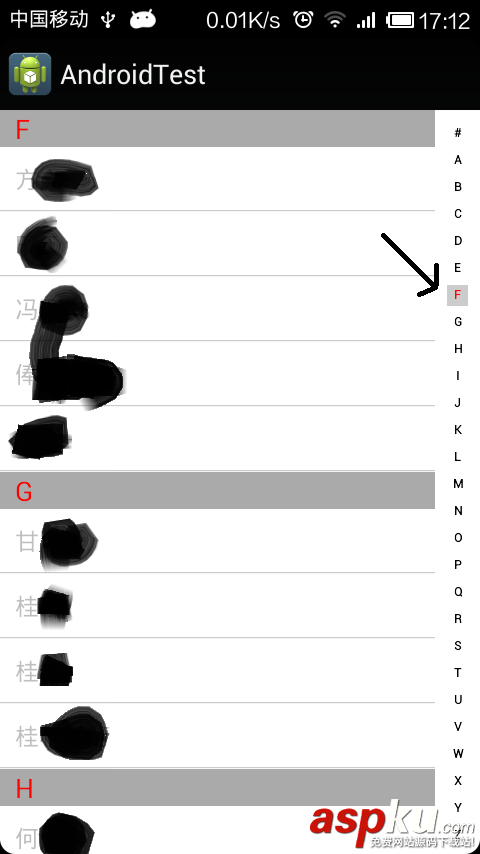
具体实现的代码如下:
- package com.freesonfish.listview_index;
- import android.content.Context;
- import android.graphics.Canvas;
- import android.graphics.Color;
- import android.graphics.Paint;
- import android.util.AttributeSet;
- import android.view.MotionEvent;
- import android.view.View;
- public class MySideBar extends View {
- private OnTouchingLetterChangedListener touchListener;
- // 26个字母
- public static String[] b = { "#", "A", "B", "C", "D", "E", "F", "G", "H", "I", "J", "K", "L", "M", "N", "O", "P", "Q", "R", "S", "T",
- "U", "V", "W", "X", "Y", "Z" };
- private boolean showBkg = false;
- int choose = -1;
- int scrollChoose = -1;
- Paint paint = new Paint();
- Paint rectPaint = new Paint();
- float rectWidth = 0f;
- public MySideBar(Context context, AttributeSet attrs, int defStyle) {
- super(context, attrs, defStyle);
- init();
- }
- public MySideBar(Context context, AttributeSet attrs) {
- super(context, attrs);
- init();
- }
- public MySideBar(Context context) {
- super(context);
- init();
- }
- private void init() {
- rectPaint.setColor(Color.parseColor("#CCCCCC"));
- rectWidth = paint.measureText("#");
- }
- /**
- * 重写这个方法
- */
- protected void onDraw(Canvas canvas) {
- super.onDraw(canvas);
- if (showBkg) {
- canvas.drawColor(Color.parseColor("#CCCCCC"));
- }
- final int height = getHeight();
- final int width = getWidth();
- final int singleHeight = height / b.length;
- final float xRectPos = ((float) width - paint.measureText("#")) / 2.0f - rectWidth;
- final float xRectPos2 = xRectPos + 3.0f * rectWidth;
- for (int i = 0; i < b.length; i++) {
- paint.setFakeBoldText(true);
- paint.setAntiAlias(true);
- final float xPos = ((float) width - paint.measureText(b[i])) / 2.0f;
- final float yPos = singleHeight * i + singleHeight;
- if (i == choose) {
- paint.setColor(Color.RED);
- canvas.drawRect(xRectPos, yPos - singleHeight / 2.0f, xRectPos2, yPos + rectWidth, rectPaint);
- }
- canvas.drawText(b[i], xPos, yPos, paint);
- paint.reset();
- }
- }
- @Override
- public boolean dispatchTouchEvent(MotionEvent event) {
- final int action = event.getAction();
- final float y = event.getY();
- final int c = (int) (y / getHeight() * b.length);
- switch (action) {
- case MotionEvent.ACTION_DOWN:
- showBkg = true;
- if (choose != c && touchListener != null) {
- doOnActionDown(c);
- }
- break;
- case MotionEvent.ACTION_MOVE:
- if (choose != c && touchListener != null) {
- doOnActionDown(c);
- }
- break;
- case MotionEvent.ACTION_UP:
- showBkg = false;
- invalidate();
- break;
- }
- return true;
- }
- /**
- * listview滚动时候调用它
- *
- * @param c
- */
- public void setColorWhenListViewScrolling(int c) {
- if (scrollChoose != c) {
- scrollChoose = c;
- String string = ListContantsUtil.AbcList.get(c);
- for (int i = c; i < b.length; ++i) {
- if (string.equals(b[i])) {
- choose = i;
- invalidate();
- break;
- }
- }
- }
- }
- /**
- * 当侧边栏被按下的动作
- * @param c
- */
- private void doOnActionDown(int c) {
- if (c > 0 && c < b.length) {
- if (ListContantsUtil.indexPositionMap.containsKey(b[c])) {
- touchListener.onTouchingLetterChanged(b[c]);
- choose = c;
- invalidate();
- } else {
- c = c - 1;
- doOnActionDown(c);
- }
- }
- }
- @Override
- public boolean onTouchEvent(MotionEvent event) {
- return super.onTouchEvent(event);
- }
- public void setOnTouchingLetterChangedListener(OnTouchingLetterChangedListener touchListener) {
- this.touchListener = touchListener;
- }
- /**
- * 用来通知activity显示选中的字母
- * @author freeson
- *
- */
- public interface OnTouchingLetterChangedListener {
- public void onTouchingLetterChanged(String s);
- }
- }
然后ListContantsUtil类是存储通讯录名字的拼音等的类,具体也如下:
- package com.freesonfish.listview_index;
- import java.util.ArrayList;
- import java.util.HashMap;
- import java.util.List;
- public class ListContantsUtil {
- static final List<Integer> indexPositionList = new ArrayList<Integer>();
- static final List<String> AbcList = new ArrayList<String>();
- static final HashMap<String, Integer> indexPositionMap = new HashMap<String, Integer>();
- static void putNameIndexToMap(List<String> list, HashMap<String, String> nameAndPinyin) {
- int lenght = list.size();
- for (int i = 0; i < lenght; ++i) {
- String name = nameAndPinyin.get(list.get(i)).substring(0, 1);
- // 判断该字符是属于字母还是数字或其他的
- int ascii = name.toCharArray()[0];
- if (ascii >= 65 && ascii <= 90) {
- if (!indexPositionMap.containsKey(name)) {
- indexPositionMap.put(name, i);
- AbcList.add(name);
- indexPositionList.add(i);
- }
- } else {
- if (!indexPositionMap.containsKey("#")) {
- indexPositionMap.put("#", i);
- AbcList.add("#");
- indexPositionList.add(i);
- }
- }
- }
- }
- }
注意,上面的程序还是有些小问题的,请大家注意优化解决。
完整实例代码代码点击此处本站下载。
希望本文所述对大家Android程序设计有所帮助。
新闻热点






疑难解答













