
这篇文章主要介绍了Android中Notification用法,以实例形式较为详细的分析并总结了Notification的功能与使用技巧,具有一定参考借鉴价值,需要的朋友可以参考下
本文实例总结了 Android中Notification用法。分享给大家供大家参考,具体如下:
我们在用手机的时候,如果来了短信,而我们没有点击查看的话,是不是在手机的最上边的状态栏里有一个短信的小图标提示啊?你是不是也想实现这种功能呢?今天的Notification就是解决这个问题的。
我们也知道Android系统也是在不断升级的,有关Notification的用法也就有很多种,有的方法已经被android抛弃了,现在我实现了三种不同的方法,并适应不同的android版本。现在我就把代码公布出来,我喜欢把解释写在代码中,在这里我就不多说了,先看效果图:
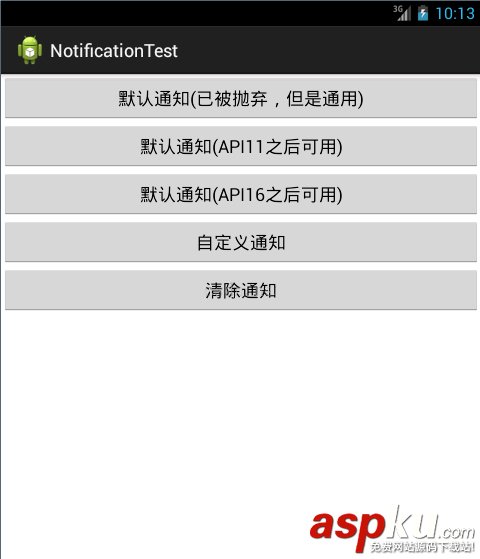
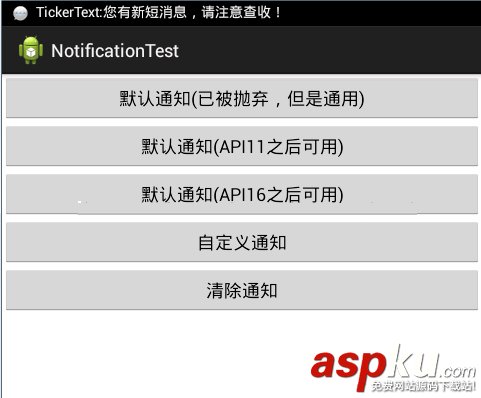
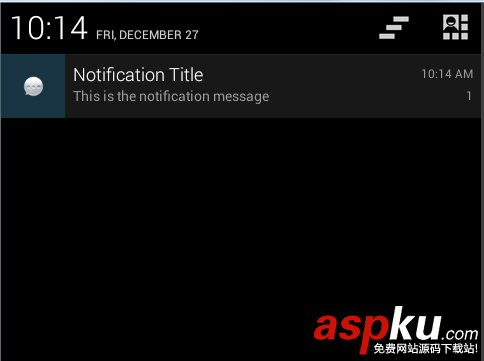
再看代码,主要的代码如下:
- package net.loonggg.notification;
- import android.app.Activity;
- import android.app.Notification;
- import android.app.NotificationManager;
- import android.app.PendingIntent;
- import android.content.Context;
- import android.content.Intent;
- import android.os.Bundle;
- import android.view.View;
- import android.widget.RemoteViews;
- public class MainActivity extends Activity {
- private static final int NOTIFICATION_FLAG = 1;
- @Override
- protected void onCreate(Bundle savedInstanceState) {
- super.onCreate(savedInstanceState);
- setContentView(R.layout.activity_main);
- }
- public void notificationMethod(View view) {
- // 在Android进行通知处理,首先需要重系统哪里获得通知管理器NotificationManager,它是一个系统Service。
- NotificationManager manager = (NotificationManager) getSystemService(Context.NOTIFICATION_SERVICE);
- switch (view.getId()) {
- // 默认通知
- case R.id.btn1:
- // 创建一个PendingIntent,和Intent类似,不同的是由于不是马上调用,需要在下拉状态条出发的activity,所以采用的是PendingIntent,即点击Notification跳转启动到哪个Activity
- PendingIntent pendingIntent = PendingIntent.getActivity(this, 0,
- new Intent(this, MainActivity.class), 0);
- // 下面需兼容Android 2.x版本是的处理方式
- // Notification notify1 = new Notification(R.drawable.message,
- // "TickerText:" + "您有新短消息,请注意查收!", System.currentTimeMillis());
- Notification notify1 = new Notification();
- notify1.icon = R.drawable.message;
- notify1.tickerText = "TickerText:您有新短消息,请注意查收!";
- notify1.when = System.currentTimeMillis();
- notify1.setLatestEventInfo(this, "Notification Title",
- "This is the notification message", pendingIntent);
- notify1.number = 1;
- notify1.flags |= Notification.FLAG_AUTO_CANCEL; // FLAG_AUTO_CANCEL表明当通知被用户点击时,通知将被清除。
- // 通过通知管理器来发起通知。如果id不同,则每click,在statu那里增加一个提示
- manager.notify(NOTIFICATION_FLAG, notify1);
- break;
- // 默认通知 API11及之后可用
- case R.id.btn2:
- PendingIntent pendingIntent2 = PendingIntent.getActivity(this, 0,
- new Intent(this, MainActivity.class), 0);
- // 通过Notification.Builder来创建通知,注意API Level
- // API11之后才支持
- Notification notify2 = new Notification.Builder(this)
- .setSmallIcon(R.drawable.message) // 设置状态栏中的小图片,尺寸一般建议在24×24,这个图片同样也是在下拉状态栏中所显示,如果在那里需要更换更大的图片,可以使用setLargeIcon(Bitmap
- // icon)
- .setTicker("TickerText:" + "您有新短消息,请注意查收!")// 设置在status
- // bar上显示的提示文字
- .setContentTitle("Notification Title")// 设置在下拉status
- // bar后Activity,本例子中的NotififyMessage的TextView中显示的标题
- .setContentText("This is the notification message")// TextView中显示的详细内容
- .setContentIntent(pendingIntent2) // 关联PendingIntent
- .setNumber(1) // 在TextView的右方显示的数字,可放大图片看,在最右侧。这个number同时也起到一个序列号的左右,如果多个触发多个通知(同一ID),可以指定显示哪一个。
- .getNotification(); // 需要注意build()是在API level
- // 16及之后增加的,在API11中可以使用getNotificatin()来代替
- notify2.flags |= Notification.FLAG_AUTO_CANCEL;
- manager.notify(NOTIFICATION_FLAG, notify2);
- break;
- // 默认通知 API16及之后可用
- case R.id.btn3:
- PendingIntent pendingIntent3 = PendingIntent.getActivity(this, 0,
- new Intent(this, MainActivity.class), 0);
- // 通过Notification.Builder来创建通知,注意API Level
- // API16之后才支持
- Notification notify3 = new Notification.Builder(this)
- .setSmallIcon(R.drawable.message)
- .setTicker("TickerText:" + "您有新短消息,请注意查收!")
- .setContentTitle("Notification Title")
- .setContentText("This is the notification message")
- .setContentIntent(pendingIntent3).setNumber(1).build(); // 需要注意build()是在API
- // level16及之后增加的,API11可以使用getNotificatin()来替代
- notify3.flags |= Notification.FLAG_AUTO_CANCEL; // FLAG_AUTO_CANCEL表明当通知被用户点击时,通知将被清除。
- manager.notify(NOTIFICATION_FLAG, notify3);// 步骤4:通过通知管理器来发起通知。如果id不同,则每click,在status哪里增加一个提示
- break;
- // 自定义通知
- case R.id.btn4:
- // Notification myNotify = new Notification(R.drawable.message,
- // "自定义通知:您有新短信息了,请注意查收!", System.currentTimeMillis());
- Notification myNotify = new Notification();
- myNotify.icon = R.drawable.message;
- myNotify.tickerText = "TickerText:您有新短消息,请注意查收!";
- myNotify.when = System.currentTimeMillis();
- myNotify.flags = Notification.FLAG_NO_CLEAR;// 不能够自动清除
- RemoteViews rv = new RemoteViews(getPackageName(),
- R.layout.my_notification);
- rv.setTextViewText(R.id.text_content, "hello wrold!");
- myNotify.contentView = rv;
- Intent intent = new Intent(Intent.ACTION_MAIN);
- PendingIntent contentIntent = PendingIntent.getActivity(this, 1,
- intent, 1);
- myNotify.contentIntent = contentIntent;
- manager.notify(NOTIFICATION_FLAG, myNotify);
- break;
- case R.id.btn5:
- // 清除id为NOTIFICATION_FLAG的通知
- manager.cancel(NOTIFICATION_FLAG);
- // 清除所有的通知
- // manager.cancelAll();
- break;
- default:
- break;
- }
- }
- }
再看主布局文件:
- <LinearLayout xmlns:android="http://schemas.android.com/apk/res/android"
- xmlns:tools="http://schemas.android.com/tools"
- android:layout_width="match_parent"
- android:layout_height="match_parent"
- android:orientation="vertical"
- tools:context=".MainActivity" >
- <Button
- android:id="@+id/btn1"
- android:layout_width="fill_parent"
- android:layout_height="wrap_content"
- android:onClick="notificationMethod"
- android:text="默认通知(已被抛弃,但是通用)" />
- <Button
- android:id="@+id/btn2"
- android:layout_width="fill_parent"
- android:layout_height="wrap_content"
- android:onClick="notificationMethod"
- android:text="默认通知(API11之后可用)" />
- <Button
- android:id="@+id/btn3"
- android:layout_width="fill_parent"
- android:layout_height="wrap_content"
- android:onClick="notificationMethod"
- android:text="默认通知(API16之后可用)" />
- <Button
- android:id="@+id/btn4"
- android:layout_width="fill_parent"
- android:layout_height="wrap_content"
- android:onClick="notificationMethod"
- android:text="自定义通知" />
- <Button
- android:id="@+id/btn5"
- android:layout_width="fill_parent"
- android:layout_height="wrap_content"
- android:onClick="notificationMethod"
- android:text="清除通知" />
- </LinearLayout>
还有一个是:自定义通知的布局文件my_notification.xml,代码如下:
- <?xml version="1.0" encoding="utf-8"?>
- <LinearLayout xmlns:android="http://schemas.android.com/apk/res/android"
- android:layout_width="match_parent"
- android:layout_height="wrap_content"
- android:background="#ffffff"
- android:orientation="vertical" >
- <TextView
- android:id="@+id/text_content"
- android:layout_width="wrap_content"
- android:layout_height="wrap_content"
- android:textSize="20sp" />
- </LinearLayout>
希望本文所述对大家Android程序设计有所帮助。
新闻热点






疑难解答













