
关于通知Notification相信大家都不陌生了,平时上QQ的时候有消息来了或者有收到了短信,手机顶部就会显示有新消息什么的,就类似这种。今天就稍微记录下几种Notification的用法。3.0以前的通知和3.0以后的通知是有些区别的。
notification是一种让你的应用程序在没有开启情况下或在后台运行警示用户。它是看不见的程序组件(Broadcast Receiver,Service和不活跃的Activity)警示用户有需要注意的事件发生的最好途径。
1、新建一个android项目
我新建项目的 minSdkVersion="11",targetSdkVersion="19"。也就是支持最低版本的3.0的。
2、习惯性地打开项目清单文件AndroidManifest.xml
,添加一个权限: 不添加不行的。
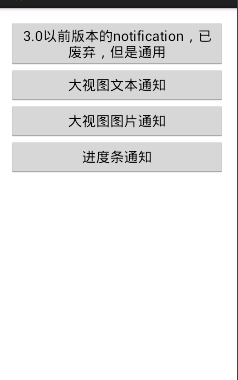
3、在布局activity_main.xml中添加几个按钮
,样子就大概这样,垂直排版的LinearLayout
具体代码
- <LinearLayout xmlns:android="http://schemas.android.com/apk/res/android"
- xmlns:tools="http://schemas.android.com/tools"
- android:layout_width="match_parent"
- android:layout_height="match_parent"
- android:paddingBottom="@dimen/activity_vertical_margin"
- android:paddingLeft="@dimen/activity_horizontal_margin"
- android:paddingRight="@dimen/activity_horizontal_margin"
- android:paddingTop="@dimen/activity_vertical_margin"
- android:orientation="vertical"
- tools:context=".MainActivity" >
- <Button
- android:id="@+id/btn_01"
- android:layout_width="match_parent"
- android:layout_height="wrap_content"
- android:text="3.0以前版本的notification,用新的吧"
- android:onClick="click"
- />
- <Button
- android:id="@+id/btn_02"
- android:layout_width="match_parent"
- android:layout_height="wrap_content"
- android:text="大视图文本通知"
- android:onClick="click"
- />
- <Button
- android:id="@+id/btn_03"
- android:layout_width="match_parent"
- android:layout_height="wrap_content"
- android:text="大视图图片通知"
- android:onClick="click"
- />
- <Button
- android:id="@+id/btn_04"
- android:layout_width="match_parent"
- android:layout_height="wrap_content"
- android:text="进度条通知"
- android:onClick="click"
- />
- </LinearLayout>
4、MainActivity中的代码:
- package com.xin.day__notificationdemo;
- import java.util.Timer;
- import java.util.TimerTask;
- import android.app.Activity;
- import android.app.Notification;
- import android.app.NotificationManager;
- import android.app.PendingIntent;
- import android.content.Intent;
- import android.graphics.BitmapFactory;
- import android.os.Bundle;
- import android.support.v.app.NotificationCompat;
- import android.support.v.app.NotificationCompat.BigPictureStyle;
- import android.support.v.app.NotificationCompat.BigTextStyle;
- import android.support.v.app.NotificationCompat.Builder;
- import android.util.Log;
- import android.view.View;
- public class MainActivity extends Activity {
- //通知的唯一标识,在一个应用程序中不同的通知要区别开来
- private static final int NO = x;
- private static final int NO = x;
- private static final int NO = x;
- private static final int NO = x;
- //进度条要用
- private int progress = ;
- @Override
- protected void onCreate(Bundle savedInstanceState) {
- super.onCreate(savedInstanceState);
- setContentView(R.layout.activity_main);
- }
- //click方法,和xml文件中的各个按钮的onClick属性的值要一致
- public void click(View view) {
- //创建NotificationManager
- final NotificationManager manager = (NotificationManager) getSystemService(NOTIFICATION_SERVICE);
- //用switch语句控制四个控件
- switch (view.getId()) {
- case R.id.btn_: {
- Notification notification = new Notification();
- notification.icon = R.drawable.ic_launcher;
- notification.tickerText = "有消息了。。。";
- Intent intent = new Intent(this, MainActivity.class);
- PendingIntent pendingIntent = PendingIntent.getActivity(this, ,
- intent, PendingIntent.FLAG_UPDATE_CURRENT);
- notification.setLatestEventInfo(this, ".以前的通知", "试试而已", pendingIntent);
- notification.when = System.currentTimeMillis();
- notification.defaults = Notification.DEFAULT_ALL;
- notification.flags = Notification.FLAG_AUTO_CANCEL;
- notification.number = ;
- notification.vibrate = new long[]{, };
- manager.notify(NO, notification);
- }
- break;
- case R.id.btn_:{
- //大视图文本通知
- //创建消息构造器,在扩展包
- NotificationCompat.Builder builder = new NotificationCompat.Builder(this);
- //设置当有消息是的提示,图标和提示文字
- builder.setSmallIcon(R.drawable.ic_launcher).setTicker("有新消息了");
- //需要样式
- BigTextStyle style = new BigTextStyle();
- style.setBigContentTitle("上课通知");//通知的标题
- style.bigText("今天下午要在综B上jsp");//通知的文本内容
- //大视图文本具体内容
- style.setSummaryText("这是正常的课程安排,请各位同学按时上课");
- builder.setStyle(style);
- //显示消息到达的时间,这里设置当前时间
- builder.setWhen(System.currentTimeMillis());
- //获取一个通知对象
- Notification notification = builder.build();
- notification.flags = Notification.FLAG_AUTO_CANCEL;
- //发送(显示)通知
- //notify()第一个参数id An identifier for this notification unique within your application
- //get?意思说,这个通知在你的应用程序中唯一的标识符
- manager.notify(NO, notification);
- }
- break;
- case R.id.btn_:{
- //大视图图片通知
- NotificationCompat.Builder builderPic = new Builder(this);
- builderPic.setSmallIcon(R.drawable.ic_launcher).setTicker("新浪体育提醒");
- //进行设置
- BigPictureStyle pictureStyle = new BigPictureStyle();
- pictureStyle.setBigContentTitle("新浪体育 快船VS骑士 ");
- pictureStyle.bigPicture(BitmapFactory.decodeResource(getResources(), R.drawable.ic_game));
- pictureStyle.setSummaryText(" 快船VS骑士 天王山之战!!!");//不要在意文字
- //设置样式
- builderPic.setStyle(pictureStyle);
- //设置显示的时间
- builderPic.setWhen(System.currentTimeMillis());
- Notification notification = pictureStyle.build();
- notification.flags = Notification.FLAG_AUTO_CANCEL;
- //
- manager.notify(NO, notification);
- }
- break;
- case R.id.btn_:{
- //进度条通知
- final NotificationCompat.Builder builderProgress = new NotificationCompat.Builder(this);
- builderProgress.setSmallIcon(R.drawable.ic_launcher).setTicker("进度条通知");
- builderProgress.setProgress(, progress, false);
- final Notification notification = builderProgress.build();
- //发送一个通知
- manager.notify(NO, notification);
- //创建一个计时器
- Timer timer = new Timer();
- timer.schedule(new TimerTask(){
- @Override
- public void run() {
- Log.i("progress",progress+"");
- while(progress <= ){
- progress ++;
- try {
- Thread.sleep();
- } catch (InterruptedException e) {
- // TODO Auto-generated catch block
- e.printStackTrace();
- }
- //更新进度条
- builderProgress.setProgress(, progress, false);
- //再次通知
- manager.notify(NO, builderProgress.build());
- }
- //计时器退出
- this.cancel();
- //进度条退出
- manager.cancel(NO);
- return;//结束方法
- }
- }, );
- }
- break;
- default:
- break;
- }
- }
- }
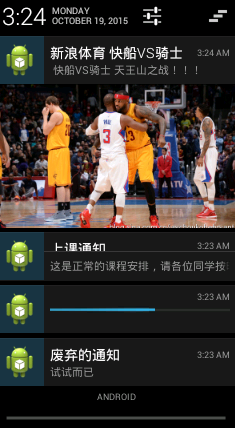
5、运行:我的虚拟机版本是4.0的(api19),按住通知左(右)滑动就可以让通知小时了。
效果如下:
新闻热点






疑难解答













