
这篇文章主要介绍了Android中Market的Loading效果实现方法,较为详细的分析了Android中loading效果的相关布局及功能实现技巧,具有一定参考借鉴价值,需要的朋友可以参考下
本文实例讲述了Android中Market的Loading效果实现方法。分享给大家供大家参考。具体如下:
在Android中,要实现Loading效果,一般情况下都使用ProgressDialog控件。ApiDemos/src/com/example/android/apis/view/ProgressBar3.java 提供两个demo:
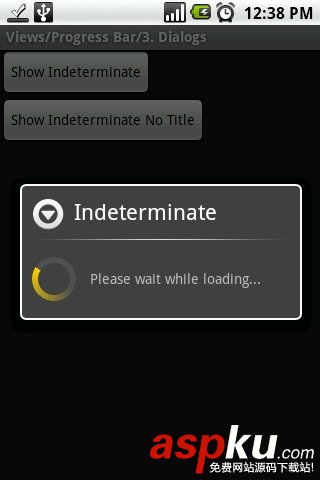
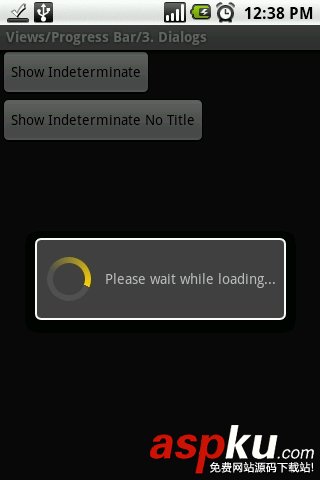
仔细看了Android Market,发现却是不一样的,请看截图:

那到底如何实现呢?首先,我们创建一个布局文件,
res/layout/fullscreen_loading_indicator.xml, 其内容如下:
- <?xml version="1.0" encoding="utf-8"?>
- <LinearLayout
- xmlns:android="http://schemas.android.com/apk/res/android"
- android:gravity="center_vertical|center_horizontal"
- android:orientation="horizontal"
- android:id="@+id/fullscreen_loading_style"
- android:layout_width="fill_parent"
- android:layout_height="fill_parent"
- >
- <ProgressBar
- android:layout_gravity="center_vertical"
- android:layout_width="wrap_content"
- android:layout_height="wrap_content"
- style="?android:attr/progressBarStyleSmall"
- />
- <TextView
- android:id="@+id/current_action"
- android:layout_width="wrap_content"
- android:layout_height="wrap_content"
- android:layout_marginLeft="5.0dip"
- android:text="@+string/loading"
- />
- </LinearLayout>
然后在main.xml 把它include 进来
- <?xml version="1.0" encoding="utf-8"?>
- <LinearLayout xmlns:android="http://schemas.android.com/apk/res/android"
- android:orientation="vertical" android:layout_width="fill_parent"
- android:layout_height="fill_parent">
- <LinearLayout android:orientation="vertical"
- android:id="@+id/main_info"
- android:visibility="gone"
- android:layout_width="fill_parent"
- android:layout_height="fill_parent">
- <TextView android:layout_width="fill_parent"
- android:layout_height="fill_parent"
- android:text="abc"></TextView>
- </LinearLayout>
- <LinearLayout android:orientation="vertical"
- android:id="@+id/main_Loading"
- android:layout_width="fill_parent"
- android:layout_height="fill_parent">
- <include android:visibility="visible"
- android:layout_width="fill_parent"
- android:layout_height="fill_parent"
- layout="@layout/fullscreen_loading_style" />
- </LinearLayout>
- </LinearLayout>
主程序:
- package com.tymx.fullloading;
- import android.app.Activity;
- import android.os.Bundle;
- import android.os.Handler;
- import android.os.Message;
- import android.view.View;
- import android.widget.LinearLayout;
- public class myFullLoading extends Activity {
- /** Called when the activity is first created. */
- private LinearLayout mLoadingLayout;
- @Override
- public void onCreate(Bundle savedInstanceState) {
- super.onCreate(savedInstanceState);
- setContentView(R.layout.main);
- final Handler handler = new Handler(){
- @Override
- public void handleMessage(Message msg) {
- // TODO Auto-generated method stub
- super.handleMessage(msg);
- if (msg.what==1){
- mLoadingLayout = (LinearLayout)findViewById(R.id.fullscreen_loading_style);
- mLoadingLayout.setVisibility(View.GONE);
- LinearLayout mMain = (LinearLayout)findViewById(R.id.main_info);
- mMain.setVisibility(View.VISIBLE);
- }
- }
- };
- new Thread(){
- public void run(){
- for (int i=0;i<1000;i++){
- System.out.print(i+"");
- }
- Message msg = handler.obtainMessage(1,"flash");
- handler.sendMessage(msg);
- }
- }.start();
- }
- }
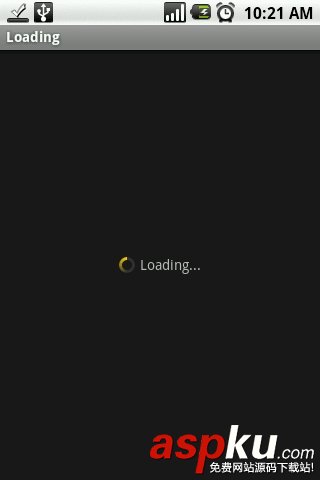
运行的效果为:
希望本文所述对大家的Android程序设计有所帮助。
新闻热点






疑难解答













