
这篇文章主要介绍了Android游戏开发学习②焰火绽放效果实现方法,以实例形式详细分析了Android中粒子对象类Particle类和粒子集合类ParticleSet类及物理引擎ParticleThread类 的使用技巧,具有一定参考借鉴价值,需要的朋友可以参考下
本文实例讲述了Android游戏开发学习②焰火绽放效果实现方法。分享给大家供大家参考。具体如下:
本节介绍在游戏开发中常用到的数学物理应用——粒子系统。粒子系统与上一节的小球有类似的地方,都是通过数学方法和物理公式模拟客观世界中的物体的运动轨迹。不同的是小球更强调个体运动,而焰火粒子等粒子系统更注重整体感觉。
一、焰火粒子效果
1.粒子对象类Particle类和粒子集合类ParticleSet类
每个粒子都为一个Particle类的对象,程序中产生的所有Particle对象都由一个ParticleSet对象来管理。
Particle类:
- package com.particle;
- public class Particle {
- int color; // 粒子颜色
- int r; // 粒子半径
- double vertical_v; // 垂直速度
- double horizontal_v; // 水平速度
- int startX; // 初始X坐标
- int startY; // 初始Y坐标
- int x; // 实时X坐标
- int y; // 实时Y坐标
- double startTime; // 起始时间
- public Particle(int color, int r, double vertical_v, double horizontal_v, int x, int y, double startTime) {
- super();
- this.color = color;
- this.r = r;
- this.vertical_v = vertical_v;
- this.horizontal_v = horizontal_v;
- this.startX = x;
- this.startY = y;
- this.x = x;
- this.y = y;
- this.startTime = startTime;
- }
- }
ParticleSet类:
- package com.particle;
- import java.util.ArrayList;
- import android.graphics.Color;
- public class ParticleSet {
- ArrayList<Particle> particleSet;
- public ParticleSet() {
- particleSet = new ArrayList<Particle>();
- }
- /**
- * 向粒子集合中添加指定数量的粒子对象
- */
- public void add(int count, double startTime) {
- for (int i = 0; i < count; i++) {
- int tempColor = this.getColor(i);
- int tempR = 1; // 粒子半径
- double tempv_v = -30 + 10 * (Math.random()); // 随机产生粒子竖直方向的速度
- double tempv_h = 10 - 20 * (Math.random()); // 随机产生粒子水平方向的速度
- int tempX = 160;
- int tempY = (int) (100 - 10 * (Math.random())); // 随机产生粒子Y坐标,90到100之间
- Particle particle = new Particle(tempColor, tempR, tempv_v,
- tempv_h, tempX, tempY, startTime);
- particleSet.add(particle);
- }
- }
- /**
- * 获取指定索引的颜色
- */
- public int getColor(int i) {
- int color = Color.RED;
- switch (i%4) {
- case 0:
- color = Color.RED;
- break;
- case 1:
- color = Color.GREEN;
- break;
- case 2:
- color = Color.YELLOW;
- break;
- case 3:
- color = Color.GRAY;
- break;
- }
- return color;
- }
- }
产生的粒子竖直初速度为-30至-20,方向向上;水平初速度为-10至10,方向向左或向右。
2.物理引擎ParticleThread类
- package com.particle;
- import java.util.ArrayList;
- public class ParticleThread extends Thread {
- boolean flag;
- ParticleView father;
- int sleepSpan = 80;
- double time = 0; // 物理引擎的时间轴
- double span = 0.15; // 每次计算粒子位移时采用的时间间隔
- public ParticleThread(ParticleView father) {
- this.father = father;
- this.flag = true;
- }
- @Override
- public void run() {
- while (flag) {
- father.ps.add(5, time); // 每次添加5个粒子
- ArrayList<Particle> tempSet = father.ps.particleSet; // 获取粒子集合
- for (int i = tempSet.size() - 1; i >= 0; i--) {
- Particle particle = tempSet.get(i);
- double timeSpan = time - particle.startTime; // 计算从程序开始到现在经过的时间
- int tempX = (int) (particle.startX + particle.horizontal_v * timeSpan);
- int tempY = (int) (particle.startY + 4.9 * timeSpan * timeSpan + particle.vertical_v * timeSpan);
- if (tempY > ParticleView.DIE_OUT_LINE) { // 如果粒子超过屏幕下边沿
- tempSet.remove(particle);
- }
- particle.x = tempX;
- particle.y = tempY;
- }
- time += span;
- try {
- Thread.sleep(sleepSpan);
- } catch (Exception e) {
- e.printStackTrace();
- }
- }
- }
- }
本例中的物理引擎没有采用获取系统时间的方式,而是自己定义了一个时间轴(成员变量time)。这样可以自己确定时间轴行进的快慢程度(通过改变成员变量span的值),而不必依赖于系统的时间。
3.视图类ParticleView类
- package com.particle;
- import java.util.ArrayList;
- import android.content.Context;
- import android.graphics.Canvas;
- import android.graphics.Color;
- import android.graphics.Paint;
- import android.graphics.RectF;
- import android.view.SurfaceHolder;
- import android.view.SurfaceHolder.Callback;
- import android.view.SurfaceView;
- public class ParticleView extends SurfaceView implements Callback {
- public static final int DIE_OUT_LINE = 300;
- DrawThread dt;
- ParticleSet ps;
- ParticleThread pt;
- String fps = "FPS:N/A";
- public ParticleView(Context context) {
- super(context);
- this.getHolder().addCallback(this);
- dt = new DrawThread(this, getHolder());
- ps = new ParticleSet();
- pt = new ParticleThread(this);
- }
- public void doDraw(Canvas canvas) {
- canvas.drawColor(Color.BLACK); // 清屏
- ArrayList<Particle> particleSet = ps.particleSet;
- Paint paint = new Paint();
- for (int i = 0; i < particleSet.size(); i++) {
- Particle p = particleSet.get(i);
- paint.setColor(p.color);
- int tempX = p.x;
- int tempY = p.y;
- int tempRadius = p.r;
- RectF oval = new RectF(tempX, tempY, tempX + 2 * tempRadius, tempY
- + 2 * tempRadius);
- canvas.drawOval(oval, paint); // 绘制椭圆粒子
- }
- paint.setColor(Color.WHITE);
- paint.setTextSize(18);
- paint.setAntiAlias(true);
- canvas.drawText(fps, 15, 15, paint);
- }
- @Override
- public void surfaceChanged(SurfaceHolder arg0, int arg1, int arg2, int arg3) {
- }
- @Override
- public void surfaceCreated(SurfaceHolder arg0) {
- if (!dt.isAlive()) {
- dt.start();
- }
- if (!pt.isAlive()) {
- pt.start();
- }
- }
- @Override
- public void surfaceDestroyed(SurfaceHolder arg0) {
- dt.flag = false;
- dt = null;
- pt.flag = false;
- pt = null;
- }
- }
4.绘图类DrawThread及Activity类
基本与上节相同
DrawThread类:
- package com.particle;
- import android.graphics.Canvas;
- import android.view.SurfaceHolder;
- public class DrawThread extends Thread {
- ParticleView pv;
- SurfaceHolder surfaceHolder;
- boolean flag=false;
- int sleepSpan=30;
- long start =System.nanoTime(); //记录起始时间,该变量用于计算帧速率
- int count=0 ; //记录帧数
- public DrawThread(ParticleView pv,SurfaceHolder surfaceHolder) {
- this.pv=pv;
- this.surfaceHolder=surfaceHolder;
- this.flag=true;
- }
- public void run() {
- Canvas canvas=null;
- while(flag) {
- try {
- canvas=surfaceHolder.lockCanvas(null); //获取BallView的画布
- synchronized (surfaceHolder) {
- pv.doDraw(canvas);
- }
- } catch (Exception e) {
- e.printStackTrace();
- } finally {
- if(canvas!=null) {
- surfaceHolder.unlockCanvasAndPost(canvas); // surfaceHolder解锁,并将画布传回
- }
- }
- this.count++;
- if(count==20) { //计满20帧时计算一次帧速率
- count=0;
- long tempStamp=System.nanoTime();
- long span=tempStamp-start;
- start=tempStamp;
- double fps=Math.round(100000000000.0/span*20)/100.0;
- pv.fps="FPS:"+fps;
- }
- try {
- Thread.sleep(sleepSpan);
- } catch (InterruptedException e) {
- e.printStackTrace();
- }
- }
- }
- }
MainActivity类:
- package com.particle;
- import android.app.Activity;
- import android.os.Bundle;
- import android.view.Window;
- import android.view.WindowManager;
- public class MainActivity extends Activity {
- ParticleView pv;
- @Override
- public void onCreate(Bundle savedInstanceState) {
- super.onCreate(savedInstanceState);
- requestWindowFeature(Window.FEATURE_NO_TITLE); //设置不显示标题
- getWindow().setFlags(WindowManager.LayoutParams.FLAG_FULLSCREEN, WindowManager.LayoutParams.FLAG_FULLSCREEN); //设置全屏
- pv=new ParticleView(this);
- setContentView(pv);
- }
- }
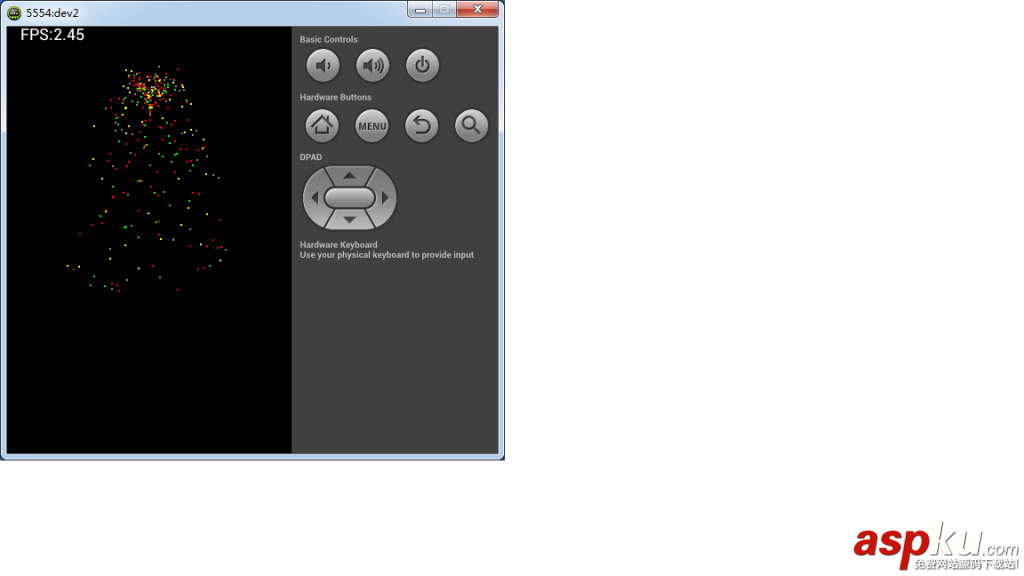
效果图:

二、瀑布粒子效果
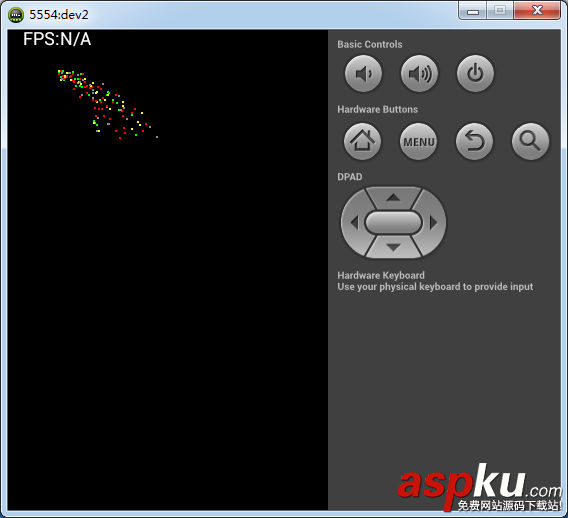
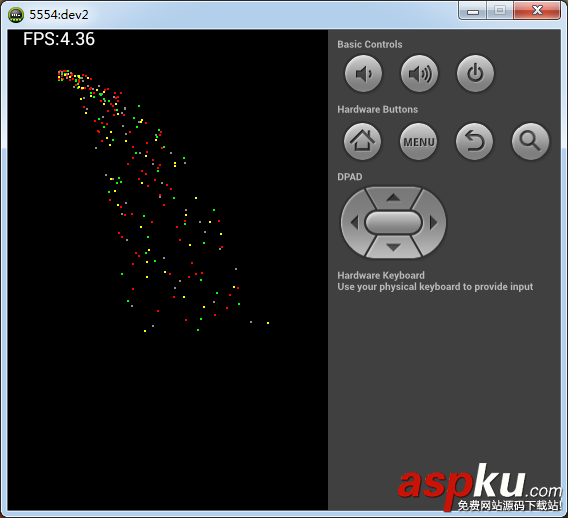
瀑布粒子和焰火粒子十分类似,二者的运动都是带有初速度的下落运动。所不同的是焰火粒子水平方向和竖直方向的速度均不为零,而瀑布粒子只有水平方向初速度,竖直方向初速度为零。只需在焰火粒子的生成部分ParticleSet类中修改即可。
ParticleSet类add方法修改如下:
- /**
- * 向粒子集合中添加指定数量的粒子对象(瀑布粒子效果)
- */
- public void add2(int count, double startTime) {
- for (int i = 0; i < count; i++) {
- int tempColor = this.getColor(i);
- int tempR = 1; // 粒子半径
- double tempv_v = 0; // 粒子竖直方向的速度为0
- double tempv_h = 10 + 20 * (Math.random()); // 随机产生粒子水平方向的速度
- int tempX = 50;
- int tempY = (int) (50 - 10 * (Math.random())); // 随机产生粒子Y坐标,90到100之间
- Particle particle = new Particle(tempColor, tempR, tempv_v,
- tempv_h, tempX, tempY, startTime);
- particleSet.add(particle);
- }
- }
效果图:
希望本文所述对大家的Android程序设计有所帮助。
新闻热点






疑难解答













