
先上几张图,给大家瞧瞧,对整体有个了解:
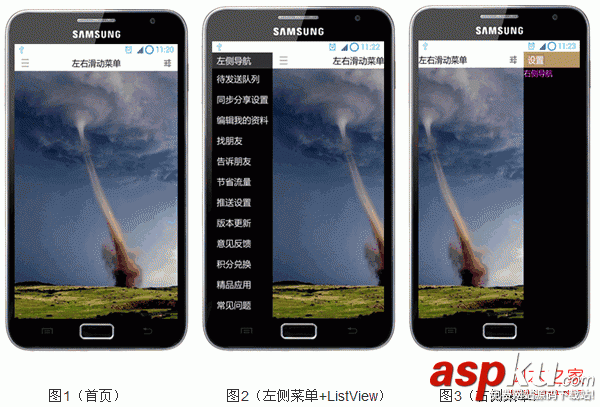
一、首页布局:
复制代码代码如下:
<RelativeLayout xmlns:android="http://schemas.android.com/apk/res/android"
xmlns:tools="http://schemas.android.com/tools"
android:layout_width="match_parent"
android:layout_height="match_parent"
tools:context=".MainActivity" >
<!-- 主布局 -->
<RelativeLayout
android:id="@+id/mainLayout"
android:layout_width="match_parent"
android:layout_height="match_parent">
<RelativeLayout
android:id="@+id/titlebar"
android:layout_width="match_parent"
android:layout_height="wrap_content"
android:background="#ffffff"
android:padding="5dip">
<ImageView
android:id="@+id/ivMore"
android:src="@drawable/nav_more_normal"
android:contentDescription="@string/img_desc"
android:layout_width="wrap_content"
android:layout_height="wrap_content"
android:layout_centerVertical="true"
android:layout_alignParentLeft="true"
android:layout_marginLeft="10dip"/>
<TextView
android:layout_width="wrap_content"
android:layout_height="wrap_content"
android:layout_centerHorizontal="true"
android:layout_centerVertical="true"
android:text="@string/title"
android:textSize="20sp"
android:textColor="#000000"/>
<ImageView
android:id="@+id/ivSettings"
android:src="@drawable/nav_setting_normal"
android:contentDescription="@string/img_desc"
android:layout_width="wrap_content"
android:layout_height="wrap_content"
android:layout_centerVertical="true"
android:layout_alignParentRight="true"
android:layout_marginRight="10dip"/>
</RelativeLayout>
<ImageView
android:src="@drawable/picture"
android:contentDescription="@string/img_desc"
android:scaleType="fitXY"
android:layout_width="match_parent"
android:layout_height="match_parent"
android:layout_below="@id/titlebar"/>
</RelativeLayout>
<!-- 左侧菜单导航 -->
<RelativeLayout
android:id="@+id/leftLayout"
android:layout_width="140dip"
android:layout_height="match_parent"
android:background="#000000">
<RelativeLayout
android:id="@+id/leftTitlebar"
android:layout_width="match_parent"
android:layout_height="wrap_content"
android:background="@color/grey21"
android:padding="5dip">
<TextView
android:layout_marginLeft="5dip"
android:layout_width="wrap_content"
android:layout_height="wrap_content"
android:layout_alignParentLeft="true"
android:layout_centerVertical="true"
android:text="@string/leftNav"
android:textSize="20sp"
android:textColor="#ffffff"/>
</RelativeLayout>
<com.chris.lr.slidemenu.LayoutRelative
android:id="@+id/layoutSlideMenu"
android:layout_width="match_parent"
android:layout_height="match_parent"
android:layout_below="@id/leftTitlebar">
<ListView
android:id="@+id/listMore"
android:cacheColorHint="#00000000"
android:layout_width="match_parent"
android:layout_height="match_parent"/>
</com.chris.lr.slidemenu.LayoutRelative>
</RelativeLayout>
<!-- 右侧菜单导航 -->
<RelativeLayout
android:id="@+id/rightLayout"
android:layout_width="140dip"
android:layout_height="match_parent"
android:background="#000000">
<RelativeLayout
android:id="@+id/rightTitlebar"
android:layout_width="match_parent"
android:layout_height="wrap_content"
android:background="@color/gold"
android:padding="5dip">
<TextView
android:layout_marginLeft="5dip"
android:layout_width="wrap_content"
android:layout_height="wrap_content"
android:layout_alignParentLeft="true"
android:layout_centerVertical="true"
android:text="@string/right_title"
android:textSize="20sp"
android:textColor="#ffffff"/>
</RelativeLayout>
<TextView
android:text="@string/rightNav"
android:textColor="#ff00ff"
android:textSize="18sp"
android:layout_width="match_parent"
android:layout_height="30dip"
android:layout_below="@id/rightTitlebar"
android:background="#000000"/>
</RelativeLayout>
</RelativeLayout>
布局很简单,我个人比较推荐用RelativeLayout,因为这个是几个Layout中,性能最好的,而LinearLayout则不好,原因在于,某个子视图的宽高变动,会引起这个布局中其它地方也需要重新调整。
布局中,有com.chris.lr.slidemenu.LayoutRelative这个自定义控件是继承RelativeLayout的,里面只是加了些手势的处理,它的作用实际上就是最开始讲到的,如果含有ListView这类需要判断手势的,则就用到它,先由它来判断,然后在视情况是否拦截由自己来处理。
二、自定义控件:
复制代码代码如下:
package com.chris.lr.slidemenu;
import android.content.Context;
import android.util.AttributeSet;
import android.util.Log;
import android.view.GestureDetector;
import android.view.GestureDetector.SimpleOnGestureListener;
import android.view.MotionEvent;
import android.widget.RelativeLayout;
public class LayoutRelative extends RelativeLayout {
private static final String TAG = "ChrisSlideMenu";
private GestureDetector mGestureDetector;
private boolean bLockScrollX = false;
private boolean bTouchIntercept = false;
private OnScrollListener mOnScrollListenerCallback = null;
public LayoutRelative(Context context) {
this(context, null);
}
public LayoutRelative(Context context, AttributeSet attrs) {
this(context, attrs, 0);
}
public LayoutRelative(Context context, AttributeSet attrs, int defStyle) {
super(context, attrs, defStyle);
mGestureDetector = new GestureDetector(new LayoutGestureListener());
}
/**
* 设置滚动监听接口
* @param l
*/
public void setOnScrollListener(OnScrollListener l){
mOnScrollListenerCallback = l;
}
/*
* Progress:
* 1. 重载dispatchTouchEvent,将消息传递给GestureDetector;
* 2. 重载手势中onDown 和 onScroll两个函数;
* 3. 在onDown中,默认对水平滚动方向加锁;
* 4. 在onScroll中,判断e1与e2的水平方向与垂直方向距离:
* a. 如果垂直方向大,则表明是上下滚动,且返回false表明当前手势不用拦截;
* b. 如果水平方向大,则表明是左右滚动,且返回true表明当前手势需要拦截;
* 5. 重载onInterceptTouchEvent,如果手势返回为true,则onInterceptTouchEvent也返回true;
* 6. 如果要拦截手势消息,则需要重载onTouchEvent,或子视图中重载这个函数,来处理这条消息;
* 7. 如果自己处理,则对水平方向滚动去锁(表明当前用户想左右滚动);
*
* ----------
* ---------------------- ------>| onDown |
* | | | ----------
* | dispatchTouchEvent | <---- ------ false: 上下滚动
* | | | ------------ /
* ---------------------- ------>| onScroll | ----
* | ------------ /
* | ------ true : 左右滚动
* | intercept = true ----------------
* |----------------------| onTouchEvent |
* | ----------------
* -------------------------
* | |
* | onInterceptTouchEvent |
* | |
* -------------------------
*
*/
@Override
public boolean dispatchTouchEvent(MotionEvent ev) {
bTouchIntercept = mGestureDetector.onTouchEvent(ev);
if(MotionEvent.ACTION_UP == ev.getAction() && !bLockScrollX){
if(mOnScrollListenerCallback != null){
mOnScrollListenerCallback.doOnRelease();
}
}
return super.dispatchTouchEvent(ev);
}
// viewgroup.onInterceptTouchEvent
@Override
public boolean onInterceptTouchEvent(MotionEvent ev) {
super.onInterceptTouchEvent(ev);
return bTouchIntercept;
}
// view.onTouchEvent
@Override
public boolean onTouchEvent(MotionEvent event) {
bLockScrollX = false;
return super.onTouchEvent(event);
}
/**
* @author cheng.yang
*
* 自定义手势监听
*/
public class LayoutGestureListener extends SimpleOnGestureListener {
@Override
public boolean onDown(MotionEvent e) {
bLockScrollX = true;
return super.onDown(e);
}
@Override
public boolean onScroll(MotionEvent e1, MotionEvent e2,
float distanceX, float distanceY) {
if(!bLockScrollX){
if(mOnScrollListenerCallback != null){
mOnScrollListenerCallback.doOnScroll(e1, e2, distanceX, distanceY);
}
}
if(Math.abs(e1.getY() - e2.getY()) > Math.abs(e1.getX() - e2.getX())){
return false;
}else{
return true;
}
}
}
public interface OnScrollListener {
void doOnScroll(MotionEvent e1, MotionEvent e2,
float distanceX, float distanceY);
void doOnRelease();
}
}
这个控件中,含有一个接口,当用户手势为左右时,则需要将滚动数据回传到主视图中去处理,而自己拦截不往下传递消息。里面有个消息流程图,讲的比较详细了,大家可以先看看,有什么问题,可以问我。
三、MainActivity的实现:
这个需要着讲解,毕竟,左、右滑动的实现都在这里。
复制代码代码如下:
/**
*
* @author cheng.yang
*
* 左、右菜单滑出
*
* params[0]: 滑动距离
* params[1]: 滑动速度,带方向
*/
public class SlideMenu extends AsyncTask<Integer, Integer, Void>{
@Override
protected Void doInBackground(Integer... params) {
if(params.length != 2){
Log.e(TAG, "error, params must have 2!");
}
int times = params[0] / Math.abs(params[1]);
if(params[0] % Math.abs(params[1]) != 0){
times ++;
}
for(int i = 0; i < times; i++){
this.publishProgress(params[0], params[1], i+1);
}
return null;
}
@Override
protected void onProgressUpdate(Integer... values) {
if(values.length != 3){
Log.e(TAG, "error, values must have 3!");
}
int distance = Math.abs(values[1]) * values[2];
int delta = values[0] - distance;
int leftMargin = 0;
if(values[1] < 0){ // 左移
leftMargin = (delta > 0 ? values[1] : -(Math.abs(values[1]) - Math.abs(delta)));
}else{
leftMargin = (delta > 0 ? values[1] : (Math.abs(values[1]) - Math.abs(delta)));
}
rollLayout(leftMargin);
}
首先,自定义一个继承于AsyncTask的类的线程,这个自定义类,就是用来实现动画效果,重在“滑动”,而不是硬生生的挤出来。关于AsyncTask的用法,大家可以看我的博客中关于它的讲解:
http://blog.csdn.net/qingye_love/article/details/8777508
自定义类的使用需要两个参数,一个是滑动的距离,一个是每次滑动多少且向哪个方向滑动:
1. 滑动距离:若是左侧菜单滑出来,距离就是左侧菜单的宽度;同理,右侧滑出就是右侧菜单的宽度;
2. 滑动速度:即动画滑动时,向哪个方向,且每次滑动多少像素;
在doInBackground中,计算需要滑动多少次,然后用for循环调用publishProgress,实际上就是调用的onProgressUpdate,在onProgressUpdate中,根据方向,以及当前main layout的 leftMargin来计算是滑动指定的距离(速度),还是当终点距离小于滑动速度时,速度就为终点距离,最终,调用rollLayout,来修改 leftLayout, mainLayout, rightLayout三者的布局,达到滑动的效果。
rollLayout的实现:
复制代码代码如下:
private void rollLayout(int margin){
RelativeLayout.LayoutParams lp = (LayoutParams) mainLayout.getLayoutParams();
lp.leftMargin += margin;
lp.rightMargin -= margin;
mainLayout.setLayoutParams(lp);
lp = (LayoutParams) leftLayout.getLayoutParams();
lp.leftMargin += margin;
leftLayout.setLayoutParams(lp);
lp = (LayoutParams) rightLayout.getLayoutParams();
lp.leftMargin += margin;
lp.rightMargin -= margin;
rightLayout.setLayoutParams(lp);
}
这个就是修改三个layout的leftMargin和rightMargin。
初始化布局控件:
复制代码代码如下:
private void initView(){
mainLayout = (RelativeLayout) findViewById(R.id.mainLayout);
leftLayout = (RelativeLayout) findViewById(R.id.leftLayout);
rightLayout = (RelativeLayout) findViewById(R.id.rightLayout);
mainLayout.setOnTouchListener(this);
leftLayout.setOnTouchListener(this);
rightLayout.setOnTouchListener(this);
layoutSlideMenu = (LayoutRelative) findViewById(R.id.layoutSlideMenu);
layoutSlideMenu.setOnScrollListener(new OnScrollListener(){
@Override
public void doOnScroll(MotionEvent e1, MotionEvent e2,
float distanceX, float distanceY) {
onScroll(distanceX);
}
@Override
public void doOnRelease(){
onRelease();
}
});
ivMore = (ImageView) findViewById(R.id.ivMore);
ivSettings = (ImageView) findViewById(R.id.ivSettings);
ivMore.setOnTouchListener(this);
ivSettings.setOnTouchListener(this);
mListMore = (ListView) findViewById(R.id.listMore);
mListMore.setAdapter(new ArrayAdapter<String>(this, R.layout.item, R.id.tv_item, title));
mListMore.setOnItemClickListener(this);
mGestureDetector = new GestureDetector(this);
mGestureDetector.setIsLongpressEnabled(false);
resizeLayout();
}
调整三个layout,将leftLayout移动到屏幕最左边之外,现时将rightLayout移动到屏幕最右边之外:
复制代码代码如下:
/*
* 使用leftMargin及rightMargin防止layout被挤压变形
* Math.abs(leftMargin - rightMargin) = layout.width
*/
private void resizeLayout(){
DisplayMetrics dm = getResources().getDisplayMetrics();
// 固定 main layout, 防止被左、右挤压变形
RelativeLayout.LayoutParams lp = (LayoutParams) mainLayout.getLayoutParams();
lp.width = dm.widthPixels;
mainLayout.setLayoutParams(lp);
// 将左layout调整至main layout左边
lp = (LayoutParams) leftLayout.getLayoutParams();
lp.leftMargin = -lp.width;
leftLayout.setLayoutParams(lp);
Log.d(TAG, "left l.margin = " + lp.leftMargin);
// 将左layout调整至main layout右边
lp = (LayoutParams) rightLayout.getLayoutParams();
lp.leftMargin = dm.widthPixels;
lp.rightMargin = -lp.width;
rightLayout.setLayoutParams(lp);
Log.d(TAG, "right l.margin = " + lp.leftMargin);
}
重载onTouch,处理消息:
复制代码代码如下:
////////////////////////////// onTouch ///////////////////////////////
@Override
public boolean onTouch(View v, MotionEvent event) {
mClickedView = v;
if(MotionEvent.ACTION_UP == event.getAction() && bIsScrolling){
onRelease();
}
return mGestureDetector.onTouchEvent(event);
}
记录选择的view,并将消息传给GestureDetector;
重载GestureDetector的onDown, onScroll, onSingleTapUp这三个是主要的,其它的重载不做任何修改;
复制代码代码如下:
/////////////////// GestureDetector Override Begin ///////////////////
@Override
public boolean onDown(MotionEvent e) {
bIsScrolling = false;
mScroll = 0;
iLimited = 0;
RelativeLayout.LayoutParams lp = (LayoutParams) mainLayout.getLayoutParams();
if(lp.leftMargin > 0){
iLimited = 1;
}else if(lp.leftMargin < 0){
iLimited = -1;
}
return true;
}
在onDown中,判断当前的 mainLayout 的 leftMargin 的值,并用 iLimited 记录下来,原因:
如果当前显示的是左侧菜单,则用户滚动屏幕时,最多只是将左侧菜单滑出到屏幕外,而不会继续滑动,将右侧菜单显示出来;同理,当前已经显示了右侧菜单。
复制代码代码如下:
@Override
public boolean onSingleTapUp(MotionEvent e) {
/*
* 正常情况下,mainLayout的leftMargin为0,
* 当左/右菜单为打开中,此时就不为0,需要判断
*/
if(mClickedView != null){
RelativeLayout.LayoutParams lp = (LayoutParams) mainLayout.getLayoutParams();
if(mClickedView == ivMore){
Log.d(TAG, "[onSingleTapUp] ivMore clicked! leftMargin = " + lp.leftMargin);
if(lp.leftMargin == 0){
new SlideMenu().execute(leftLayout.getLayoutParams().width, SPEED);
}else{
new SlideMenu().execute(leftLayout.getLayoutParams().width, -SPEED);
}
}else if(mClickedView == ivSettings){
Log.d(TAG, "[onSingleTapUp] ivSettings clicked! leftMargin = " + lp.leftMargin);
if(lp.leftMargin == 0){
new SlideMenu().execute(rightLayout.getLayoutParams().width, -SPEED);
}else{
new SlideMenu().execute(rightLayout.getLayoutParams().width, SPEED);
}
}else if(mClickedView == mainLayout){
Log.d(TAG, "[onSingleTapUp] mainLayout clicked!");
}
}
return true;
}
这个函数中,处理标题栏左、右两个按钮,点击一次,显示侧导航菜单,再点击一次,则关闭。
复制代码代码如下:
@Override
public boolean onScroll(MotionEvent e1, MotionEvent e2, float distanceX,
float distanceY) {
onScroll(distanceX);
return false;
}
滚动处理,直接将本次的水平滚动距离传给onScroll函数来处理,因为,侧边导航菜单的水平滚动也将通过OnScrollListener.doOnScroll来回调,所以,写个通用函数。
复制代码代码如下:
private void onScroll(float distanceX){
bIsScrolling = true;
mScroll += distanceX; // 向左为正
Log.d(TAG, "mScroll = " + mScroll + ", distanceX = " + distanceX);
RelativeLayout.LayoutParams lp = (LayoutParams) mainLayout.getLayoutParams();
RelativeLayout.LayoutParams lpLeft = (LayoutParams) leftLayout.getLayoutParams();
RelativeLayout.LayoutParams lpRight = (LayoutParams) rightLayout.getLayoutParams();
Log.d(TAG, "lp.leftMargin = " + lp.leftMargin);
int distance = 0;
if(mScroll > 0){ // 向左移动
if(lp.leftMargin <= 0){ // 打开右导航菜单
if(iLimited > 0){
return;
}
distance = lpRight.width - Math.abs(lp.leftMargin);
}else if(lp.leftMargin > 0){ // 关闭左导航菜单
distance = lp.leftMargin;
}
if(mScroll >= distance){
mScroll = distance;
}
}else if(mScroll < 0){ // 向右移动
if(lp.leftMargin >= 0){ // 打开左导航菜单
if(iLimited < 0){
return;
}
distance = lpLeft.width - Math.abs(lp.leftMargin);
}else if(lp.leftMargin < 0){ // 关闭右导航菜单
distance = Math.abs(lp.leftMargin);
}
if(mScroll <= -distance){
mScroll = -distance;
}
}
Log.d(TAG, "mScroll = " + mScroll);
if(mScroll != 0){
rollLayout(-mScroll);
}
}
接下来,我们看看当侧边导航菜单,水平滚动且用户松开手指时,回调OnScrollListener.doOnRelease,我们会调用一个onRelease来负责处理收尾工作:
复制代码代码如下:
private void onRelease(){
RelativeLayout.LayoutParams lp = (LayoutParams) mainLayout.getLayoutParams();
if(lp.leftMargin < 0){ // 左移
/*
* 左移大于右导航宽度一半,则自动展开,否则自动缩回去
*/
if(Math.abs(lp.leftMargin) > rightLayout.getLayoutParams().width/2){
new SlideMenu().execute(rightLayout.getLayoutParams().width - Math.abs(lp.leftMargin), -SPEED);
}else{
new SlideMenu().execute(Math.abs(lp.leftMargin), SPEED);
}
}else if(lp.leftMargin > 0){
/*
* 右移大于左导航宽度一半,则自动展开,否则自动缩回去
*/
if(Math.abs(lp.leftMargin) > leftLayout.getLayoutParams().width/2){
new SlideMenu().execute(leftLayout.getLayoutParams().width - Math.abs(lp.leftMargin), SPEED);
}else{
new SlideMenu().execute(Math.abs(lp.leftMargin), -SPEED);
}
}
}
主要的代码块已经讲解完了,下面是完整的代码:
复制代码代码如下:
package com.chris.lr.slidemenu;
import com.chris.lr.slidemenu.LayoutRelative.OnScrollListener;
import android.os.AsyncTask;
import android.os.Bundle;
import android.util.DisplayMetrics;
import android.util.Log;
import android.view.GestureDetector;
import android.view.GestureDetector.OnGestureListener;
import android.view.KeyEvent;
import android.view.MotionEvent;
import android.view.View;
import android.view.View.OnTouchListener;
import android.view.Window;
import android.widget.AdapterView;
import android.widget.AdapterView.OnItemClickListener;
import android.widget.ArrayAdapter;
import android.widget.ImageView;
import android.widget.ListView;
import android.widget.RelativeLayout;
import android.widget.Toast;
import android.widget.RelativeLayout.LayoutParams;
import android.app.Activity;
public class MainActivity extends Activity implements OnGestureListener,
OnTouchListener, OnItemClickListener {
private static final String TAG = "ChrisSlideMenu";
private RelativeLayout mainLayout;
private RelativeLayout leftLayout;
private RelativeLayout rightLayout;
private LayoutRelative layoutSlideMenu;
private ListView mListMore;
private ImageView ivMore;
private ImageView ivSettings;
private GestureDetector mGestureDetector;
private static final int SPEED = 30;
private boolean bIsScrolling = false;
private int iLimited = 0;
private int mScroll = 0;
private View mClickedView = null;
private String title[] = {"待发送队列",
"同步分享设置",
"编辑我的资料",
"找朋友",
"告诉朋友",
"节省流量",
"推送设置",
"版本更新",
"意见反馈",
"积分兑换",
"精品应用",
"常见问题",
"退出当前帐号",
"退出1",
"退出2",
"退出3",
"退出4"};
@Override
protected void onCreate(Bundle savedInstanceState) {
super.onCreate(savedInstanceState);
this.requestWindowFeature(Window.FEATURE_NO_TITLE);
setContentView(R.layout.activity_main);
initView();
}
private void initView(){
mainLayout = (RelativeLayout) findViewById(R.id.mainLayout);
leftLayout = (RelativeLayout) findViewById(R.id.leftLayout);
rightLayout = (RelativeLayout) findViewById(R.id.rightLayout);
mainLayout.setOnTouchListener(this);
leftLayout.setOnTouchListener(this);
rightLayout.setOnTouchListener(this);
layoutSlideMenu = (LayoutRelative) findViewById(R.id.layoutSlideMenu);
layoutSlideMenu.setOnScrollListener(new OnScrollListener(){
@Override
public void doOnScroll(MotionEvent e1, MotionEvent e2,
float distanceX, float distanceY) {
onScroll(distanceX);
}
@Override
public void doOnRelease(){
onRelease();
}
});
ivMore = (ImageView) findViewById(R.id.ivMore);
ivSettings = (ImageView) findViewById(R.id.ivSettings);
ivMore.setOnTouchListener(this);
ivSettings.setOnTouchListener(this);
mListMore = (ListView) findViewById(R.id.listMore);
mListMore.setAdapter(new ArrayAdapter<String>(
this, R.layout.item, R.id.tv_item, title));
mListMore.setOnItemClickListener(this);
mGestureDetector = new GestureDetector(this);
mGestureDetector.setIsLongpressEnabled(false);
resizeLayout();
}
/*
* 使用leftMargin及rightMargin防止layout被挤压变形
* Math.abs(leftMargin - rightMargin) = layout.width
*/
private void resizeLayout(){
DisplayMetrics dm = getResources().getDisplayMetrics();
// 固定 main layout, 防止被左、右挤压变形
RelativeLayout.LayoutParams lp =
(LayoutParams) mainLayout.getLayoutParams();
lp.width = dm.widthPixels;
mainLayout.setLayoutParams(lp);
// 将左layout调整至main layout左边
lp = (LayoutParams) leftLayout.getLayoutParams();
lp.leftMargin = -lp.width;
leftLayout.setLayoutParams(lp);
Log.d(TAG, "left l.margin = " + lp.leftMargin);
// 将左layout调整至main layout右边
lp = (LayoutParams) rightLayout.getLayoutParams();
lp.leftMargin = dm.widthPixels;
lp.rightMargin = -lp.width;
rightLayout.setLayoutParams(lp);
Log.d(TAG, "right l.margin = " + lp.leftMargin);
}
@Override
public boolean onKeyDown(int keyCode, KeyEvent event) {
if(keyCode == KeyEvent.KEYCODE_BACK && event.getRepeatCount() == 0){
RelativeLayout.LayoutParams lp =
(LayoutParams) mainLayout.getLayoutParams();
if(lp.leftMargin != 0){
if(lp.leftMargin > 0){
new SlideMenu().execute(
leftLayout.getLayoutParams().width, -SPEED);
}else if(lp.leftMargin < 0){
new SlideMenu().execute(
rightLayout.getLayoutParams().width, SPEED);
}
return true;
}
}
return super.onKeyDown(keyCode, event);
}
private void rollLayout(int margin){
RelativeLayout.LayoutParams lp =
(LayoutParams) mainLayout.getLayoutParams();
lp.leftMargin += margin;
lp.rightMargin -= margin;
mainLayout.setLayoutParams(lp);
lp = (LayoutParams) leftLayout.getLayoutParams();
lp.leftMargin += margin;
leftLayout.setLayoutParams(lp);
lp = (LayoutParams) rightLayout.getLayoutParams();
lp.leftMargin += margin;
lp.rightMargin -= margin;
rightLayout.setLayoutParams(lp);
}
private void onScroll(float distanceX){
bIsScrolling = true;
mScroll += distanceX; // 向左为正
Log.d(TAG, "mScroll = " + mScroll + ", distanceX = " + distanceX);
RelativeLayout.LayoutParams lp =
(LayoutParams) mainLayout.getLayoutParams();
RelativeLayout.LayoutParams lpLeft =
(LayoutParams) leftLayout.getLayoutParams();
RelativeLayout.LayoutParams lpRight =
(LayoutParams) rightLayout.getLayoutParams();
Log.d(TAG, "lp.leftMargin = " + lp.leftMargin);
int distance = 0;
if(mScroll > 0){ // 向左移动
if(lp.leftMargin <= 0){ // 打开右导航菜单
if(iLimited > 0){
return;
}
distance = lpRight.width - Math.abs(lp.leftMargin);
}else if(lp.leftMargin > 0){ // 关闭左导航菜单
distance = lp.leftMargin;
}
if(mScroll >= distance){
mScroll = distance;
}
}else if(mScroll < 0){ // 向右移动
if(lp.leftMargin >= 0){ // 打开左导航菜单
if(iLimited < 0){
return;
}
distance = lpLeft.width - Math.abs(lp.leftMargin);
}else if(lp.leftMargin < 0){ // 关闭右导航菜单
distance = Math.abs(lp.leftMargin);
}
if(mScroll <= -distance){
mScroll = -distance;
}
}
Log.d(TAG, "mScroll = " + mScroll);
if(mScroll != 0){
rollLayout(-mScroll);
}
}
private void onRelease(){
RelativeLayout.LayoutParams lp =
(LayoutParams) mainLayout.getLayoutParams();
if(lp.leftMargin < 0){ // 左移
/*
* 左移大于右导航宽度一半,则自动展开,否则自动缩回去
*/
if(Math.abs(lp.leftMargin) > rightLayout.getLayoutParams().width/2){
new SlideMenu().execute(rightLayout.getLayoutParams().width -
Math.abs(lp.leftMargin), -SPEED);
}else{
new SlideMenu().execute(Math.abs(lp.leftMargin), SPEED);
}
}else if(lp.leftMargin > 0){
/*
* 右移大于左导航宽度一半,则自动展开,否则自动缩回去
*/
if(Math.abs(lp.leftMargin) > leftLayout.getLayoutParams().width/2){
new SlideMenu().execute(leftLayout.getLayoutParams().width -
Math.abs(lp.leftMargin), SPEED);
}else{
new SlideMenu().execute(Math.abs(lp.leftMargin), -SPEED);
}
}
}
///////////////////// ListView.onItemClick ///////////////////////
@Override
public void onItemClick(AdapterView<?> arg0, View arg1, int arg2, long arg3) {
Toast.makeText(this, title[arg2], Toast.LENGTH_SHORT).show();
}
////////////////////////////// onTouch ///////////////////////////////
@Override
public boolean onTouch(View v, MotionEvent event) {
mClickedView = v;
if(MotionEvent.ACTION_UP == event.getAction() && bIsScrolling){
onRelease();
}
return mGestureDetector.onTouchEvent(event);
}
/////////////////// GestureDetector Override Begin ///////////////////
@Override
public boolean onDown(MotionEvent e) {
bIsScrolling = false;
mScroll = 0;
iLimited = 0;
RelativeLayout.LayoutParams lp =
(LayoutParams) mainLayout.getLayoutParams();
if(lp.leftMargin > 0){
iLimited = 1;
}else if(lp.leftMargin < 0){
iLimited = -1;
}
return true;
}
@Override
public boolean onFling(MotionEvent arg0, MotionEvent arg1, float arg2,
float arg3) {
return false;
}
@Override
public void onLongPress(MotionEvent e) {
}
@Override
public boolean onScroll(MotionEvent e1, MotionEvent e2, float distanceX,
float distanceY) {
onScroll(distanceX);
return false;
}
@Override
public void onShowPress(MotionEvent arg0) {
}
@Override
public boolean onSingleTapUp(MotionEvent e) {
/*
* 正常情况下,mainLayout的leftMargin为0,
* 当左/右菜单为打开中,此时就不为0,需要判断
*/
if(mClickedView != null){
RelativeLayout.LayoutParams lp =
(LayoutParams) mainLayout.getLayoutParams();
if(mClickedView == ivMore){
Log.d(TAG, "[onSingleTapUp] ivMore clicked! leftMargin = "
+ lp.leftMargin);
if(lp.leftMargin == 0){
new SlideMenu().execute(
leftLayout.getLayoutParams().width, SPEED);
}else{
new SlideMenu().execute(
leftLayout.getLayoutParams().width, -SPEED);
}
}else if(mClickedView == ivSettings){
Log.d(TAG, "[onSingleTapUp] ivSettings clicked! leftMargin = "
+ lp.leftMargin);
if(lp.leftMargin == 0){
new SlideMenu().execute(
rightLayout.getLayoutParams().width, -SPEED);
}else{
new SlideMenu().execute(
rightLayout.getLayoutParams().width, SPEED);
}
}else if(mClickedView == mainLayout){
Log.d(TAG, "[onSingleTapUp] mainLayout clicked!");
}
}
return true;
}
/////////////////// GestureDetector Override End ///////////////////
/**
*
* @author cheng.yang
*
* 左、右菜单滑出
*
* params[0]: 滑动距离
* params[1]: 滑动速度,带方向
*/
public class SlideMenu extends AsyncTask<Integer, Integer, Void>{
@Override
protected Void doInBackground(Integer... params) {
if(params.length != 2){
Log.e(TAG, "error, params must have 2!");
}
int times = params[0] / Math.abs(params[1]);
if(params[0] % Math.abs(params[1]) != 0){
times ++;
}
for(int i = 0; i < times; i++){
this.publishProgress(params[0], params[1], i+1);
}
return null;
}
@Override
protected void onProgressUpdate(Integer... values) {
if(values.length != 3){
Log.e(TAG, "error, values must have 3!");
}
int distance = Math.abs(values[1]) * values[2];
int delta = values[0] - distance;
int leftMargin = 0;
if(values[1] < 0){ // 左移
leftMargin = (delta > 0 ? values[1] :
-(Math.abs(values[1]) - Math.abs(delta)));
}else{
leftMargin = (delta > 0 ? values[1] :
(Math.abs(values[1]) - Math.abs(delta)));
}
rollLayout(leftMargin);
}
}
}
总结:
本文左,右滑出菜单的原理,就是用到了leftMargin和rightMargin两个属性,并配合几个GestureDetector来完全手势判断的逻辑处理,其中,自定义的那个控件布局LayoutRelative,可以用在任何子视图中需要处理上下,左右滚动冲突的地方,良好的解决了冲突问题。
完整的代码下载地址:
http://download.csdn.net/detail/qingye_love/5237799
希望大家多来聊聊,同时,大家可以在我的基础上,实现onFling的方法,欢迎交流。



















