
先看效果图:
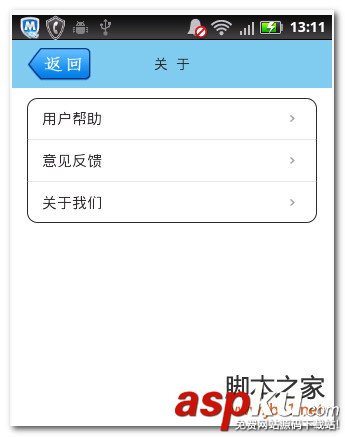
首先,你得写一个类我们命名为CornerListView
[java]
/**
* 圆角ListView示例
* @Description: 圆角ListView示例
* @FileName: CornerListView.java
*/
public class CornerListView extends ListView {
public CornerListView(Context context) {
super(context);
}
public CornerListView(Context context, AttributeSet attrs, int defStyle) {
super(context, attrs, defStyle);
}
public CornerListView(Context context, AttributeSet attrs) {
super(context, attrs);
}
@Override
public boolean onInterceptTouchEvent(MotionEvent ev) {
switch (ev.getAction()) {
case MotionEvent.ACTION_DOWN:
int x = (int) ev.getX();
int y = (int) ev.getY();
int itemnum = pointToPosition(x, y);
if (itemnum == AdapterView.INVALID_POSITION)
break;
else{
if(itemnum==0){
if(itemnum==(getAdapter().getCount()-1)){
setSelector(R.drawable.<SPAN style="COLOR: #ff0000">app_list_corner_round</SPAN>);
}else{
setSelector(R.drawable.<SPAN style="COLOR: #ff0000">app_list_corner_round_top</SPAN>);
}
}else if(itemnum==(getAdapter().getCount()-1))
setSelector(R.drawable.<SPAN style="COLOR: #ff0000">app_list_corner_round_bottom</SPAN>);
else{
setSelector(R.drawable.<SPAN style="COLOR: #ff0000">app_list_corner_shape</SPAN>);
}
}
break;
case MotionEvent.ACTION_UP:
break;
}
return super.onInterceptTouchEvent(ev);
}
}
/**
* 圆角ListView示例
* @Description: 圆角ListView示例
* @FileName: CornerListView.java
*/
public class CornerListView extends ListView {
public CornerListView(Context context) {
super(context);
}
public CornerListView(Context context, AttributeSet attrs, int defStyle) {
super(context, attrs, defStyle);
}
public CornerListView(Context context, AttributeSet attrs) {
super(context, attrs);
}
@Override
public boolean onInterceptTouchEvent(MotionEvent ev) {
switch (ev.getAction()) {
case MotionEvent.ACTION_DOWN:
int x = (int) ev.getX();
int y = (int) ev.getY();
int itemnum = pointToPosition(x, y);
if (itemnum == AdapterView.INVALID_POSITION)
break;
else{
if(itemnum==0){
if(itemnum==(getAdapter().getCount()-1)){
setSelector(R.drawable.app_list_corner_round);
}else{
setSelector(R.drawable.app_list_corner_round_top);
}
}else if(itemnum==(getAdapter().getCount()-1))
setSelector(R.drawable.app_list_corner_round_bottom);
else{
setSelector(R.drawable.app_list_corner_shape);
}
}
break;
case MotionEvent.ACTION_UP:
break;
}
return super.onInterceptTouchEvent(ev);
}
}
其中,app_list_corner_round
[html]
<SPAN style="COLOR: #333333"><?xml version="1.0" encoding="utf-8"?>
<shape xmlns:android="http://schemas.android.com/apk/res/android">
<gradient android:startColor="#BFEEFF"
android:endColor="#40B9FF"
android:angle="270"/>
<corners android:topLeftRadius="6dip"
android:topRightRadius="6dip"
android:bottomLeftRadius="6dip"
android:bottomRightRadius="6dip"/>
</shape> </SPAN>
<?xml version="1.0" encoding="utf-8"?>
<shape xmlns:android="http://schemas.android.com/apk/res/android">
<gradient android:startColor="#BFEEFF"
android:endColor="#40B9FF"
android:angle="270"/>
<corners android:topLeftRadius="6dip"
android:topRightRadius="6dip"
android:bottomLeftRadius="6dip"
android:bottomRightRadius="6dip"/>
</shape>
app_list_corner_round_top
[html]
<SPAN style="COLOR: #333333"><?xml version="1.0" encoding="utf-8"?>
<shape xmlns:android="http://schemas.android.com/apk/res/android">
<gradient android:startColor="#BFEEFF"
android:endColor="#40B9FF"
android:angle="270"/>
<corners android:topLeftRadius="6dip"
android:topRightRadius="6dip"/>
</shape> </SPAN>
<?xml version="1.0" encoding="utf-8"?>
<shape xmlns:android="http://schemas.android.com/apk/res/android">
<gradient android:startColor="#BFEEFF"
android:endColor="#40B9FF"
android:angle="270"/>
<corners android:topLeftRadius="6dip"
android:topRightRadius="6dip"/>
</shape>
app_list_corner_round_bottom
[html]
<SPAN style="COLOR: #333333"><?xml version="1.0" encoding="utf-8"?>
<shape xmlns:android="http://schemas.android.com/apk/res/android">
<gradient android:startColor="#BFEEFF"
android:endColor="#40B9FF"
android:angle="270"/>
<corners android:bottomLeftRadius="6dip"
android:bottomRightRadius="6dip" />
</shape> </SPAN>
<?xml version="1.0" encoding="utf-8"?>
<shape xmlns:android="http://schemas.android.com/apk/res/android">
<gradient android:startColor="#BFEEFF"
android:endColor="#40B9FF"
android:angle="270"/>
<corners android:bottomLeftRadius="6dip"
android:bottomRightRadius="6dip" />
</shape>
app_list_corner_shape
[html]
<?xml version="1.0" encoding="utf-8"?>
<shape xmlns:android="http://schemas.android.com/apk/res/android">
<gradient android:startColor="#BFEEFF"
android:endColor="#40B9FF"
android:angle="270"/>
</shape>
<?xml version="1.0" encoding="utf-8"?>
<shape xmlns:android="http://schemas.android.com/apk/res/android">
<gradient android:startColor="#BFEEFF"
android:endColor="#40B9FF"
android:angle="270"/>
</shape>
写好了之后,就可以在你的代码中直接像listview一样调用。



















