
废话少说,直接上图,有图有真相。
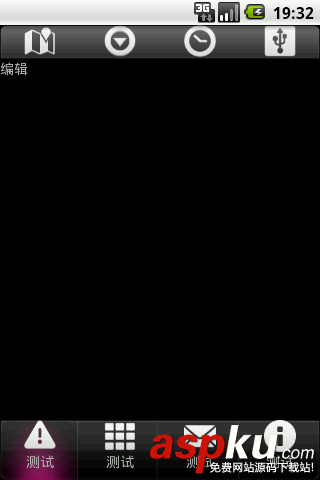
这两个工具栏全是用布局来实现的。底部工具栏布局代码:
代码
< xmlns:android="http://schemas.android.com/apk/res/android"
android:background="@drawable/bottom"
android:layout_width="fill_parent"
android:layout_height="wrap_content"
>
<android:id="@+id/edit"
android:text="测试"
android:gravity="center_horizontal"
android:drawableTop="@drawable/ic_dialog_alert"
android:layout_alignParentLeft="true"
android:layout_width="80dip"
android:layout_height="wrap_content"
>
<android:id="@+id/menu2"
android:text="测试"
android:gravity="center_horizontal"
android:drawableTop="@drawable/ic_dialog_dialer"
android:layout_toRightOf="@id/edit"
android:layout_width="80dip"
android:layout_height="wrap_content"
>
<android:id="@+id/effect"
android:text="测试"
android:gravity="center_horizontal"
android:drawableTop="@drawable/ic_dialog_email"
android:layout_toRightOf="@id/menu2"
android:layout_width="80dip"
android:layout_height="wrap_content"
>
<android:id="@+id/menu3"
android:text="测试"
android:gravity="center_horizontal"
android:drawableTop="@drawable/ic_dialog_info"
android:layout_toRightOf="@id/effect"
android:layout_width="80dip"
android:layout_height="wrap_content"
>
顶部工具栏布局代码:
代码
<xmlns:android="http://schemas.android.com/apk/res/android"
android:background="@drawable/top"
android:layout_width="fill_parent"
android:layout_height="wrap_content"
>
<android:id="@+id/undo"
android:src="@drawable/ic_dialog_map"
android:layout_alignParentLeft="true"
android:layout_width="80dip"
android:layout_height="wrap_content"
>
<android:id="@+id/save"
android:src="@drawable/ic_dialog_menu_generic"
android:layout_toRightOf="@id/undo"
android:layout_width="80dip"
android:layout_height="wrap_content"
>
<android:id="@+id/share"
android:src="@drawable/ic_dialog_time"
android:layout_toRightOf="@id/save"
android:layout_width="80dip"
android:layout_height="wrap_content"
>
<android:id="@+id/redo"
android:src="@drawable/ic_dialog_usb"
android:layout_toRightOf="@id/share"
android:layout_width="80dip"
android:layout_height="wrap_content"
>
主窗口布局代码:
代码
<android:layout_height="fill_parent">
xmlns:android="http://schemas.android.com/apk/res/android"
android:id="@+id/layout_topmenu"
android:layout_width="fill_parent"
android:layout_height="wrap_content"
android:layout_alignParentTop="true"
>
<android:text="asdfasdfas"
android:layout_width="wrap_content"
android:layout_height="wrap_content"
android:layout_below="@id/layout_topmenu">
<xmlns:android="http://schemas.android.com/apk/res/android"
android:layout_width="fill_parent"
android:layout_height="wrap_content"
android:layout_alignParentBottom="true"
>
主窗口代码:
代码
package com.figoyu.photoqualify;
import android.app.Activity;
import android.os.Bundle;
import android.view.MotionEvent;
import android.view.View;
import android.view.Window;
import android.view.View.OnTouchListener;
import android.widget.ImageView;
import android.widget.TextView;
public class MainActivity extends Activity {
TextView txt1;
TextView edittv;
ImageView imgbtn;
boolean isFirst = true;
boolean istopFirst = true;
@Override
public void onCreate(Bundle savedInstanceState) {
super.onCreate(savedInstanceState);
requestWindowFeature(Window.FEATURE_NO_TITLE);
setContentView(R.layout.main);
edittv = (TextView)findViewById(R.id.edit);
txt1 = (TextView)findViewById(R.id.txt1);
imgbtn = (ImageView)findViewById(R.id.undo);
edittv.setOnTouchListener(new OnTouchListener() {
@Override
public boolean onTouch(View v, MotionEvent event) {
if(isFirst) {
txt1.setText("编辑");
edittv.setBackgroundDrawable(getResources().getDrawable(R.drawable.item_background));
isFirst = false;
}else {
txt1.setText("退出编辑");
edittv.setBackgroundDrawable(getResources().getDrawable(R.drawable.touming));
isFirst = true;
}
return false;
}
});
imgbtn.setOnTouchListener(new OnTouchListener() {
@Override
public boolean onTouch(View v, MotionEvent event) {
if(istopFirst) {
txt1.setText("编辑");
istopFirst = false;
}else {
txt1.setText("退出编辑");
istopFirst = true;
}
return false;
}
});
}
}



















