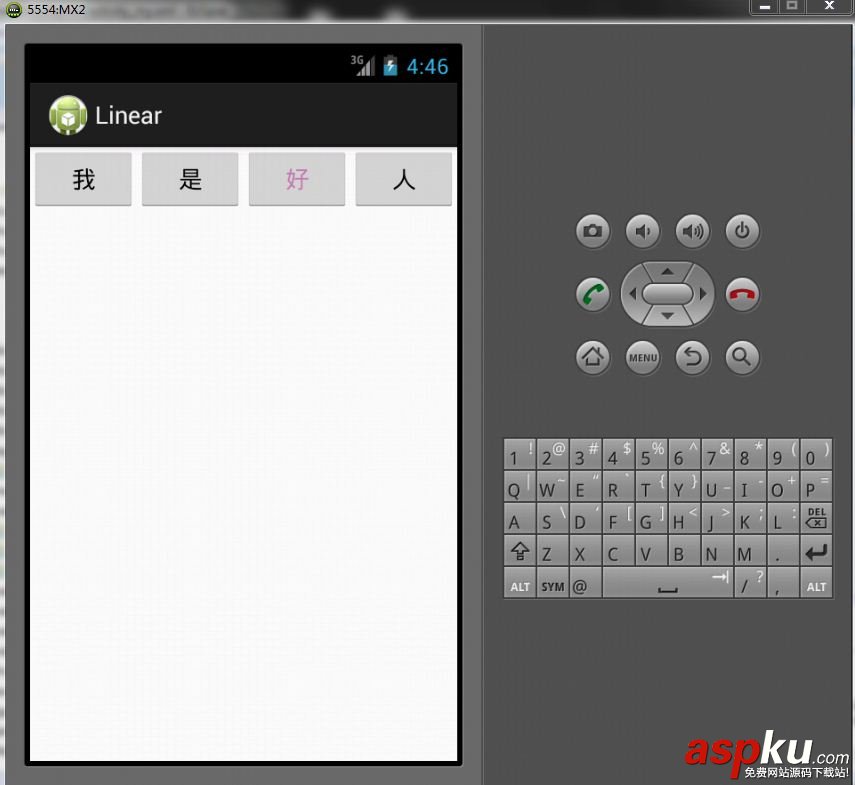
布局文件:res/layout/activity_my.xml
[html] <LinearLayout xmlns:android="http://schemas.android.com/apk/res/android"
xmlns:tools="http://schemas.android.com/tools"
android:id="@+id/LinearLayout"
android:layout_width="fill_parent"
android:layout_height="fill_parent"
android:orientation="horizontal"
tools:context=".MyActivity" >
<Button
android:id="@+id/button1"
android:layout_width="wrap_content"
android:layout_height="wrap_content"
android:layout_weight="1"
android:text="@string/wo"
android:textColorHint="@color/calamus" />
<Button
android:id="@+id/button2"
android:layout_width="wrap_content"
android:layout_height="wrap_content"
android:layout_weight="1"
android:text="@string/shi" />
<Button
android:id="@+id/button3"
android:layout_width="wrap_content"
android:layout_height="wrap_content"
android:layout_weight="1"
android:text="@string/hao"
android:textColor="@color/calamus" />
<Button
android:id="@+id/button4"
android:layout_width="wrap_content"
android:layout_height="wrap_content"
android:layout_weight="1"
android:text="@string/ren" />
</LinearLayout>
<LinearLayout xmlns:android="http://schemas.android.com/apk/res/android"
xmlns:tools="http://schemas.android.com/tools"
android:id="@+id/LinearLayout"
android:layout_width="fill_parent"
android:layout_height="fill_parent"
android:orientation="horizontal"
tools:context=".MyActivity" >
<Button
android:id="@+id/button1"
android:layout_width="wrap_content"
android:layout_height="wrap_content"
android:layout_weight="1"
android:text="@string/wo"
android:textColorHint="@color/calamus" />
<Button
android:id="@+id/button2"
android:layout_width="wrap_content"
android:layout_height="wrap_content"
android:layout_weight="1"
android:text="@string/shi" />
<Button
android:id="@+id/button3"
android:layout_width="wrap_content"
android:layout_height="wrap_content"
android:layout_weight="1"
android:text="@string/hao"
android:textColor="@color/calamus" />
<Button
android:id="@+id/button4"
android:layout_width="wrap_content"
android:layout_height="wrap_content"
android:layout_weight="1"
android:text="@string/ren" />
</LinearLayout>
资源文件:res/values/strings.xml
[html] view plaincopyprint?<?xml version="1.0" encoding="utf-8"?>
<resources>
<string name="app_name">Linear</string>
<string name="action_settings">Settings</string>
<string name="wo">我</string>
<string name="shi">是</string>
<string name="hao">好</string>
<string name="ren">人</string>
</resources>
<?xml version="1.0" encoding="utf-8"?>
<resources>
<string name="app_name">Linear</string>
<string name="action_settings">Settings</string>
<string name="wo">我</string>
<string name="shi">是</string>
<string name="hao">好</string>
<string name="ren">人</string>
</resources>
资源文件:res/values/styles.xml
[html] view plaincopyprint?<resources>
<!--
Base application theme, dependent on API level. This theme is replaced
by AppBaseTheme from res/values-vXX/styles.xml on newer devices.
-->
<style name="AppBaseTheme" parent="android:Theme.Light">
<!--
Theme customizations available in newer API levels can go in
res/values-vXX/styles.xml, while customizations related to
backward-compatibility can go here.
-->
</style>
<!-- Application theme. -->
<style name="AppTheme" parent="AppBaseTheme">
<!-- All customizations that are NOT specific to a particular API-level can go here. -->
</style>
<color name="calamus">#c77eb5</color>
</resources>
<resources>
<!--
Base application theme, dependent on API level. This theme is replaced
by AppBaseTheme from res/values-vXX/styles.xml on newer devices.
-->
<style name="AppBaseTheme" parent="android:Theme.Light">
<!--
Theme customizations available in newer API levels can go in
res/values-vXX/styles.xml, while customizations related to
backward-compatibility can go here.
-->
</style>
<!-- Application theme. -->
<style name="AppTheme" parent="AppBaseTheme">
<!-- All customizations that are NOT specific to a particular API-level can go here. -->
</style>
<color name="calamus">#c77eb5</color>
</resources>
资源索引文件R.java
[java] view plaincopyprint?/* AUTO-GENERATED FILE. DO NOT MODIFY.
*
* This class was automatically generated by the
* aapt tool from the resource data it found. It
* should not be modified by hand.
*/
package com.eirc.linear;
public final class R {
public static final class attr {
}
public static final class color {
public static final int calamus=0x7f070000;
}
public static final class dimen {
/** Default screen margins, per the Android Design guidelines.
Customize dimensions originally defined in res/values/dimens.xml (such as
screen margins) for sw720dp devices (e.g. 10" tablets) in landscape here.
*/
public static final int activity_horizontal_margin=0x7f040000;
public static final int activity_vertical_margin=0x7f040001;
}
public static final class drawable {
public static final int ic_launcher=0x7f020000;
}
public static final class id {
public static final int LinearLayout=0x7f090000;
public static final int action_settings=0x7f090005;
public static final int button1=0x7f090001;
public static final int button2=0x7f090002;
public static final int button3=0x7f090003;
public static final int button4=0x7f090004;
}
public static final class layout {
public static final int activity_my=0x7f030000;
}
public static final class menu {
public static final int my=0x7f080000;
}
public static final class string {
public static final int action_settings=0x7f050001;
public static final int app_name=0x7f050000;
public static final int hao=0x7f050004;
public static final int ren=0x7f050005;
public static final int shi=0x7f050003;
public static final int wo=0x7f050002;
}
public static final class style {
/**
Base application theme, dependent on API level. This theme is replaced
by AppBaseTheme from res/values-vXX/styles.xml on newer devices.
Theme customizations available in newer API levels can go in
res/values-vXX/styles.xml, while customizations related to
backward-compatibility can go here.
Base application theme for API 11+. This theme completely replaces
AppBaseTheme from res/values/styles.xml on API 11+ devices.
API 11 theme customizations can go here.
Base application theme for API 14+. This theme completely replaces
AppBaseTheme from BOTH res/values/styles.xml and
res/values-v11/styles.xml on API 14+ devices.
API 14 theme customizations can go here.
*/
public static final int AppBaseTheme=0x7f060000;
/** Application theme.
All customizations that are NOT specific to a particular API-level can go here.
*/
public static final int AppTheme=0x7f060001;
}
}
/* AUTO-GENERATED FILE. DO NOT MODIFY.
*
* This class was automatically generated by the
* aapt tool from the resource data it found. It
* should not be modified by hand.
*/
package com.eirc.linear;
public final class R {
public static final class attr {
}
public static final class color {
public static final int calamus=0x7f070000;
}
public static final class dimen {
/** Default screen margins, per the Android Design guidelines.
Customize dimensions originally defined in res/values/dimens.xml (such as
screen margins) for sw720dp devices (e.g. 10" tablets) in landscape here.
*/
public static final int activity_horizontal_margin=0x7f040000;
public static final int activity_vertical_margin=0x7f040001;
}
public static final class drawable {
public static final int ic_launcher=0x7f020000;
}
public static final class id {
public static final int LinearLayout=0x7f090000;
public static final int action_settings=0x7f090005;
public static final int button1=0x7f090001;
public static final int button2=0x7f090002;
public static final int button3=0x7f090003;
public static final int button4=0x7f090004;
}
public static final class layout {
public static final int activity_my=0x7f030000;
}
public static final class menu {
public static final int my=0x7f080000;
}
public static final class string {
public static final int action_settings=0x7f050001;
public static final int app_name=0x7f050000;
public static final int hao=0x7f050004;
public static final int ren=0x7f050005;
public static final int shi=0x7f050003;
public static final int wo=0x7f050002;
}
public static final class style {
/**
Base application theme, dependent on API level. This theme is replaced
by AppBaseTheme from res/values-vXX/styles.xml on newer devices.
Theme customizations available in newer API levels can go in
res/values-vXX/styles.xml, while customizations related to
backward-compatibility can go here.
Base application theme for API 11+. This theme completely replaces
AppBaseTheme from res/values/styles.xml on API 11+ devices.
API 11 theme customizations can go here.
Base application theme for API 14+. This theme completely replaces
AppBaseTheme from BOTH res/values/styles.xml and
res/values-v11/styles.xml on API 14+ devices.
API 14 theme customizations can go here.
*/
public static final int AppBaseTheme=0x7f060000;
/** Application theme.
All customizations that are NOT specific to a particular API-level can go here.
*/
public static final int AppTheme=0x7f060001;
}
}
Activity:
[java] view plaincopyprint?package com.eirc.linear;
import android.os.Bundle;
import android.app.Activity;
import android.view.Menu;
public class MyActivity extends Activity {
@Override
protected void onCreate(Bundle savedInstanceState) {
super.onCreate(savedInstanceState);
setContentView(R.layout.activity_my);
}
@Override
public boolean onCreateOptionsMenu(Menu menu) {
// Inflate the menu; this adds items to the action bar if it is present.
getMenuInflater().inflate(R.menu.my, menu);
return true;
}
}
package com.eirc.linear;
import android.os.Bundle;
import android.app.Activity;
import android.view.Menu;
public class MyActivity extends Activity {
@Override
protected void onCreate(Bundle savedInstanceState) {
super.onCreate(savedInstanceState);
setContentView(R.layout.activity_my);
}
@Override
public boolean onCreateOptionsMenu(Menu menu) {
// Inflate the menu; this adds items to the action bar if it is present.
getMenuInflater().inflate(R.menu.my, menu);
return true;
}
}
最终效果: