
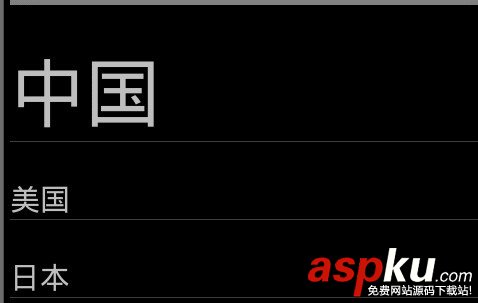
效果:点击字体,字体变大
主要利用的getView()方法和setOnItemClickListener()方法
ListText.java
复制代码代码如下:
package lt.com;
import java.util.ArrayList;
import java.util.HashMap;
import java.util.List;
import java.util.Map;
import android.app.Activity;
import android.app.AlertDialog;
import android.app.ListActivity;
import android.content.Context;
import android.content.DialogInterface;
import android.os.Bundle;
import android.util.Log;
import android.view.LayoutInflater;
import android.view.View;
import android.view.ViewGroup;
import android.widget.AdapterView;
import android.widget.BaseAdapter;
import android.widget.Button;
import android.widget.ImageView;
import android.widget.ListView;
import android.widget.TextView;
import android.widget.AdapterView.OnItemClickListener;
public class ListText extends Activity {
List<Map<String,Object>> mData;
public static int select_item = -1;
//MyAdapter adapter;
/** Called when the activity is first created. */
@Override
public void onCreate(Bundle savedInstanceState) {
super.onCreate(savedInstanceState);
setContentView(R.layout.main);
ListView lv=(ListView)findViewById(R.id.lv) ;
mData= GetDate();
final MyAdapter adapter =new MyAdapter(this);
lv.setAdapter(adapter);
Log.v("tag", "100");
//点击事件
lv.setOnItemClickListener(new OnItemClickListener(){
public void onItemClick(AdapterView<?> arg0, View arg1, int arg2,
long arg3) {
select_item = arg2; //当前选择的item
adapter.notifyDataSetChanged(); //通知adapter刷新数据
Log.v("tag", "1");
}
public void onNothingSelected(AdapterView<?> arg0) {
}
});
}
//item相关信息 名称 图片
public List<Map<String,Object>> GetDate(){
List<Map<String,Object>> list=new ArrayList<Map<String,Object>>(); //存在一个大仓库,摆放着很多抽屉 ,list相当把抽屉放进仓库。
// 这是upcast 或者ArrayList<Map<String,Object>> list=new ArrayList<Map<String,Object>>();也行
Map<String,Object> map=new HashMap<String,Object>();//抽屉,里面有东西。
map.put("text", "中国");//把东西放到抽屉里面
list.add(map);//把抽屉放到仓库里
HashMap<String,Object> map1=new HashMap<String,Object>();
map1.put("text", "美国");
list.add(map1);
HashMap<String,Object> map2=new HashMap<String,Object>();
map2.put("text", "日本");
list.add(map2);
return list;
}
//自定义适配器
public class MyAdapter extends BaseAdapter{
private LayoutInflater mInflater;//Instantiates a layout XML file into its corresponding View objects.
private int select_item;
public MyAdapter(Context context){
this.mInflater = LayoutInflater.from(context);//Obtains the LayoutInflater from the given context.
}
//item的数量
public int getCount() {
// TODO Auto-generated method stub
return mData.size();
}
public Object getItem(int arg0) {
// TODO Auto-generated method stub
return null;
}
public long getItemId(int position) {
// TODO Auto-generated method stub
return 0;
}
//convertView是复用的view,如果没有旧的就新建个新的view;parent是listview
public View getView(int position, View convertView, ViewGroup parent) {
// TODO Auto-generated method stub
ViewHolder holder = null;
if(convertView==null){
holder=new ViewHolder();
convertView=mInflater.inflate(R.layout.main, null);//Inflate a new view hierarchy from the specified xml resource.
holder.texta = (TextView)convertView.findViewById(R.id.text);
convertView.setTag(holder);//Sets the tag associated with this view , A tag can be used to mark a view in its hierarchy and does not have to be unique within the hierarchy.
//这个view是holder绘制的
}
else{
holder = (ViewHolder)convertView.getTag();//get tag
}
holder.texta.setText((String)mData.get(position).get("text"));
this.select_item = ListText.select_item;
try{
if(this.select_item == position){
holder.texta.setTextSize(50); //选中的Item字体:50px
Log.v("tag", "3");
}
else
holder.texta.setTextSize(20); //未选中的Item字体:10px
Log.v("tag", "2");
}catch(Exception ex){
ex.printStackTrace();
}
return convertView;
}
}
/** listView 中某项被选中后的逻辑
protected void onListItemClick(ListView l, View v, int position, long id) {
select_item = position; //当前选择的item
// adapter.notifyDataSetChanged(); //通知adapter刷新数据
Log.v("tag", "1");
}
*/
public final class ViewHolder{
TextView texta;
}
}
main.xml
复制代码代码如下:
<?xml version="1.0" encoding="utf-8"?>
<LinearLayout xmlns:android="http://schemas.android.com/apk/res/android"
android:layout_width="fill_parent"
android:layout_height="fill_parent"
android:orientation="vertical" >
<ListView
android:id="@+id/lv"
android:layout_width="match_parent"
android:layout_height="match_parent"
>
</ListView>
<TextView
android:id="@+id/text"
android:layout_width="fill_parent"
android:layout_height="wrap_content"
/>
</LinearLayout>



















