
下面就讲一下Tweene Animations。
主要类:
Animation 动画
AlphaAnimation 渐变透明度
RotateAnimation 画面旋转
ScaleAnimation 渐变尺寸缩放
TranslateAnimation 位置移动
AnimationSet 动画集
一.AlphaAnimation
其中AlphaAnimation类第一个参数fromAlpha表示动画起始时的透明度, 第二个参数toAlpha表示动画结束时的透明度。
setDuration用来设置动画持续时间。
二.RotateAnimation
其中RotateAnimation类第一个参数fromDegrees表示动画起始时的角度, 第二个参数toDegrees表示动画结束时的角度。
另外还可以设置伸缩模式pivotXType、pivotYType, 伸缩动画相对于x,y 坐标的开始位置pivotXValue、pivotYValue等。
三.ScaleAnimation
ScaleAnimation类中
第一个参数fromX ,第二个参数toX:分别是动画起始、结束时X坐标上的伸缩尺寸。
第三个参数fromY ,第四个参数toY:分别是动画起始、结束时Y坐标上的伸缩尺寸。
另外还可以设置伸缩模式pivotXType、pivotYType, 伸缩动画相对于x,y 坐标的开始位置pivotXValue、pivotYValue等。
四.TranslateAnimation
第一个参数fromXDelta ,第二个参数toXDelta:分别是动画起始、结束时X坐标。
第三个参数fromYDelta ,第四个参数toYDelta:分别是动画起始、结束时Y坐标。
下面我实现的这个例子是使得图片有上述四个动画效果,且其中第五实现的是两个效果的重叠,具体的实现截图如下:
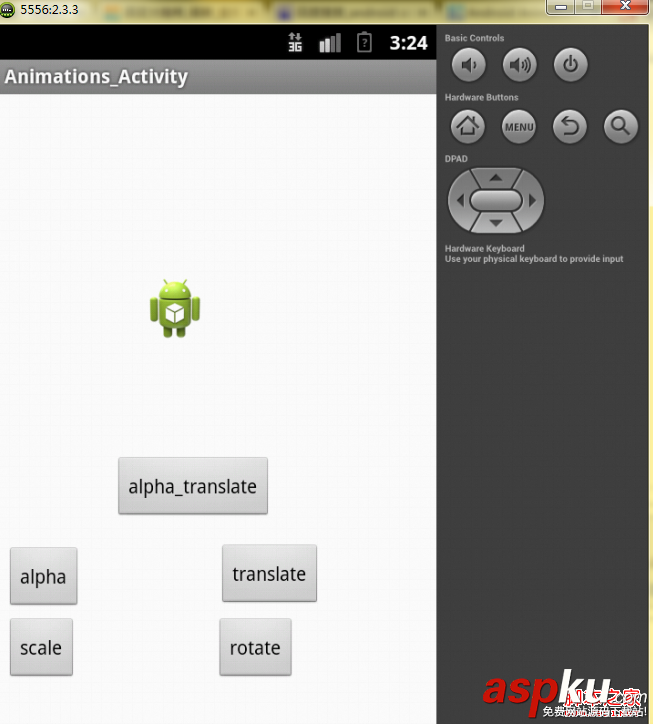
点击各个按钮会做出相应的反应。
本实例用到的布局文件如下:
复制代码代码如下:
<?xml version="1.0" encoding="utf-8"?>
<AbsoluteLayout
android:layout_width="fill_parent"
android:layout_height="fill_parent"
xmlns:android="http://schemas.android.com/apk/res/android">
<Button
android:id="@+id/button_scale"
android:layout_width="wrap_content"
android:layout_height="wrap_content"
android:text="scale"
android:layout_x="5dp"
android:layout_y="383dp" />
<Button
android:id="@+id/button_rotate"
android:layout_width="wrap_content"
android:layout_height="wrap_content"
android:text="rotate"
android:layout_x="158dp"
android:layout_y="383dp" />
<Button
android:id="@+id/button_alpha"
android:layout_width="wrap_content"
android:layout_height="wrap_content"
android:text="alpha"
android:layout_x="5dp"
android:layout_y="331dp" />
<Button
android:id="@+id/button_translate"
android:layout_width="wrap_content"
android:layout_height="wrap_content"
android:text="translate"
android:layout_x="160dp"
android:layout_y="329dp" />
<Button
android:id="@+id/button_alpha_translate"
android:layout_width="wrap_content"
android:layout_height="wrap_content"
android:text="alpha_translate"
android:layout_x="84dp"
android:layout_y="265dp" />
<ImageView
android:id="@+id/imageview"
android:layout_width="wrap_content"
android:layout_height="wrap_content"
android:layout_x="105dp"
android:layout_y="133dp"
android:src="@drawable/ic_launcher"
/>
</AbsoluteLayout>
实现本实例的源代码如下:
复制代码代码如下:
public class Animations_Activity extends Activity {
private Button button1;
private Button button2;
private Button button3;
private Button button4;
private Button button5;
private ImageView imageView;
@Override
protected void onCreate(Bundle savedInstanceState) {
super.onCreate(savedInstanceState);
setContentView(R.layout.activity_animations_);
button1=(Button)findViewById(R.id.button_alpha);
button2=(Button)findViewById(R.id.button_rotate);
button3=(Button)findViewById(R.id.button_scale);
button4=(Button)findViewById(R.id.button_translate);
button5=(Button)findViewById(R.id.button_alpha_translate);
imageView=(ImageView)findViewById(R.id.imageview);
button1.setOnClickListener(new MyButton());
button2.setOnClickListener(new MyButton());
button3.setOnClickListener(new MyButton());
button4.setOnClickListener(new MyButton());
button5.setOnClickListener(new MyButton());
}
class MyButton implements OnClickListener{
@Override
public void onClick(View arg0) {
// TODO Auto-generated method stub
switch (arg0.getId()) {
case R.id.button_alpha:
Alpha();
break;
case R.id.button_rotate:
Rotata();
break;
case R.id.button_scale:
Scale();
break;
case R.id.button_translate:
Translate();
break;
case R.id.button_alpha_translate:
Alpha_Translate();
break;
default:
break;
}
}
}
/*
* 1.创建一个AnimationSet对象,该对象存储的是动画的集合
* 2.根据需要创建相应的Animation对象
* 3.根据动画的需求,为Animation对象设置相应的数据(即执行效果)
* 4.奖Animation对象添加到AnimationSet对象当中
* 5.使用控件对象开始执行AnimationSet
*/
public void Alpha() {
AnimationSet animationSet=new AnimationSet(true);
AlphaAnimation alphaAnimation=new AlphaAnimation(1, 0);
alphaAnimation.setDuration(2000);
animationSet.addAnimation(alphaAnimation);
imageView.startAnimation(animationSet);
}
public void Rotata(){
AnimationSet animationSet=new AnimationSet(true);
//后面的四个参数定义的是旋转的圆心位置
RotateAnimation rotateAnimation=new RotateAnimation(
0, 360,
Animation.RELATIVE_TO_PARENT, 1f,
Animation.RELATIVE_TO_PARENT, 0f);
rotateAnimation.setDuration(2000);
animationSet.addAnimation(rotateAnimation);
imageView.startAnimation(animationSet);
}
public void Scale() {
AnimationSet animationSet=new AnimationSet(true);
ScaleAnimation scaleAnimation=new ScaleAnimation(
1, 0.1f, 1, 0.1f,
Animation.RELATIVE_TO_SELF, 0.5f,
Animation.RELATIVE_TO_SELF, 0.5f);
scaleAnimation.setDuration(2000);
animationSet.addAnimation(scaleAnimation);
imageView.startAnimation(scaleAnimation);
}
public void Translate() {
AnimationSet animationSet=new AnimationSet(true);
TranslateAnimation translateAnimation=new TranslateAnimation(
Animation.RELATIVE_TO_SELF, 0f, //X轴的开始位置
Animation.RELATIVE_TO_SELF, 0.5f, //X轴的结束位置
Animation.RELATIVE_TO_SELF, 0f, //Y轴的开始位置
Animation.RELATIVE_TO_SELF, 1.0f); //Y轴的结束位置
translateAnimation.setDuration(2000);
animationSet.addAnimation(translateAnimation);
/*
* 第一行的设置如果为true,则动画执行完之后效果定格在执行完之后的状态
* 第二行的设置如果为false,则动画执行完之后效果定格在执行完之后的状态
* 第三行设置的是一个long类型的值,是指动画延迟多少毫秒之后执行
* 第四行定义的是动画重复几次执行
*/
animationSet.setFillAfter(true);
animationSet.setFillBefore(false);
animationSet.setStartOffset(2000);
animationSet.setRepeatCount(3);
imageView.startAnimation(animationSet);
}
public void Alpha_Translate() {
AnimationSet animationSet=new AnimationSet(true);
AlphaAnimation alphaAnimation=new AlphaAnimation(1, 0);
alphaAnimation.setDuration(2000);
animationSet.addAnimation(alphaAnimation);
TranslateAnimation translateAnimation=new TranslateAnimation(
Animation.RELATIVE_TO_SELF, 0f, //X轴的开始位置
Animation.RELATIVE_TO_SELF, 0.5f, //X轴的结束位置
Animation.RELATIVE_TO_SELF, 0f, //Y轴的开始位置
Animation.RELATIVE_TO_SELF, 1.0f); //Y轴的结束位置
translateAnimation.setDuration(2000);
animationSet.addAnimation(translateAnimation);
imageView.startAnimation(animationSet);
}
@Override
public boolean onCreateOptionsMenu(Menu menu) {
// Inflate the menu; this adds items to the action bar if it is present.
getMenuInflater().inflate(R.menu.activity_animations_, menu);
return true;
}
}



















