
本文实例讲述了Android编程之单元测试用法。分享给大家供大家参考,具体如下:
在实际开发中,开发android软件的过程需要不断地进行测试。使用Junint测试框架,是正规Android开发的必用技术,在Junint中可以得到组件,可以模拟发送事件和检测程序处理的正确性。单元测试是嵌入到项目中;也可以作为一个单独的项目争对某个具体项目进行测试。
第一步:首先在AndroidManifest.xml中加入下面红色代码:
<manifest xmlns:android="http://schemas.android.com/apk/res/android"
package="com.lee0000.test" android:versionCode="1" android:versionName="1.0">
<application android:icon="@drawable/icon" android:label="@string/app_name">
<uses-library android:name="android.test.runner"/>
</application>
<use-sdk android:minSdkVersion="6"/>
<instrumentation android:name="android.test.instrumentationTestRunner" android:targetPackage="com.lee0000.test" android:label="Tests"/>
***上面targetPackage指定的包要和应用的package相同。
第二步:编写单元测试代码,一般对将要测试的方法命名testXXX。需要测试的时候选择大纲(Outline视图)选择测试的方法右键点击,选择"Run As" - "Android Junit Test"。
例:
项目结构:
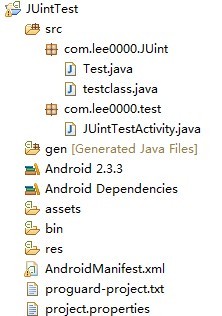
AndroidManifest.xml文件:
- <?xml version="1.0" encoding="utf-8"?>
- <manifest xmlns:android="http://schemas.android.com/apk/res/android"
- package="com.lee0000.test"
- android:versionCode="1"
- android:versionName="1.0" >
- <uses-sdk android:minSdkVersion="15" />
- <application
- android:icon="@drawable/ic_launcher"
- android:label="@string/app_name" >
- <activity
- android:name=".JUintTestActivity"
- android:label="@string/app_name" >
- <intent-filter>
- <action android:name="android.intent.action.MAIN" />
- <category android:name="android.intent.category.LAUNCHER" />
- </intent-filter>
- </activity>
- <uses-library android:name="android.test.runner" />
- </application>
- <instrumentation
- android:name="android.test.InstrumentationTestRunner"
- android:targetPackage="com.lee0000.test" android:label="Tests"/>
- </manifest>
定义测试的两个方法:
- public class testclass {
- public void str(String s){
- System.out.println(s.substring(6));
- }
- public int add(int a,int b){
- return a+b;
- }
- }
一般继承的是AndroidTestCase,测试的时候就是测试这两个方法,如果在对应方法中选择"Run As" - "Android Junit Test"时出错,可以右键Test类,选择"Run as" - "Run Configurations",在 Instrumentation runner中选择:
- import junit.framework.Assert;
- import android.test.AndroidTestCase;
- public class Test extends AndroidTestCase{
- public void teststr() throws Exception{
- testclass tc = new testclass();
- tc.str("null");
- }
- public void testadd(){
- testclass tc = new testclass();
- int t = tc.add(1, 2);
- Assert.assertEquals(3, t);
- }
- }
希望本文所述对大家Android程序设计有所帮助。



















