
这篇文章主要介绍了Android编程之图片颜色处理方法,涉及Android针对图片的颜色值、饱和度、透明度等处理技巧,具有一定参考借鉴价值,需要的朋友可以参考下
本文实例讲述了Android编程之图片颜色处理方法。分享给大家供大家参考,具体如下:
你想做到跟美图秀秀一样可以处理自己的照片,美化自己的照片吗?其实你也可以自己做一个这样的软件,废话不多说了,直接上图,上代码了!
效果图如下:
没处理前:
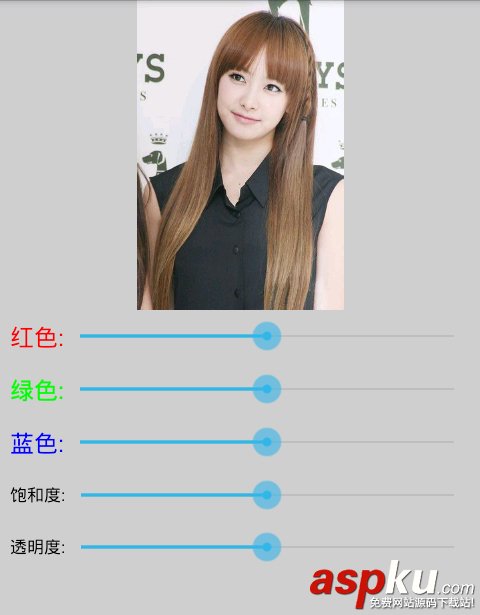
处理之后:
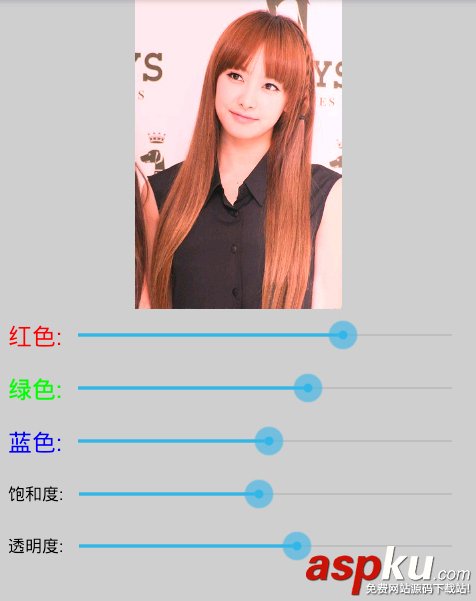
MainActivity.java的代码如下:
- package net.loonggg.test;
- import android.app.Activity;
- import android.graphics.Bitmap;
- import android.graphics.BitmapFactory;
- import android.graphics.Canvas;
- import android.graphics.Color;
- import android.graphics.ColorMatrix;
- import android.graphics.ColorMatrixColorFilter;
- import android.graphics.Matrix;
- import android.graphics.Paint;
- import android.os.Bundle;
- import android.widget.ImageView;
- import android.widget.SeekBar;
- import android.widget.SeekBar.OnSeekBarChangeListener;
- public class MainActivity extends Activity {
- private SeekBar sb1, sb2, sb3, sb4, sb5;
- private ImageView iv;
- private Bitmap bitmap, updateBitmap;
- private Canvas canvas;
- private Paint paint;
- @Override
- protected void onCreate(Bundle savedInstanceState) {
- super.onCreate(savedInstanceState);
- setContentView(R.layout.activity_main);
- iv = (ImageView) findViewById(R.id.iv);
- sb1 = (SeekBar) findViewById(R.id.sb1);
- sb2 = (SeekBar) findViewById(R.id.sb2);
- sb3 = (SeekBar) findViewById(R.id.sb3);
- sb4 = (SeekBar) findViewById(R.id.sb4);
- sb5 = (SeekBar) findViewById(R.id.sb5);
- bitmap = BitmapFactory.decodeResource(getResources(), R.drawable.b);
- updateBitmap = Bitmap.createBitmap(bitmap.getWidth(),
- bitmap.getHeight(), bitmap.getConfig());
- canvas = new Canvas(updateBitmap);
- paint = new Paint();
- final ColorMatrix cm = new ColorMatrix();
- paint.setColorFilter(new ColorMatrixColorFilter(cm));
- paint.setColor(Color.BLACK);
- paint.setAntiAlias(true);
- final Matrix matrix = new Matrix();
- canvas.drawBitmap(bitmap, matrix, paint);
- iv.setImageBitmap(updateBitmap);
- /**
- * RGB三原色 红色值的设置
- */
- sb1.setOnSeekBarChangeListener(new OnSeekBarChangeListener() {
- @Override
- public void onStopTrackingTouch(SeekBar seekBar) {
- int progress = seekBar.getProgress();
- cm.set(new float[] { progress / 128f, 0, 0, 0, 0,// 红色值
- 0, 1, 0, 0, 0,// 绿色值
- 0, 0, 1, 0, 0,// 蓝色值
- 0, 0, 0, 1, 0 // 透明度
- });
- paint.setColorFilter(new ColorMatrixColorFilter(cm));
- canvas.drawBitmap(bitmap, matrix, paint);
- iv.setImageBitmap(updateBitmap);
- }
- @Override
- public void onStartTrackingTouch(SeekBar seekBar) {
- }
- @Override
- public void onProgressChanged(SeekBar seekBar, int progress,
- boolean fromUser) {
- }
- });
- /**
- * RGB三原色 绿色值的设置
- */
- sb2.setOnSeekBarChangeListener(new OnSeekBarChangeListener() {
- @Override
- public void onStopTrackingTouch(SeekBar seekBar) {
- int progress = seekBar.getProgress();
- cm.set(new float[] { 1, 0, 0, 0, 0,// 红色值
- 0, progress / 128f, 0, 0, 0,// 绿色值
- 0, 0, 1, 0, 0,// 蓝色值
- 0, 0, 0, 1, 0 // 透明度
- });
- paint.setColorFilter(new ColorMatrixColorFilter(cm));
- canvas.drawBitmap(bitmap, matrix, paint);
- iv.setImageBitmap(updateBitmap);
- }
- @Override
- public void onStartTrackingTouch(SeekBar seekBar) {
- }
- @Override
- public void onProgressChanged(SeekBar seekBar, int progress,
- boolean fromUser) {
- }
- });
- /**
- * RGB三原色 蓝色值的设置
- */
- sb3.setOnSeekBarChangeListener(new OnSeekBarChangeListener() {
- @Override
- public void onStopTrackingTouch(SeekBar seekBar) {
- int progress = seekBar.getProgress();
- cm.set(new float[] { 1, 0, 0, 0, 0,// 红色值
- 0, 1, 0, 0, 0,// 绿色值
- 0, 0, progress / 128f, 0, 0,// 蓝色值
- 0, 0, 0, 1, 0 // 透明度
- });
- paint.setColorFilter(new ColorMatrixColorFilter(cm));
- canvas.drawBitmap(bitmap, matrix, paint);
- iv.setImageBitmap(updateBitmap);
- }
- @Override
- public void onStartTrackingTouch(SeekBar seekBar) {
- }
- @Override
- public void onProgressChanged(SeekBar seekBar, int progress,
- boolean fromUser) {
- }
- });
- /**
- * RGB三原色 三个值都改变为设置饱和度(亮度)
- */
- sb4.setOnSeekBarChangeListener(new OnSeekBarChangeListener() {
- @Override
- public void onStopTrackingTouch(SeekBar seekBar) {
- int progress = seekBar.getProgress();
- cm.set(new float[] { progress / 128f, 0, 0, 0, 0,// 红色值
- 0, progress / 128f, 0, 0, 0,// 绿色值
- 0, 0, progress / 128f, 0, 0,// 蓝色值
- 0, 0, 0, 1, 0 // 透明度
- });
- paint.setColorFilter(new ColorMatrixColorFilter(cm));
- canvas.drawBitmap(bitmap, matrix, paint);
- iv.setImageBitmap(updateBitmap);
- }
- @Override
- public void onStartTrackingTouch(SeekBar seekBar) {
- }
- @Override
- public void onProgressChanged(SeekBar seekBar, int progress,
- boolean fromUser) {
- }
- });
- /**
- * RGB三原色 设置透明度
- */
- sb5.setOnSeekBarChangeListener(new OnSeekBarChangeListener() {
- @Override
- public void onStopTrackingTouch(SeekBar seekBar) {
- int progress = seekBar.getProgress();
- cm.set(new float[] { 1, 0, 0, 0, 0,// 红色值
- 0, 1, 0, 0, 0,// 绿色值
- 0, 0, 1, 0, 0,// 蓝色值
- 0, 0, 0, progress / 128f, 0 // 透明度
- });
- paint.setColorFilter(new ColorMatrixColorFilter(cm));
- canvas.drawBitmap(bitmap, matrix, paint);
- iv.setImageBitmap(updateBitmap);
- }
- @Override
- public void onStartTrackingTouch(SeekBar seekBar) {
- }
- @Override
- public void onProgressChanged(SeekBar seekBar, int progress,
- boolean fromUser) {
- }
- });
- }
- }
布局文件代码如下:
- <LinearLayout xmlns:android="http://schemas.android.com/apk/res/android"
- xmlns:tools="http://schemas.android.com/tools"
- android:layout_width="match_parent"
- android:layout_height="match_parent"
- android:background="#CDCDCD"
- android:orientation="vertical"
- tools:context=".MainActivity" >
- <ImageView
- android:id="@+id/iv"
- android:layout_width="fill_parent"
- android:layout_height="wrap_content" />
- <LinearLayout
- android:layout_width="fill_parent"
- android:layout_height="wrap_content"
- android:gravity="center_vertical"
- android:orientation="horizontal"
- android:padding="10dp" >
- <TextView
- android:layout_width="wrap_content"
- android:layout_height="wrap_content"
- android:text="红色:"
- android:textColor="#FF0000"
- android:textSize="24sp" />
- <SeekBar
- android:id="@+id/sb1"
- android:layout_width="fill_parent"
- android:layout_height="wrap_content"
- android:max="256"
- android:progress="128" />
- </LinearLayout>
- <LinearLayout
- android:layout_width="fill_parent"
- android:layout_height="wrap_content"
- android:gravity="center_vertical"
- android:orientation="horizontal"
- android:padding="10dp" >
- <TextView
- android:layout_width="wrap_content"
- android:layout_height="wrap_content"
- android:text="绿色:"
- android:textColor="#00FF00"
- android:textSize="24sp" />
- <SeekBar
- android:id="@+id/sb2"
- android:layout_width="fill_parent"
- android:layout_height="wrap_content"
- android:max="256"
- android:progress="128" />
- </LinearLayout>
- <LinearLayout
- android:layout_width="fill_parent"
- android:layout_height="wrap_content"
- android:gravity="center_vertical"
- android:orientation="horizontal"
- android:padding="10dp" >
- <TextView
- android:layout_width="wrap_content"
- android:layout_height="wrap_content"
- android:text="蓝色:"
- android:textColor="#0000FF"
- android:textSize="24sp" />
- <SeekBar
- android:id="@+id/sb3"
- android:layout_width="fill_parent"
- android:layout_height="wrap_content"
- android:max="256"
- android:progress="128" />
- </LinearLayout>
- <LinearLayout
- android:layout_width="fill_parent"
- android:layout_height="wrap_content"
- android:gravity="center_vertical"
- android:orientation="horizontal"
- android:padding="10dp" >
- <TextView
- android:layout_width="wrap_content"
- android:layout_height="wrap_content"
- android:text="饱和度:"
- android:textColor="#000000"
- android:textSize="16.5sp" />
- <SeekBar
- android:id="@+id/sb4"
- android:layout_width="fill_parent"
- android:layout_height="wrap_content"
- android:max="256"
- android:progress="128" />
- </LinearLayout>
- <LinearLayout
- android:layout_width="fill_parent"
- android:layout_height="wrap_content"
- android:gravity="center_vertical"
- android:orientation="horizontal"
- android:padding="10dp" >
- <TextView
- android:layout_width="wrap_content"
- android:layout_height="wrap_content"
- android:text="透明度:"
- android:textColor="#000000"
- android:textSize="16.5sp" />
- <SeekBar
- android:id="@+id/sb5"
- android:layout_width="fill_parent"
- android:layout_height="wrap_content"
- android:max="256"
- android:progress="128" />
- </LinearLayout>
- </LinearLayout>
到这里就完了,看明白了吗?
希望本文所述对大家Android程序设计有所帮助。
新闻热点






疑难解答













