
最近由于Android项目需要,要求做一个类似于支付宝的九宫格解锁组件,下面小编给大家分享了具体实现代码,需要的朋友可以参考下
本文概述:
滑动解锁九宫格的分析:
1、需要自定义控件;
2、需要重写事件onTouchEvent();
3、需要给九个点设置序号和坐标,这里用Map类就行;
4、需要判断是否到滑到过九点之一,并存储滑到过的点的序号,而且需要一个方法可以返回它们,这里用List类就行;
滑动解锁当前还是比较流行的,今天写了个简单的滑动解锁九宫格的例程,分享出来让初学者看看。
我的是这样的:
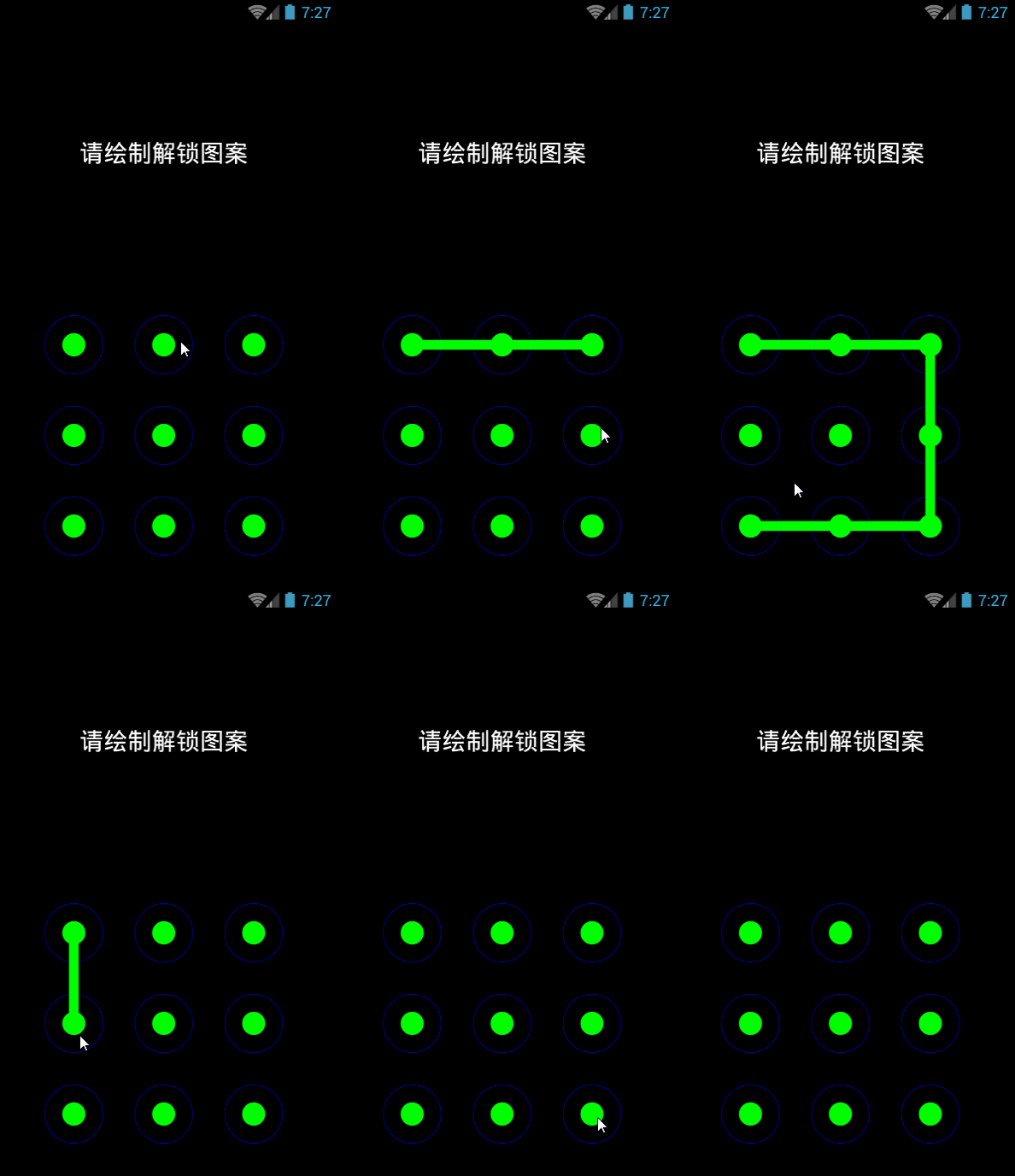
Demo
首先,自定义一个View
- /**
- * 九宫格
- */
- public class NineGridView extends View {
- private int width;//该控件的宽
- private int height;//该控件的高
- private Paint mPaintBigCircle;//用于画外圆
- private Paint mPaintSmallCircle;//用于画内圆
- private Paint mPaintLine;//用于画线
- private Paint mPaintText;//用于画文本
- private Path path;//手势划线时需要用到它
- private Map<Integer, Float[]> pointContainer;//存储九个点的坐标
- private List<Integer> pointerSlipped;//存储得到的九宫格密码
- public List<Integer> getPointerSlipped() {
- return pointerSlipped;
- }
- public void setPointerSlipped(List<Integer> pointerSlipped) {
- this.pointerSlipped = pointerSlipped;
- }
- public NineGridView(Context context) {
- super(context);
- }
- public NineGridView(Context context, AttributeSet attrs) {
- super(context, attrs);
- mPaintBigCircle = new Paint();
- mPaintBigCircle.setColor(Color.BLUE);
- mPaintBigCircle.setStyle(Paint.Style.STROKE);//不充满
- mPaintBigCircle.setAntiAlias(true);//抗锯齿打开
- mPaintSmallCircle = new Paint();
- mPaintSmallCircle.setColor(Color.GREEN);
- mPaintSmallCircle.setStyle(Paint.Style.FILL);//充满,即画的几何体为实心
- mPaintSmallCircle.setAntiAlias(true);
- mPaintLine = new Paint();
- mPaintLine.setColor(Color.GREEN);
- mPaintLine.setStyle(Paint.Style.STROKE);
- mPaintLine.setStrokeWidth(20);
- mPaintLine.setAntiAlias(true);
- mPaintText = new Paint();
- mPaintText.setColor(Color.WHITE);
- mPaintText.setTextAlign(Paint.Align.CENTER);//向中央对齐
- mPaintText.setTextSize(50);
- mPaintText.setAntiAlias(true);
- path = new Path();
- pointContainer = new HashMap<>();
- pointerSlipped = new ArrayList<>();
- }
- @Override
- protected void onMeasure(int widthMeasureSpec, int heightMeasureSpec) {
- super.onMeasure(widthMeasureSpec, heightMeasureSpec);
- width = getDefaultSize(getSuggestedMinimumWidth(), widthMeasureSpec);
- height = getDefaultSize(getSuggestedMinimumHeight(), heightMeasureSpec);
- }
- private float pivotX;//触屏得到的x坐标
- private float pivotY;//触屏得到的y坐标
- private float selectedX;//当前选中的圆点的x坐标
- private float selectedY;//当前选中的圆点的y坐标
- private float selectedXOld;//从前选中的圆点的x坐标
- private float selectedYOld;//从前选中的圆点的y坐标
- private boolean isHasMoved = false;//用于判断path是否调用过moveTo()方法
- @Override
- public boolean onTouchEvent(MotionEvent event) {
- switch (event.getAction()) {
- case MotionEvent.ACTION_DOWN:
- pivotX = event.getX();
- pivotY = event.getY();
- //每次触屏时需要清空一下pointerSlipped,即重置密码
- pointerSlipped.clear();
- Log.d("pointTouched", pivotX + "," + pivotY);
- getSelectedPointIndex(pivotX, pivotY);
- invalidate();//重绘
- break;
- case MotionEvent.ACTION_MOVE:
- pivotX = event.getX();
- pivotY = event.getY();
- getSelectedPointIndex(pivotX, pivotY);
- invalidate();
- break;
- case MotionEvent.ACTION_UP:
- /**
- * 当手指离开屏幕时,重置path
- */
- path.reset();
- isHasMoved = false;
- String indexSequence = "";
- //打印出上一次手势密码的值
- for(int index:pointerSlipped){
- indexSequence += "/"+index;
- }
- Log.d("index",indexSequence);
- break;
- }
- invalidate();
- return true;
- }
- /**
- * 得到并存储经过的圆点的序号
- * @param pivotX
- * @param pivotY
- */
- private void getSelectedPointIndex(float pivotX, float pivotY) {
- int index = 0;
- if (pivotX > patternMargin && pivotX < patternMargin + bigCircleRadius * 2) {
- if (pivotY > height / 2 && pivotY < height / 2 + bigCircleRadius * 2) {
- selectedX = pointContainer.get(1)[0];
- selectedY = pointContainer.get(1)[1];
- index = 1;
- Log.d("selectedPoint", selectedX + "," + selectedY);
- } else if (pivotY > height / 2 + added && pivotY < height / 2 + added + bigCircleRadius * 2) {
- selectedX = pointContainer.get(4)[0];
- selectedY = pointContainer.get(4)[1];
- index = 4;
- } else if (pivotY > height / 2 + added * 2 && pivotY < height / 2 + added * 2 + bigCircleRadius * 2) {
- selectedX = pointContainer.get(7)[0];
- selectedY = pointContainer.get(7)[1];
- index = 7;
- }
- } else if (pivotX > patternMargin + added && pivotX < patternMargin + added + bigCircleRadius * 2) {
- if (pivotY > height / 2 && pivotY < height / 2 + bigCircleRadius * 2) {
- selectedX = pointContainer.get(2)[0];
- selectedY = pointContainer.get(2)[1];
- index = 2;
- } else if (pivotY > height / 2 + added && pivotY < height / 2 + added + bigCircleRadius * 2) {
- selectedX = pointContainer.get(5)[0];
- selectedY = pointContainer.get(5)[1];
- index = 5;
- } else if (pivotY > height / 2 + added * 2 && pivotY <height / 2 + added * 2 + bigCircleRadius * 2) {
- selectedX = pointContainer.get(8)[0];
- selectedY = pointContainer.get(8)[1];
- index = 8;
- }
- } else if (pivotX > patternMargin + added * 2 && pivotX < patternMargin + added * 2 + bigCircleRadius * 2) {
- if (pivotY > height / 2 && pivotY < height / 2 + bigCircleRadius * 2) {
- selectedX = pointContainer.get(3)[0];
- selectedY = pointContainer.get(3)[1];
- index = 3;
- } else if (pivotY > height / 2 + added && pivotY < height / 2 + added + bigCircleRadius * 2) {
- selectedX = pointContainer.get(6)[0];
- selectedY = pointContainer.get(6)[1];
- index = 6;
- } else if (pivotY > height / 2 + added * 2 && pivotY < height / 2 + added * 2 + bigCircleRadius * 2) {
- selectedX = pointContainer.get(9)[0];
- selectedY = pointContainer.get(9)[1];
- index = 9;
- }
- }
- if (selectedX!=selectedXOld||selectedY!=selectedYOld){
- //当这次的坐标与上次的坐标不同时存储这次点序号
- pointerSlipped.add(index);
- selectedXOld = selectedX;
- selectedYOld = selectedY;
- if (!isHasMoved){
- //当第一次触碰到九个点之一时,path调用moveTo;
- path.moveTo(selectedX,selectedY);
- isHasMoved = true;
- }else{
- //path移动至当前圆点坐标
- path.lineTo(selectedX,selectedY);
- }
- }
- }
- private String text = "请绘制解锁图案";
- private float x;//绘制的圆形的x坐标
- private float y;//绘制圆形的纵坐标
- private float added;//水平竖直方向每个圆点中心间距
- private float patternMargin = 100;//九宫格距离边界距离
- private float bigCircleRadius = 90;//外圆半径
- private float smallCircleRadius = 25;//内圆半径
- private int index;//圆点的序号
- @Override
- protected void onDraw(Canvas canvas) {
- super.onDraw(canvas);
- added = (width - patternMargin * 2) / 3;
- x = patternMargin + added / 2;
- y = added / 2 + height / 2;
- index = 1;
- canvas.drawColor(Color.BLACK);
- canvas.drawText(text, width / 2, height / 4, mPaintText);
- /**
- * 绘制九个圆点图案
- */
- for (int column = 0; column < 3; column++) {
- for (int row = 0; row < 3; row++) {
- canvas.drawCircle(x, y, bigCircleRadius, mPaintBigCircle);
- canvas.drawCircle(x, y, smallCircleRadius, mPaintSmallCircle);
- pointContainer.put(index, new Float[]{x, y});
- index++;
- x += added;
- }
- y += added;
- x = patternMargin + added / 2;
- }
- x = patternMargin + added / 2;
- y = added / 2 + height / 2;
- canvas.drawPath(path, mPaintLine);
- }
- }
为什么要规避重复?
因为在触屏时,会调用很多次onTouchEvent()方法,这样存储的手势密码肯定会不准确,我在以上代码中作出了处理,已经避免了重复,看打印信息:
这里写图片描述
显然,密码没有相邻数重复,当然还有一种情况就是手指在两个点之间来回等问题,这种状况也需要避免,这里没有作处理。当然,我做得还不够。。。
自定义view中用到的dp和px互相转换的工具类:
- public class SizeConvert {
- /**
- * 将dp转换为sp
- */
- public static int dip2px(Context context, float dipValue){
- final float scale = context.getResources().getDisplayMetrics().density;
- return (int)(dipValue * scale + 0.5f);
- }
- /**
- * sp转dp
- */
- public static int px2dip(Context context, float pxValue){
- final float scale = context.getResources().getDisplayMetrics().density;
- return (int)(pxValue / scale + 0.5f);
- }
- }
主活动:
- public class NineGridActivity extends BaseActivity{
- @Override
- protected void onCreate(Bundle savedInstanceState) {
- super.onCreate(savedInstanceState);
- setContentView(R.layout.view_nine_grid);
- }
- }
layout中的布局文件view_nine_grid:
- <?xml version="1.0" encoding="utf-8"?>
- <LinearLayout xmlns:android="http://schemas.android.com/apk/res/android"
- android:orientation="vertical"
- android:layout_width="match_parent"
- android:layout_height="match_parent">
- <com.test.shiweiwei.myproject.selfish_view.NineGridView
- android:layout_width="match_parent"
- android:layout_height="match_parent"/>
- </LinearLayout>
总结
我写的只是最基本的九宫格滑动解密项目,实际用的九宫格解密比这个要复杂,有许多特效和其他更严谨的处理,事件的处理也不是这样草草了事,如果想写得漂亮,还得多花工夫。
新闻热点






疑难解答













