
这篇文章主要介绍了Android实现多线程下载文件的方法,以实例形式较为详细的分析了Android多线程文件传输及合并等操作的相关技巧,具有一定参考借鉴价值,需要的朋友可以参考下
本文实例讲述了Android实现多线程下载文件的方法。分享给大家供大家参考。具体如下:
多线程下载大概思路就是通过Range 属性实现文件分段,然后用RandomAccessFile 来读写文件,最终合并为一个文件
首先看下效果图:
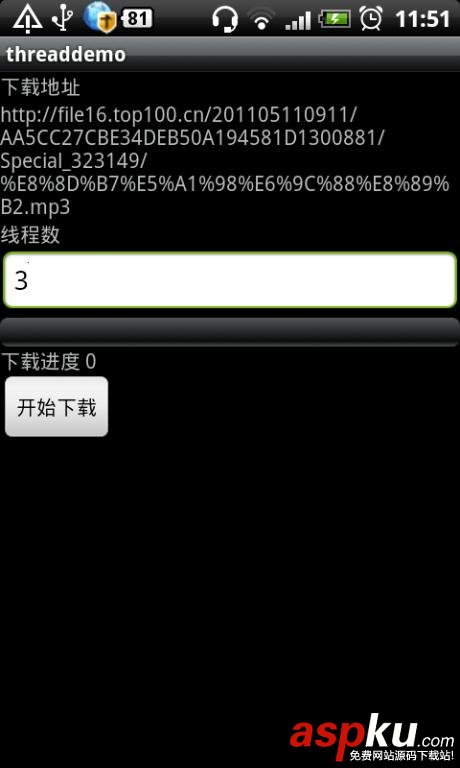
创建工程 ThreadDemo
首先布局文件 threaddemo.xml
- <?xml version="1.0" encoding="utf-8"?>
- <LinearLayout xmlns:android="http://schemas.android.com/apk/res/android"
- android:orientation="vertical"
- android:layout_width="fill_parent"
- android:layout_height="fill_parent"
- >
- <TextView
- android:layout_width="fill_parent"
- android:layout_height="wrap_content"
- android:text="下载地址"
- />
- <TextView
- android:id="@+id/downloadurl"
- android:layout_width="fill_parent"
- android:layout_height="wrap_content"
- android:lines="5"
- />
- <TextView
- android:layout_width="fill_parent"
- android:layout_height="wrap_content"
- android:text="线程数"
- />
- <EditText
- android:id="@+id/downloadnum"
- android:layout_width="fill_parent"
- android:layout_height="wrap_content"
- />
- <ProgressBar
- android:id="@+id/downloadProgressBar"
- android:layout_width="fill_parent"
- style="?android:attr/progressBarStyleHorizontal"
- android:layout_height="wrap_content"
- />
- <TextView
- android:id="@+id/downloadinfo"
- android:layout_width="fill_parent"
- android:layout_height="wrap_content"
- android:text="下载进度 0"
- />
- <Button
- android:id="@+id/downloadbutton"
- android:layout_width="wrap_content"
- android:layout_height="wrap_content"
- android:text="开始下载"
- />
- </LinearLayout>
- <?xml version="1.0" encoding="utf-8"?>
- <LinearLayout xmlns:android="http://schemas.android.com/apk/res/android" android:orientation="vertical" android:layout_width="fill_parent" android:layout_height="fill_parent" >
- <TextView android:layout_width="fill_parent" android:layout_height="wrap_content" android:text="下载地址" />
- <TextViewandroid:id="@+id/downloadurl"android:layout_width="fill_parent" android:layout_height="wrap_content" android:lines="5"/>
- <TextView android:layout_width="fill_parent" android:layout_height="wrap_content" android:text="线程数" />
- <EditTextandroid:id="@+id/downloadnum"android:layout_width="fill_parent" android:layout_height="wrap_content" />
- <ProgressBarandroid:id="@+id/downloadProgressBar"android:layout_width="fill_parent" style="?android:attr/progressBarStyleHorizontal" android:layout_height="wrap_content" />
- <TextViewandroid:id="@+id/downloadinfo"android:layout_width="fill_parent" android:layout_height="wrap_content" android:text="下载进度 0"/>
- <Buttonandroid:id="@+id/downloadbutton"android:layout_width="wrap_content" android:layout_height="wrap_content" android:text="开始下载"/>
- </LinearLayout>
主界面 Acitivity
- public class ThreadDownloadDemo extends Activity {
- private TextView downloadurl;
- private EditText downloadnum;
- private Button downloadbutton;
- private ProgressBar downloadProgressBar;
- private TextView downloadinfo;
- private int downloadedSize = 0;
- private int fileSize = 0;
- private long downloadtime;
- @Override
- public void onCreate(Bundle savedInstanceState) {
- super.onCreate(savedInstanceState);
- setContentView(R.layout.threaddemo);
- downloadurl = (TextView) findViewById(R.id.downloadurl);
- downloadurl.setText("http://file16.top100.cn/201105110911/AA5CC27CBE34DEB50A194581D1300881/Special_323149/%E8%8D%B7%E5%A1%98%E6%9C%88%E8%89%B2.mp3");
- downloadnum = (EditText) findViewById(R.id.downloadnum);
- downloadinfo = (TextView) findViewById(R.id.downloadinfo);
- downloadbutton = (Button) findViewById(R.id.downloadbutton);
- downloadProgressBar = (ProgressBar) findViewById(R.id.downloadProgressBar);
- downloadProgressBar.setVisibility(View.VISIBLE);
- downloadProgressBar.setMax(100);
- downloadProgressBar.setProgress(0);
- downloadbutton.setOnClickListener(new OnClickListener() {
- public void onClick(View v) {
- download();
- downloadtime = SystemClock.currentThreadTimeMillis();
- }
- });
- }
- private void download() {
- // 获取SD卡目录
- String dowloadDir = Environment.getExternalStorageDirectory()
- + "/threaddemodownload/";
- File file = new File(dowloadDir);
- //创建下载目录
- if (!file.exists()) {
- file.mkdirs();
- }
- //读取下载线程数,如果为空,则单线程下载
- int downloadTN = Integer.valueOf("".equals(downloadnum.getText()
- .toString()) ? "1" : downloadnum.getText().toString());
- String fileName = "hetang.mp3";
- //开始下载前把下载按钮设置为不可用
- downloadbutton.setClickable(false);
- //进度条设为0
- downloadProgressBar.setProgress(0);
- //启动文件下载线程
- new downloadTask("http://file16.top100.cn/201105110911/AA5CC27CBE34DEB50A194581D1300881/Special_323149/%E8%8D%B7%E5%A1%98%E6%9C%88%E8%89%B2.mp3", Integer
- .valueOf(downloadTN), dowloadDir + fileName).start();
- }
- Handler handler = new Handler() {
- @Override
- public void handleMessage(Message msg) {
- //当收到更新视图消息时,计算已完成下载百分比,同时更新进度条信息
- int progress = (Double.valueOf((downloadedSize * 1.0 / fileSize * 100))).intValue();
- if (progress == 100) {
- downloadbutton.setClickable(true);
- downloadinfo.setText("下载完成!");
- Dialog mdialog = new AlertDialog.Builder(ThreadDownloadDemo.this)
- .setTitle("提示信息")
- .setMessage("下载完成,总用时为:"+(SystemClock.currentThreadTimeMillis()-downloadtime)+"毫秒")
- .setNegativeButton("确定", new DialogInterface.OnClickListener(){
- @Override
- public void onClick(DialogInterface dialog, int which) {
- dialog.dismiss();
- }
- })
- .create();
- mdialog.show();
- } else {
- downloadinfo.setText("当前进度:" + progress + "%");
- }
- downloadProgressBar.setProgress(progress);
- }
- };
- public class downloadTask extends Thread {
- private int blockSize, downloadSizeMore;
- private int threadNum = 5;
- String urlStr, threadNo, fileName;
- public downloadTask(String urlStr, int threadNum, String fileName) {
- this.urlStr = urlStr;
- this.threadNum = threadNum;
- this.fileName = fileName;
- }
- @Override
- public void run() {
- FileDownloadThread[] fds = new FileDownloadThread[threadNum];
- try {
- URL url = new URL(urlStr);
- URLConnection conn = url.openConnection();
- //防止返回-1
- InputStream in = conn.getInputStream();
- //获取下载文件的总大小
- fileSize = conn.getContentLength();
- Log.i("bb", "======================fileSize:"+fileSize);
- //计算每个线程要下载的数据量
- blockSize = fileSize / threadNum;
- // 解决整除后百分比计算误差
- downloadSizeMore = (fileSize % threadNum);
- File file = new File(fileName);
- for (int i = 0; i < threadNum; i++) {
- Log.i("bb", "======================i:"+i);
- //启动线程,分别下载自己需要下载的部分
- FileDownloadThread fdt = new FileDownloadThread(url, file, i * blockSize, (i + 1) * blockSize - 1);
- fdt.setName("Thread" + i);
- fdt.start();
- fds[i] = fdt;
- }
- boolean finished = false;
- while (!finished) {
- // 先把整除的余数搞定
- downloadedSize = downloadSizeMore;
- finished = true;
- for (int i = 0; i < fds.length; i++) {
- downloadedSize += fds[i].getDownloadSize();
- if (!fds[i].isFinished()) {
- finished = false;
- }
- }
- handler.sendEmptyMessage(0);
- //线程暂停一秒
- sleep(1000);
- }
- } catch (Exception e) {
- e.printStackTrace();
- }
- }
- }
- }
- public class ThreadDownloadDemo extends Activity {
- private TextView downloadurl;
- private EditText downloadnum;
- private Button downloadbutton;
- private ProgressBar downloadProgressBar;
- private TextView downloadinfo;
- private int downloadedSize = 0;
- private int fileSize = 0;
- private long downloadtime;
- @Overridepublic void onCreate(Bundle savedInstanceState) {
- super.onCreate(savedInstanceState);
- setContentView(R.layout.threaddemo);
- downloadurl = (TextView) findViewById(R.id.downloadurl);
- downloadurl.setText("http://file16.top100.cn/201105110911/AA5CC27CBE34DEB50A194581D1300881/Special_323149/%E8%8D%B7%E5%A1%98%E6%9C%88%E8%89%B2.mp3");
- downloadnum = (EditText) findViewById(R.id.downloadnum);
- downloadinfo = (TextView) findViewById(R.id.downloadinfo);
- downloadbutton = (Button) findViewById(R.id.downloadbutton);
- downloadProgressBar = (ProgressBar) findViewById(R.id.downloadProgressBar);
- downloadProgressBar.setVisibility(View.VISIBLE);
- downloadProgressBar.setMax(100);
- downloadProgressBar.setProgress(0);
- downloadbutton.setOnClickListener(new OnClickListener() {
- public void onClick(View v) {download();
- downloadtime = SystemClock.currentThreadTimeMillis();
- }
- }
- );
- }
- private void download() {// 获取SD卡目录
- String dowloadDir = Environment.getExternalStorageDirectory()+ "/threaddemodownload/";
- File file = new File(dowloadDir);
- //创建下载目录
- if (!file.exists()) {file.mkdirs();
- }//读取下载线程数,如果为空,则单线程下载
- int downloadTN = Integer.valueOf("".equals(downloadnum.getText().toString()) ? "1" : downloadnum.getText().toString());
- String fileName = "hetang.mp3";
- //开始下载前把下载按钮设置为不可用
- downloadbutton.setClickable(false);
- //进度条设为0
- downloadProgressBar.setProgress(0);
- //启动文件下载线程
- new downloadTask("http://file16.top100.cn/201105110911/AA5CC27CBE34DEB50A194581D1300881/Special_323149/%E8%8D%B7%E5%A1%98%E6%9C%88%E8%89%B2.mp3", Integer.valueOf(downloadTN), dowloadDir + fileName).start();
- }
- Handler handler = new Handler() {@Overridepublic void handleMessage(Message msg) {
- //当收到更新视图消息时,计算已完成下载百分比,同时更新进度条信息
- int progress = (Double.valueOf((downloadedSize * 1.0 / fileSize * 100))).intValue();
- if (progress == 100) {downloadbutton.setClickable(true);
- downloadinfo.setText("下载完成!");
- Dialog mdialog = new AlertDialog.Builder(ThreadDownloadDemo.this).setTitle("提示信息").setMessage("下载完成,总用时为:"+(SystemClock.currentThreadTimeMillis()-downloadtime)+"毫秒").setNegativeButton("确定", new DialogInterface.OnClickListener(){@Overridepublic void onClick(DialogInterface dialog, int which) {dialog.dismiss();
- }}).create();
- mdialog.show();
- } else {
- downloadinfo.setText("当前进度:" + progress + "%");
- }
- downloadProgressBar.setProgress(progress);
- }
- };
- public class downloadTask extends Thread {private int blockSize, downloadSizeMore;
- private int threadNum = 5;
- String urlStr, threadNo, fileName;
- public downloadTask(String urlStr, int threadNum, String fileName) {
- this.urlStr = urlStr;
- this.threadNum = threadNum;
- this.fileName = fileName;
- }
- @Overridepublic void run() {
- FileDownloadThread[] fds = new FileDownloadThread[threadNum];
- try {URL url = new URL(urlStr);
- URLConnection conn = url.openConnection();
- //防止返回-1
- InputStream in = conn.getInputStream();
- //获取下载文件的总大小
- fileSize = conn.getContentLength();
- Log.i("bb", "======================fileSize:"+fileSize);
- //计算每个线程要下载的数据量
- blockSize = fileSize / threadNum;
- // 解决整除后百分比计算误差
- downloadSizeMore = (fileSize % threadNum);
- File file = new File(fileName);
- for (int i = 0; i < threadNum; i++) {
- Log.i("bb", "======================i:"+i);
- //启动线程,分别下载自己需要下载的部分
- FileDownloadThread fdt = new FileDownloadThread(url, file, i * blockSize, (i + 1) * blockSize - 1);
- fdt.setName("Thread" + i);
- fdt.start();
- fds[i] = fdt;
- }
- boolean finished = false;
- while (!finished) {
- // 先把整除的余数搞定
- downloadedSize = downloadSizeMore;
- finished = true;
- for (int i = 0; i < fds.length; i++) {
- downloadedSize += fds[i].getDownloadSize();
- if (!fds[i].isFinished()) {
- finished = false;
- }
- }
- handler.sendEmptyMessage(0);
- //线程暂停一秒sleep(1000);
- }
- }
- catch (Exception e) {
- e.printStackTrace();
- }
- }
- }
- }
这里启动线程将文件分割为几个部分,每一个部分再启动一个线程去下载数据
下载文件的线程
- public class FileDownloadThread extends Thread{
- private static final int BUFFER_SIZE=1024;
- private URL url;
- private File file;
- private int startPosition;
- private int endPosition;
- private int curPosition;
- //标识当前线程是否下载完成
- private boolean finished=false;
- private int downloadSize=0;
- public FileDownloadThread(URL url,File file,int startPosition,int endPosition){
- this.url=url;
- this.file=file;
- this.startPosition=startPosition;
- this.curPosition=startPosition;
- this.endPosition=endPosition;
- }
- @Override
- public void run() {
- BufferedInputStream bis = null;
- RandomAccessFile fos = null;
- byte[] buf = new byte[BUFFER_SIZE];
- URLConnection con = null;
- try {
- con = url.openConnection();
- con.setAllowUserInteraction(true);
- //设置当前线程下载的起止点
- con.setRequestProperty("Range", "bytes=" + startPosition + "-" + endPosition);
- Log.i("bb", Thread.currentThread().getName()+" bytes=" + startPosition + "-" + endPosition);
- //使用java中的RandomAccessFile 对文件进行随机读写操作
- fos = new RandomAccessFile(file, "rw");
- //设置写文件的起始位置
- fos.seek(startPosition);
- bis = new BufferedInputStream(con.getInputStream());
- //开始循环以流的形式读写文件
- while (curPosition < endPosition) {
- int len = bis.read(buf, 0, BUFFER_SIZE);
- if (len == -1) {
- break;
- }
- fos.write(buf, 0, len);
- curPosition = curPosition + len;
- if (curPosition > endPosition) {
- downloadSize+=len - (curPosition - endPosition) + 1;
- } else {
- downloadSize+=len;
- }
- }
- //下载完成设为true
- this.finished = true;
- bis.close();
- fos.close();
- } catch (IOException e) {
- e.printStackTrace();
- }
- }
- public boolean isFinished(){
- return finished;
- }
- public int getDownloadSize() {
- return downloadSize;
- }
- }
- public class FileDownloadThread extends Thread{
- private static final int BUFFER_SIZE=1024;
- private URL url;
- private File file;
- private int startPosition;
- private int endPosition;
- private int curPosition;//标识当前线程是否下载完成
- private boolean finished=false;
- private int downloadSize=0;
- public FileDownloadThread(URL url,File file,int startPosition,int endPosition){
- this.url=url;
- this.file=file;
- this.startPosition=startPosition;
- this.curPosition=startPosition;
- this.endPosition=endPosition;
- }
- @Overridepublic void run() {
- BufferedInputStream bis = null;
- RandomAccessFile fos = null;
- byte[] buf = new byte[BUFFER_SIZE];
- URLConnection con = null;
- try {
- con = url.openConnection();
- con.setAllowUserInteraction(true);
- //设置当前线程下载的起止点
- con.setRequestProperty("Range", "bytes=" + startPosition + "-" + endPosition);
- Log.i("bb", Thread.currentThread().getName()+" bytes=" + startPosition + "-" + endPosition);
- //使用java中的RandomAccessFile 对文件进行随机读写操作
- fos = new RandomAccessFile(file, "rw");
- //设置写文件的起始位置
- fos.seek(startPosition);
- bis = new BufferedInputStream(con.getInputStream());
- //开始循环以流的形式读写文件
- while (curPosition < endPosition) {
- int len = bis.read(buf, 0, BUFFER_SIZE);
- if (len == -1) {
- break;
- }
- fos.write(buf, 0, len);
- curPosition = curPosition + len;
- if (curPosition > endPosition) {
- downloadSize+=len - (curPosition - endPosition) + 1;
- } else {
- downloadSize+=len;
- }
- }
- //下载完成设为true
- this.finished = true;
- bis.close();
- fos.close();
- } catch (IOException e) {
- e.printStackTrace();
- }
- }
- public boolean isFinished(){return finished;}
- public int getDownloadSize() {return downloadSize;}
- }
这里通过RandomAccessFile 的seek方法定位到相应的位置 并实时记录下载量
当然这里需要联网和访问SD卡 所以要加上相应的权限
- <uses-permission android:name="android.permission.INTERNET" />
- <uses-permission android:name="android.permission.WRITE_EXTERNAL_STORAGE"></uses-permission>
- <uses-permission android:name="android.permission.INTERNET" /><uses-permission android:name="android.permission.WRITE_EXTERNAL_STORAGE"></uses-permission>
这样就OK了 下面可以看看断点续传的问题了。有待测试~~
希望本文所述对大家的Android程序设计有所帮助。
新闻热点






疑难解答













